Left AirPod pro transparency mode not working correctly

Hello, I’ve had my AirPod Pros for around a month now, and the other day I noticed my left airpod was transmitting the sound around me much quieter than my right airpod. I cleaned the entire headphone and still no luck. I’ve seen some posts but never a good answer on the issue. Looking for any help, I paid good money for these and take great care of them, if this is a common occurrence with Apple products, I might be taking my money elsewhere in the future.

Posted on Mar 4, 2023 5:03 PM

Reply

Similar questions

1 reply

Mar 6, 2023 6:01 PM in response to StuChainz

Hello StuChainz,


To help us get a better understanding of the issue, we’d like to ask a few questions.


1. Is the left AirPod volume lower than expected when using the AirPods with any device, or only certain devices?

2. Does the issue happen with all volume, or only when using certain apps?

3. Do you experience the same issue if Transparency mode is turned off?

The above details will help us plan how to proceed.


Please check out this link, which outlines how to manage Transparency mode settings and may help: AirPods Pro and AirPods Max Active Noise Cancellation and Transparency mode


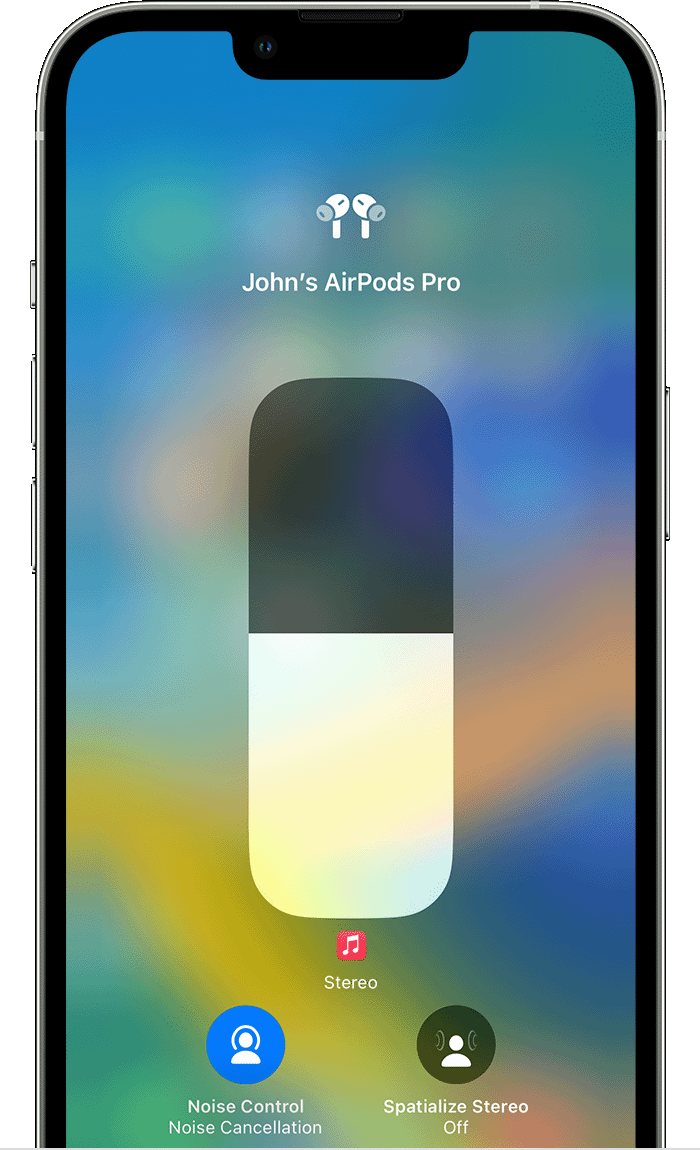
Switch between noise-control modes on your iPhone or iPad

1. Open Control Center on your iOS or iPadOS device.
2. While wearing your AirPods Max or both AirPods, touch and hold the volume slider until you see the additional controls.
3. Tap the Noise Control icon  in the lower-left corner.

Noice cancellation and transparency modes on iPhone

4. Tap Noise Cancellation, Transparency, or Off.


Thanks!

This thread has been closed by the system or the community team. You may vote for any posts you find helpful, or search the Community for additional answers.

Left AirPod pro transparency mode not working correctly

Welcome to Apple Support Community
A forum where Apple customers help each other with their products. Get started with your Apple Account.