DND iPhone 12 driving mode

I keep getting the car symbol when using siri in the vehicle and connected to Bluetooth. I have tried to disable it but there is no setting/selection for this. It has been this way for over a year and I am getting very frustrated with not being able to shut it off. Siri will not answer any questions other than get directions or call a number. I want to see history but it will not show it. I’ve checked online and they talk about the Driving selection but I don’t have it. Here’s some pics. What do I do to fix this?

iPhone 12, iOS 16

Posted on Mar 6, 2023 2:42 PM

Reply

Similar questions

1 reply

Mar 8, 2023 8:54 AM in response to Ranger69Rick

Hi there Ranger69Rick,


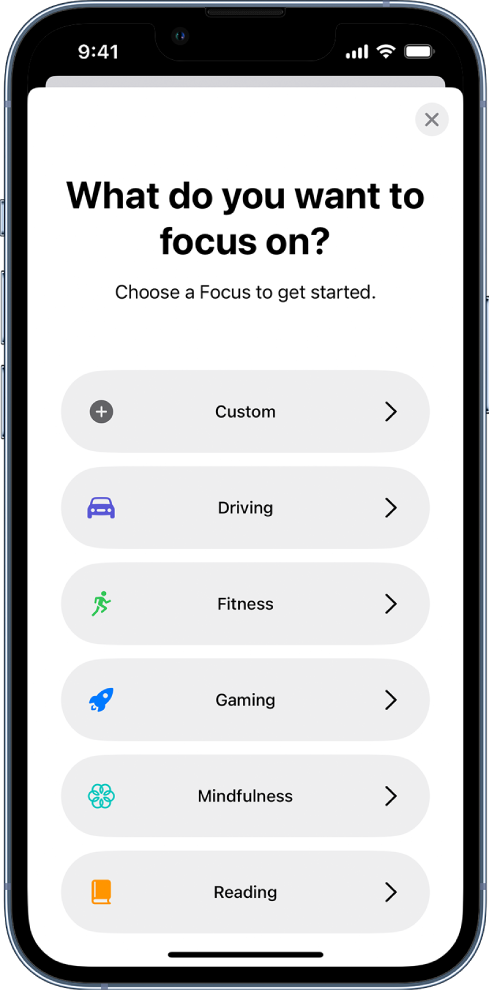
If you are not seeing a Driving Focus under Settings > Focus on your iPhone, follow these steps from Set up a Focus on iPhone to add a Driving Focus:

Create a Custom Focus
If you want to concentrate on an activity that’s different from any of the provided Focus options, you can create a Custom Focus.
A Focus setup screen for one of the additional provided Focus options, including Custom, Driving, Fitness, Gaming, Mindfulness, and Reading.
1. Go to Settings  > Focus.
2. Tap the Add button at the top right, then tap Custom.
3. Enter a name for your Focus, then tap Return.
4. Choose a color and an icon to represent your Focus, then tap Next.
5. Tap Customize Focus, then set up the options for your custom Focus.


Once you have a Driving Focus added, this article shows the different settings that can be adjusted with this particular Focus: Use the Driving Focus on your iPhone to concentrate on the road


Take care!


This thread has been closed by the system or the community team. You may vote for any posts you find helpful, or search the Community for additional answers.

DND iPhone 12 driving mode

Welcome to Apple Support Community
A forum where Apple customers help each other with their products. Get started with your Apple Account.