Please See the pic below and change the settings as shown...
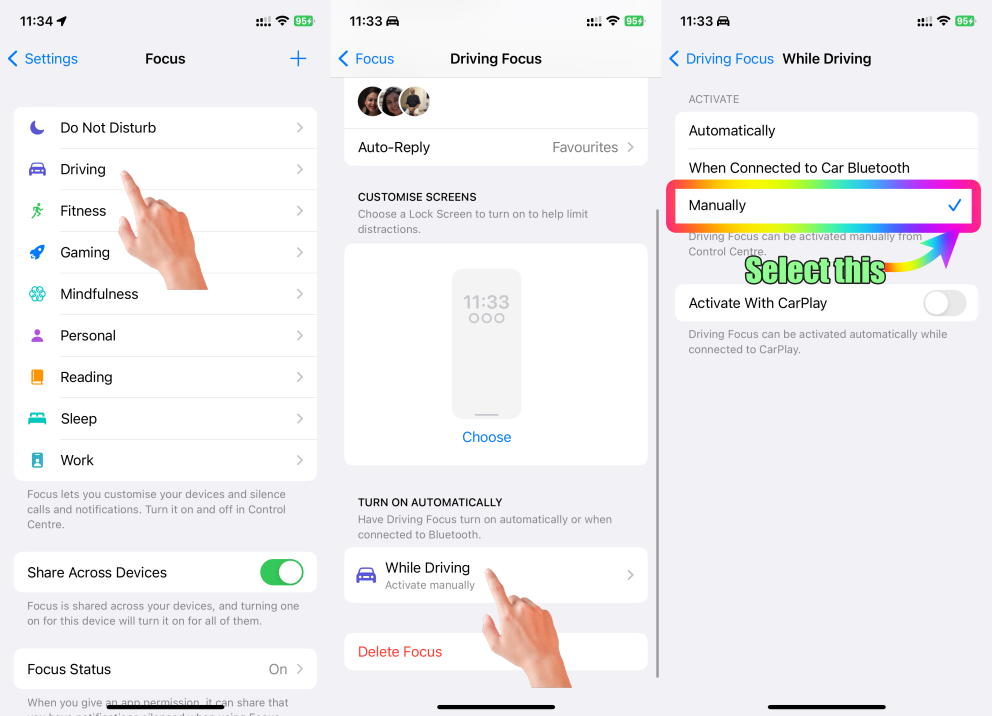
If your Focus settings are set to Activate automatically then the following explanations will enable the Driving Focus when it senses a movement.
iPhones can detect the movement of a car using a combination of sensors and algorithms. One of the primary sensors used for this purpose is the accelerometer. The accelerometer is a built-in hardware component that measures acceleration forces, including gravity and changes in velocity. When a car moves, accelerates, decelerates, or changes direction, the accelerometer detects these changes in acceleration.
Here's how the iPhone detects the movement of a car:
- The iPhone's accelerometer measures acceleration in three dimensions: X, Y, and Z. When a car accelerates or decelerates, the accelerometer detects the change in these acceleration values. This information is then used to infer movement and changes in speed.
- Some iPhones also include a gyroscope, which measures the device's orientation and rotation. While this sensor is not the primary detector of car movement, it can contribute to understanding the device's positioning and changes in direction.
- The iPhone's GPS (Global Positioning System) and other location-based services play a role in detecting movement as well. When you're in a moving car, the iPhone's GPS can track changes in your geographical position, speed, and direction. Apps that use location services, such as navigation apps, can access this data to provide real-time information about your movement.
Apps and features that utilize this sensor data can provide various functionalities, such as fitness tracking, augmented reality experiences, navigation, and more. However, keep in mind that the accuracy and effectiveness of these sensors can vary based on the iPhone model and the specific conditions in which they are used.

