How do I prevent the iPhone from going into car mode all by itself?

I do not even have a "Driving Focus" set up, but every time I turn on the car, Siri refuses to do things... It is infuriating. Sometimes, if I ask to turn on Spotify or Waze, Siri will tell me I need to unlock the phone (which is not safe if I am driving). Other times I will ask Siri for information and she responds that she is not able to search the internet. This happens even when I am the passenger and even when I am sitting in the parking garage after I've turned off the car.

I have tried several of the suggestions I've found online, but none have worked.

Anything I can find on Apple information sources only instructs how to turn focus ON, not off.

iPhone 11 / iOS 16.6

MacBook Pro 13″

Posted on Aug 17, 2023 10:52 PM

Reply

Similar questions

2 replies

Aug 17, 2023 11:17 PM in response to MatthewHUM

Please See the pic below and change the settings as shown...
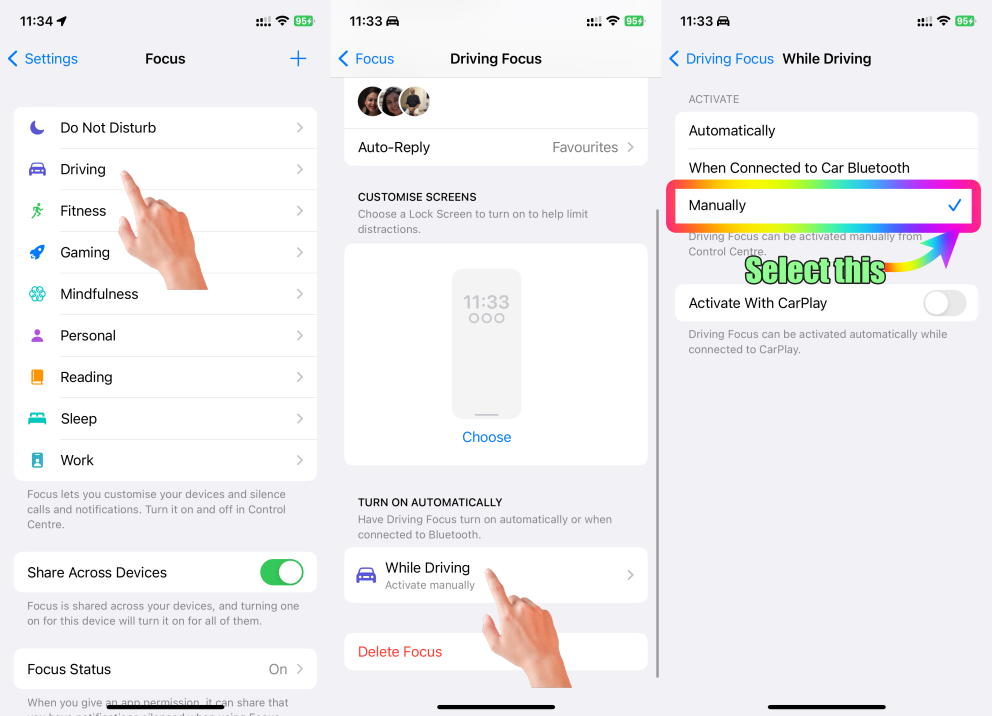


If your Focus settings are set to Activate automatically then the following explanations will enable the Driving Focus when it senses a movement.


iPhones can detect the movement of a car using a combination of sensors and algorithms. One of the primary sensors used for this purpose is the accelerometer. The accelerometer is a built-in hardware component that measures acceleration forces, including gravity and changes in velocity. When a car moves, accelerates, decelerates, or changes direction, the accelerometer detects these changes in acceleration.


Here's how the iPhone detects the movement of a car:


  1. The iPhone's accelerometer measures acceleration in three dimensions: X, Y, and Z. When a car accelerates or decelerates, the accelerometer detects the change in these acceleration values. This information is then used to infer movement and changes in speed.
  2. Some iPhones also include a gyroscope, which measures the device's orientation and rotation. While this sensor is not the primary detector of car movement, it can contribute to understanding the device's positioning and changes in direction.
  3. The iPhone's GPS (Global Positioning System) and other location-based services play a role in detecting movement as well. When you're in a moving car, the iPhone's GPS can track changes in your geographical position, speed, and direction. Apps that use location services, such as navigation apps, can access this data to provide real-time information about your movement.


Apps and features that utilize this sensor data can provide various functionalities, such as fitness tracking, augmented reality experiences, navigation, and more. However, keep in mind that the accuracy and effectiveness of these sensors can vary based on the iPhone model and the specific conditions in which they are used.


Aug 17, 2023 11:45 PM in response to SravanKrA

Thanks - I do appreciate the explanation of how the accelerometer works. I also appreciate how you included helpful pictures for how to disable the automatic Driving Focus implementation. Unfortunately, that is not a solution at this point -

As I mentioned though, I do not have the Driving Focus enabled - in fact, in my many attempts to find a solution, I have now completely deleted all Focus types. I have also reset all of the apps that use location services so that they only do so after asking me first.

I should also mention that this was never an issue until just recently - maybe 3 or 4 weeks.

Thanks for taking the time to help, though,

This thread has been closed by the system or the community team. You may vote for any posts you find helpful, or search the Community for additional answers.

How do I prevent the iPhone from going into car mode all by itself?

Welcome to Apple Support Community
A forum where Apple customers help each other with their products. Get started with your Apple Account.