Greetings John at home,
We understand that you're unable to edit a PDF file since updating to macOS Ventura 13.2.1. To clarify, are trying to accomplish this while in Preview? If so, please be mindful of the following details:
"Annotate a PDF in Preview on Mac
Although you can’t edit the text of a PDF in Preview, you can use the markup tools to provide feedback or write down something you want to remember. The editing tools in the Markup toolbar are ideal for collaborating—use them to suggest changes to a PDF and to respond to suggestions.
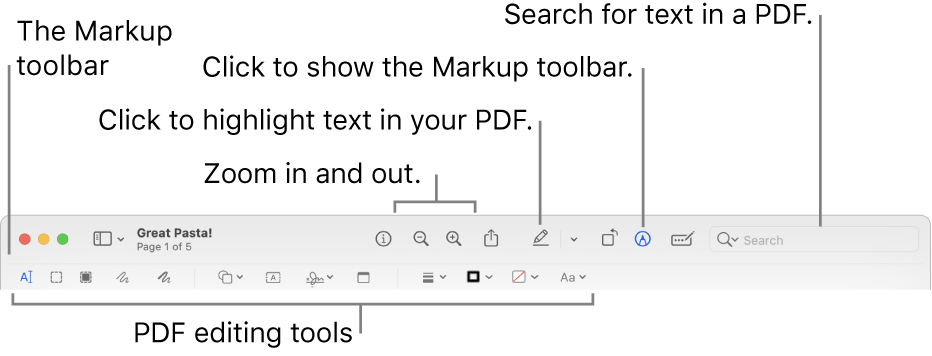
- In the Preview app
 on your Mac, click the Show Markup Toolbar button
  (if the Markup toolbar isn’t showing).
 - Use the tools in the toolbar to mark up the PDF (or use the Touch Bar).
Note: To save a PDF and allow annotations to be edited later, choose one of the following: File > Save, File > Export, or File > Export to PDF. (PDFs are also saved with editable annotations when they’re saved automatically.) To save a PDF and flatten annotations (so that they can’t be edited), choose File > Print, then select Save as PDF."
More details here: Annotate a PDF in Preview on Mac
We also suggest reviewing the following resource if you're using Markup: Mark up files on Mac
If the behavior persists, we suggest that you start up your Mac in safe mode and verify the behavior. Completing this step can help you identify whether issues you’re experiencing are caused by software that loads as your Mac starts up. Your screen may flash and load slower. This is expected behavior for this mode: How to use safe mode on your Mac
Thanks for posting in Apple Support Communities.
Let us know if this helps.


