Why the songs I'm adding to a Apple Music I've created are dissapearing?

I have created a playlist on Apple Music (Mac BookAir with Apple Music Subscription, macOS Monterey). The playlist includes 21 hours of music. Last night I noticed that some of the songs I've already added are missing and I've spent the whole evening re-adding and adding more music. The playlist consisted of over 24 hours of music. Today I noticed that all of the songs I'd added yesterday where gone from the playlist and the running time was down to 21 hours. I have added one song to check if I still can add some more music and I literally saw the song disappearing from the playlist. All the songs I've added where searched and found in Apple Music catalogue, not my own local library. And most of them I have previewed before adding to the playlist so the are available on Apple Music streaming. Where is the problem?

MacBook Air (2018 – 2020)

Posted on Mar 9, 2023 4:18 AM

Reply

Similar questions

1 reply

Mar 10, 2023 8:29 AM in response to Pyro_tekk

Hi Pyro_tekk,


You might be able to fix your issue by turning Sync Library off for all of your Mac, then turning it back on again. 


To learn how to do this, check out the link below.


Use Sync Library to access your music library across your devices - Apple Support


To perform the recommended troubleshooting steps via the link above, complete the steps in the section titled "How to turn on Sync Library on your Mac."


1. Open the Apple Music app.
2. In the menu bar, choose Account and make sure that you're signed in with the same Apple ID that you use with your Apple Music subscription.
3. Choose File > Library > Organize Library. Then select Consolidate files.
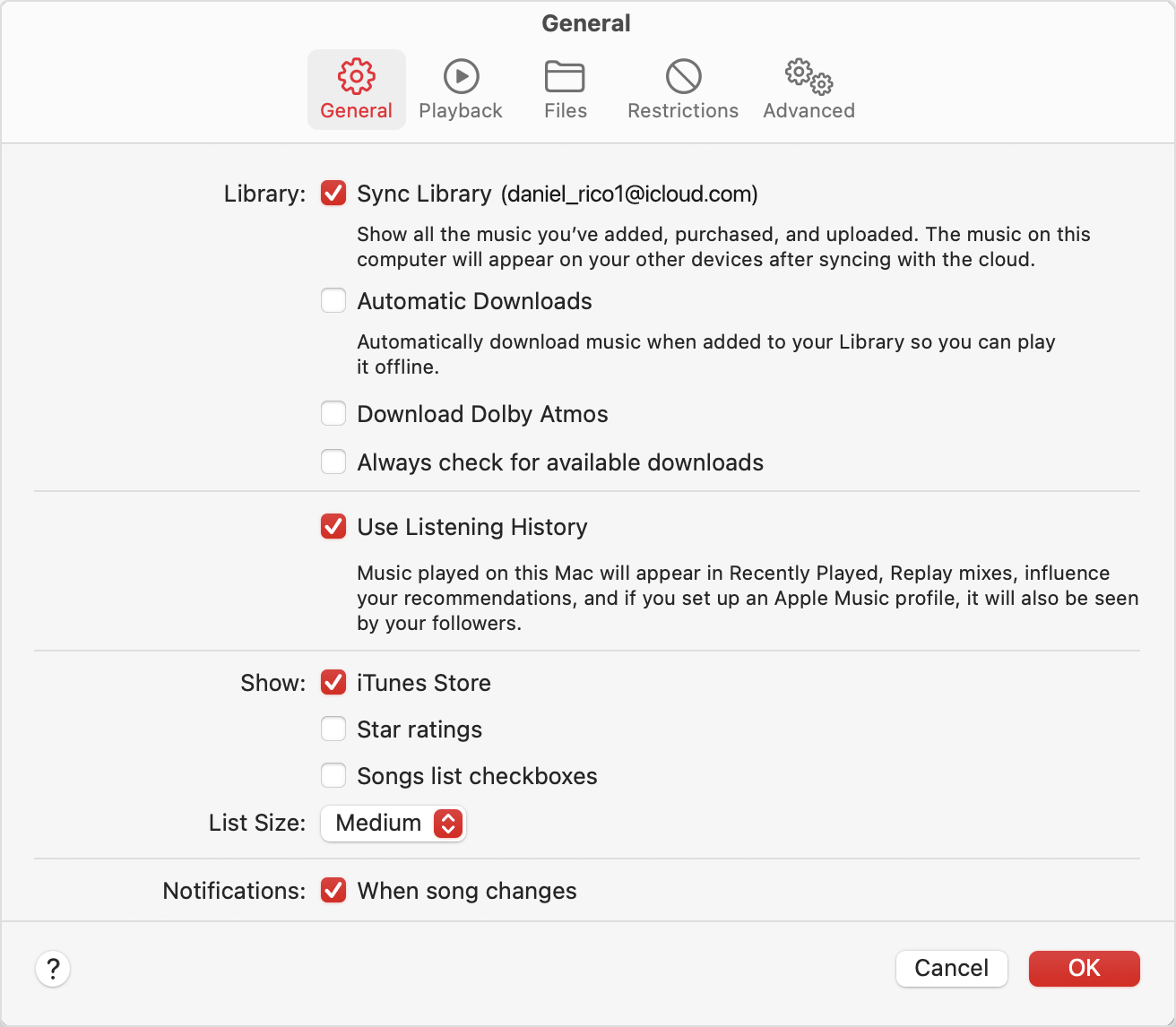
4. Choose Music > Settings or Music > Preferences.
5. Click the General tab.
6. Select Sync Library.
Preferences showing Sync Library turned on
7. Click Ok.
8. Wait for your music library to sync. To check the status, go to the bottom of the sidebar and click Updating Cloud Library.
9. Turn on Sync Library on your other devices.


We recommend the steps above because they will show you how to access your music library, including your playlists, on any device with the Apple Music app and signed in with the same Apple ID you use with your Apple Music subscription.


If you’re still experiencing the same issue, then give the steps here a try: If songs are missing from your music library after you turn on Sync Library - Apple Support


Please let us know the outcome after giving the above steps a try.


Thanks for using the Apple Support Communities.


Cheers!

This thread has been closed by the system or the community team. You may vote for any posts you find helpful, or search the Community for additional answers.

Why the songs I'm adding to a Apple Music I've created are dissapearing?

Welcome to Apple Support Community
A forum where Apple customers help each other with their products. Get started with your Apple Account.