it connects with wifi but doesnt pop up wifi ios

it connects with wifi, but wifi icon doesnt pop up ?

Posted on Mar 11, 2023 2:14 PM

Reply
Question marked as Top-ranking reply

Posted on Mar 13, 2023 1:15 PM

Hello besar81,


To help us get a better understanding of the issue, we’d like to ask a few questions.


1. Just to clarify, it seems like you're able to connect Wi-Fi, but the Wi-Fi icon doesn't appear in the status bar at the top of your screen, is that correct?

2. Are you able to access the internet when connected to Wi-Fi without any issues?

3. Does this happen with all Wi-Fi networks, or only a certain one?

4. Do you receive any errors when connecting to Wi-Fi, if so, what does the error say?


The above details will help us plan how to proceed.


Please check out the information here, which explains the status icons and symbols on your iPhone, and may be helpful: Status icons and symbols on your iPhone


Where do you see status icons

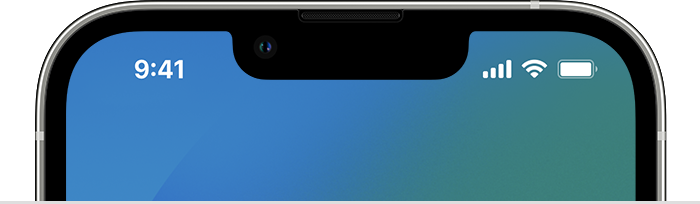
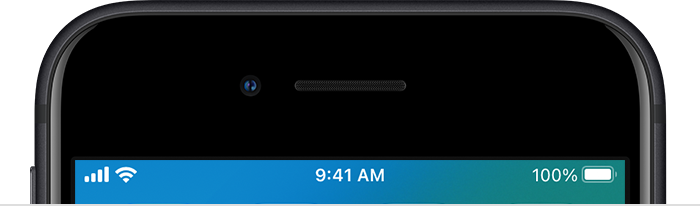
Status icons appear in the status bar on your iPhone:

The top of iPhone models with Face ID 

iPhone models with Face ID

The top of iPhone models with Touch ID 

iPhone models with Touch ID

If you don't see an icon, check Control Center by swiping down from the top-right corner.


If you're connected to Wi-Fi, but can't get online, please check out the "Get more help" section of the link you came from, which has some additional information that may help: If your iPhone or iPad won't connect to a Wi-Fi network


Get more help

* If you're connected to a Wi-Fi network but you can’t get online, try to use your Wi-Fi network on other devices. If you can't get online using your other devices, there might be a service outage. Call your cable company or internet provider for help.
* Try connecting to a Wi-Fi network in a different location. If your device can connect, you need to get help with your Wi-Fi network. If your device can't connect to any Wi-Fi networks, contact Apple.
* Update your Wi-Fi router with the latest firmware and make sure that the router supports your Apple product. For more information, contact the router's manufacturer.


Thank you!

1 reply
Question marked as Top-ranking reply

Mar 13, 2023 1:15 PM in response to besar81

Hello besar81,


To help us get a better understanding of the issue, we’d like to ask a few questions.


1. Just to clarify, it seems like you're able to connect Wi-Fi, but the Wi-Fi icon doesn't appear in the status bar at the top of your screen, is that correct?

2. Are you able to access the internet when connected to Wi-Fi without any issues?

3. Does this happen with all Wi-Fi networks, or only a certain one?

4. Do you receive any errors when connecting to Wi-Fi, if so, what does the error say?


The above details will help us plan how to proceed.


Please check out the information here, which explains the status icons and symbols on your iPhone, and may be helpful: Status icons and symbols on your iPhone


Where do you see status icons

Status icons appear in the status bar on your iPhone:

The top of iPhone models with Face ID 

iPhone models with Face ID

The top of iPhone models with Touch ID 

iPhone models with Touch ID

If you don't see an icon, check Control Center by swiping down from the top-right corner.


If you're connected to Wi-Fi, but can't get online, please check out the "Get more help" section of the link you came from, which has some additional information that may help: If your iPhone or iPad won't connect to a Wi-Fi network


Get more help

* If you're connected to a Wi-Fi network but you can’t get online, try to use your Wi-Fi network on other devices. If you can't get online using your other devices, there might be a service outage. Call your cable company or internet provider for help.
* Try connecting to a Wi-Fi network in a different location. If your device can connect, you need to get help with your Wi-Fi network. If your device can't connect to any Wi-Fi networks, contact Apple.
* Update your Wi-Fi router with the latest firmware and make sure that the router supports your Apple product. For more information, contact the router's manufacturer.


Thank you!

This thread has been closed by the system or the community team. You may vote for any posts you find helpful, or search the Community for additional answers.

it connects with wifi but doesnt pop up wifi ios

Welcome to Apple Support Community
A forum where Apple customers help each other with their products. Get started with your Apple Account.