iPad issues

My iPad keeps turning off and restarting, I timed what time it repeatedly turns off, it restarts every 3 minutes and 15 seconds, I tried the auto lock thing, and the iPad is fully updated. it wouldn’t work in my favor, Is there anything I can do and is what could be the issue with it???

Posted on Mar 13, 2023 9:11 PM

Reply
Question marked as Top-ranking reply

Posted on Mar 14, 2023 4:20 AM

Start with a forced-restart of your iPad - as this may clear the problem:


Force restart iPad (models with Face ID or with Touch ID in the top button)

If your iPad doesn’t have the Home button, do the following:

  1. Press and quickly release the volume button nearest to the top button.
  2. Press and quickly release the volume button farthest from the top button.
  3. Press and hold the top button.
  4. When the Apple logo appears, release the top button.
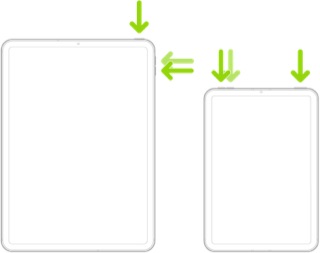


Force restart iPad (models with the Home button)

Press and hold the top button and the Home button at the same time. When the Apple logo appears, release both buttons.



If the problem remains unresolved, you may need to reset the iPad - but before doing so, ensure that you have a precautionary iCloud or iTunes backup of the iPad:

How to back up your iPhone, iPad, and iPod touch - Apple Support


When you are confident that you have a backup, reset the iPad; no data should be lost, but all settings will be reset:

Settings > General > Transfer or Reset iPad > Reset > Reset All Settings


Your iPad should restart. After restart, check for recurrence of the problem. If resolved, you can reconfigure the iPad’s (now default) settings as required.


However, of the original problem still persists, you’ll need to perform a full reset of the iPad. All data will be erased - but can be restored later:

Settings > General > Transfer or Reset iPad > Erase All Content & Settings


Your iPad will erase and reset - and again restart. You will now need to setup the iPad from the initial “hello” screen. When prompted, do not restore from your backup - but setup “as new” with your existing AppleID. The purpose of a clean setup is to ensure that the iPad is stable in a clean/default configuration. If the original problem remains, you’ll need to consider a hardware fault that requires repair; otherwise, if the problem has cleared, you can then restore your backup:

Restore your iPhone, iPad, or iPod touch from a backup - Apple Support


Another way to restore from your iCloud backup is to simply repeat the Erase All Content & Settings - and then restore directly from the existing iCloud backup.


1 reply
Question marked as Top-ranking reply

Mar 14, 2023 4:20 AM in response to tristen77

Start with a forced-restart of your iPad - as this may clear the problem:


Force restart iPad (models with Face ID or with Touch ID in the top button)

If your iPad doesn’t have the Home button, do the following:

  1. Press and quickly release the volume button nearest to the top button.
  2. Press and quickly release the volume button farthest from the top button.
  3. Press and hold the top button.
  4. When the Apple logo appears, release the top button.


Force restart iPad (models with the Home button)

Press and hold the top button and the Home button at the same time. When the Apple logo appears, release both buttons.


If the problem remains unresolved, you may need to reset the iPad - but before doing so, ensure that you have a precautionary iCloud or iTunes backup of the iPad:

How to back up your iPhone, iPad, and iPod touch - Apple Support


When you are confident that you have a backup, reset the iPad; no data should be lost, but all settings will be reset:

Settings > General > Transfer or Reset iPad > Reset > Reset All Settings


Your iPad should restart. After restart, check for recurrence of the problem. If resolved, you can reconfigure the iPad’s (now default) settings as required.


However, of the original problem still persists, you’ll need to perform a full reset of the iPad. All data will be erased - but can be restored later:

Settings > General > Transfer or Reset iPad > Erase All Content & Settings


Your iPad will erase and reset - and again restart. You will now need to setup the iPad from the initial “hello” screen. When prompted, do not restore from your backup - but setup “as new” with your existing AppleID. The purpose of a clean setup is to ensure that the iPad is stable in a clean/default configuration. If the original problem remains, you’ll need to consider a hardware fault that requires repair; otherwise, if the problem has cleared, you can then restore your backup:

Restore your iPhone, iPad, or iPod touch from a backup - Apple Support


Another way to restore from your iCloud backup is to simply repeat the Erase All Content & Settings - and then restore directly from the existing iCloud backup.


This thread has been closed by the system or the community team. You may vote for any posts you find helpful, or search the Community for additional answers.

iPad issues

Welcome to Apple Support Community
A forum where Apple customers help each other with their products. Get started with your Apple Account.