
HOw to remove a device from icloud
How to remove device from Icloud
Apple Watch Series 2, watchOS 4
How to remove device from Icloud
Apple Watch Series 2, watchOS 4
Hello Anniehope,
Thank you for reaching out to Apple Support Communities, and we'll be happy to help in any way we can. We understand you're having issues with removing a device from iCloud. Follow the instructions here to remove a device from iCloud: Remove a device from Find Devices on iCloud.com - Apple Support
"Remove a device from Find Devices on iCloud.com
You can use Find Devices on iCloud.com to temporarily remove a device from the Devices list or turn off Activation Lock on a device you already gave away or sold.
To sign in to Find Devices, go to icloud.com/find.
Tip: If you set up two-factor authentication but you don’t have your trusted device, you can still use Find Devices. Just click the Find Devices button after you enter your Apple ID.
Remove a device from the Devices list
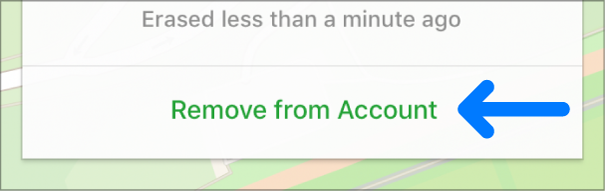
If you’re not using a device, you can temporarily remove it from your account so it doesn’t show up in your Devices list. When the device goes online again, it reappears in the list if it has Activation Lock turned on (for an iPhone, iPad, iPod touch, Mac, or Apple Watch) or is paired with your iOS or iPadOS device (for AirPods or a Beats product).
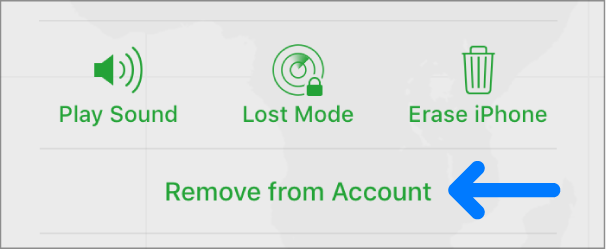
Note: You can also remove your iPhone, iPad, iPod touch, or Mac by turning off iCloud completely on that device. Turning off iCloud turns off all iCloud features on the device.
Turn off Activation Lock on a device
If you forgot to turn off Find My before you sold or gave away your iPhone, iPad, iPod touch, Mac, or Apple Watch, you can turn off Activation Lock using Find Devices on iCloud.com.
If you still have the device, see the Apple Support article Activation Lock for iPhone, iPad, and iPod touch, Activation Lock for Mac, or About Activation Lock on your Apple Watch.
We hope this helps.
Cheers!
Hello Anniehope,
Thank you for reaching out to Apple Support Communities, and we'll be happy to help in any way we can. We understand you're having issues with removing a device from iCloud. Follow the instructions here to remove a device from iCloud: Remove a device from Find Devices on iCloud.com - Apple Support
"Remove a device from Find Devices on iCloud.com
You can use Find Devices on iCloud.com to temporarily remove a device from the Devices list or turn off Activation Lock on a device you already gave away or sold.
To sign in to Find Devices, go to icloud.com/find.
Tip: If you set up two-factor authentication but you don’t have your trusted device, you can still use Find Devices. Just click the Find Devices button after you enter your Apple ID.
Remove a device from the Devices list
If you’re not using a device, you can temporarily remove it from your account so it doesn’t show up in your Devices list. When the device goes online again, it reappears in the list if it has Activation Lock turned on (for an iPhone, iPad, iPod touch, Mac, or Apple Watch) or is paired with your iOS or iPadOS device (for AirPods or a Beats product).
Note: You can also remove your iPhone, iPad, iPod touch, or Mac by turning off iCloud completely on that device. Turning off iCloud turns off all iCloud features on the device.
Turn off Activation Lock on a device
If you forgot to turn off Find My before you sold or gave away your iPhone, iPad, iPod touch, Mac, or Apple Watch, you can turn off Activation Lock using Find Devices on iCloud.com.
If you still have the device, see the Apple Support article Activation Lock for iPhone, iPad, and iPod touch, Activation Lock for Mac, or About Activation Lock on your Apple Watch.
We hope this helps.
Cheers!
HOw to remove a device from icloud

