iWatch exercise
iWatch does not correctly count exercise goals. It started after previous update
Apple Watch Series 6, watchOS 9
iWatch does not correctly count exercise goals. It started after previous update
Apple Watch Series 6, watchOS 9
Hey there PRTJ,
"You can calibrate your Apple Watch to improve the accuracy of your distance, pace, and calorie measurements. Calibrating your watch can also help it learn your fitness level and stride, which improves accuracy when GPS is limited or unavailable." Here’s how:
Check your settings
To make sure that your Apple Watch can get the information it needs, check these settings on your iPhone:
1. On your iPhone, open the Settings app.
2. Tap Privacy & Security > Location Services.
3. Make sure that Location Services is turned on.
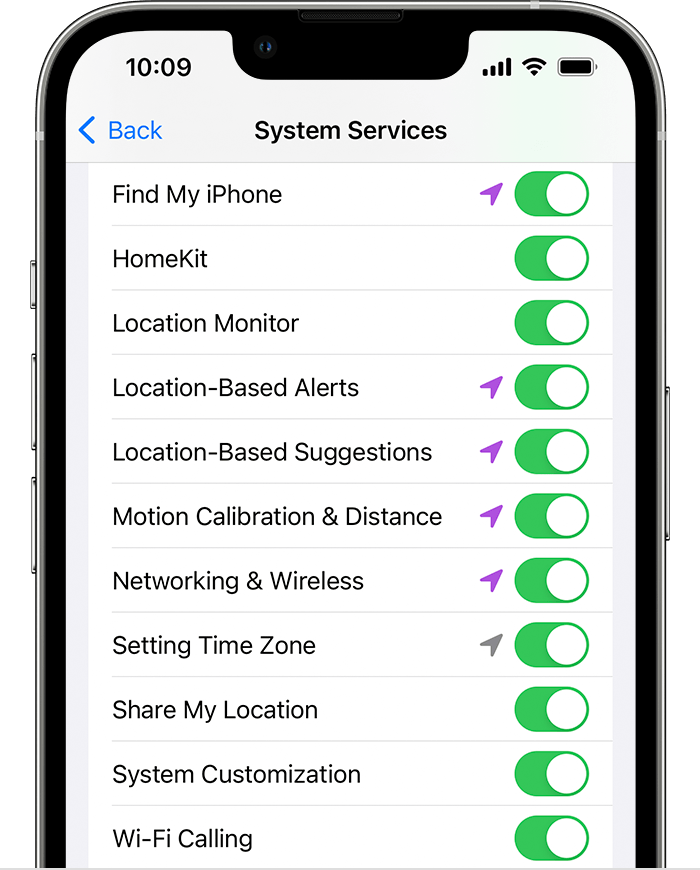
4. Scroll down, then tap System Services.
5. Make sure that Motion Calibration & Distance is turned on.
7. Continue with the steps below.
Calibrate your Apple Watch
1. While wearing your Apple Watch, go to a flat, open outdoor area that offers good GPS reception and clear skies.
2. If you have Apple Watch Series 2 or later, you just need your Apple Watch.* If you have Apple Watch Series 1 or earlier, bring your iPhone for GPS. Hold your iPhone in your hand, or wear it on an armband or waistband.
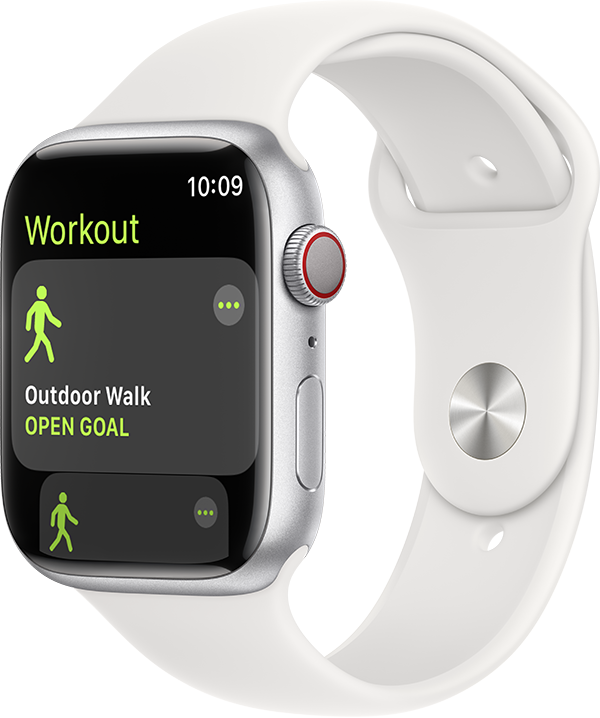
3. Open the Workout app, then tap Outdoor Walk or Outdoor Run. To set a goal before starting, tap.
5. Walk or run at your normal pace for about 20 minutes.
If you don't have time to finish the workout, you can complete 20 minutes over multiple outdoor Workout sessions. If you work out at different speeds, you should also calibrate for 20 minutes at each of the speeds that you walk or run.
Whenever you walk or run outside using the above steps, your Apple Watch continues to calibrate the accelerometer by learning your stride length at different speeds. Calibration can also improve the accuracy of your calorie calculations in the Workout app, and the calorie, distance, Move, and Exercise calculations in the Activity app.
Improve your Workout and Activity accuracy
Your personal information, such as your height, weight, gender, and age, is one of the things your Apple Watch uses to calculate how many calories you burn and more. Learn how to update your personal information.
Reset your calibration data
Here's how to reset your calibration data:
1. On your iPhone, open the Watch app.
2. Tap the My Watch tab, then tap Privacy > Reset Fitness Calibration Data.
Read more here:
Calibrate your Apple Watch for improved Workout and Activity accuracy
If you have any further questions or issues, please contact Apple Support for further help: Get Support
Take care.
Hey there PRTJ,
"You can calibrate your Apple Watch to improve the accuracy of your distance, pace, and calorie measurements. Calibrating your watch can also help it learn your fitness level and stride, which improves accuracy when GPS is limited or unavailable." Here’s how:
Check your settings
To make sure that your Apple Watch can get the information it needs, check these settings on your iPhone:
1. On your iPhone, open the Settings app.
2. Tap Privacy & Security > Location Services.
3. Make sure that Location Services is turned on.
4. Scroll down, then tap System Services.
5. Make sure that Motion Calibration & Distance is turned on.
7. Continue with the steps below.
Calibrate your Apple Watch
1. While wearing your Apple Watch, go to a flat, open outdoor area that offers good GPS reception and clear skies.
2. If you have Apple Watch Series 2 or later, you just need your Apple Watch.* If you have Apple Watch Series 1 or earlier, bring your iPhone for GPS. Hold your iPhone in your hand, or wear it on an armband or waistband.
3. Open the Workout app, then tap Outdoor Walk or Outdoor Run. To set a goal before starting, tap
5. Walk or run at your normal pace for about 20 minutes.
If you don't have time to finish the workout, you can complete 20 minutes over multiple outdoor Workout sessions. If you work out at different speeds, you should also calibrate for 20 minutes at each of the speeds that you walk or run.
Whenever you walk or run outside using the above steps, your Apple Watch continues to calibrate the accelerometer by learning your stride length at different speeds. Calibration can also improve the accuracy of your calorie calculations in the Workout app, and the calorie, distance, Move, and Exercise calculations in the Activity app.
Improve your Workout and Activity accuracy
Your personal information, such as your height, weight, gender, and age, is one of the things your Apple Watch uses to calculate how many calories you burn and more. Learn how to update your personal information.
Reset your calibration data
Here's how to reset your calibration data:
1. On your iPhone, open the Watch app.
2. Tap the My Watch tab, then tap Privacy > Reset Fitness Calibration Data.
Read more here:
Calibrate your Apple Watch for improved Workout and Activity accuracy
If you have any further questions or issues, please contact Apple Support for further help: Get Support
Take care.
iWatch exercise