Deleted all Contacts on IPhone XR when deleted cardDAV account

I had never signed up for cardDAV account but I would get a message asking for cardDAV password every time I added or changed a Contact. So after some online research, I deleted the cardDAV account in Settings-contacts. This deleted all the Contacts on my IPhone as well. Would really appreciate it if someone could advise how to recover them. I don't have a server name or account name for card DAV account. I am assuming I can use my GMail sign in as the ID and password. Thank you in advance for your help.

iPhone XR

Posted on Mar 16, 2023 9:12 PM

Reply
Question marked as Top-ranking reply

Posted on Mar 21, 2023 6:58 PM

Hi kt208,


To recover that cardDav account would require knowing at least what service/server/account it was for, so that you could attempt to regain access to said account and reconfigure that on your device. Without any of that information, the account may have been stored in a backup as it's not listed as an exclusion at Backup methods for iPhone, iPad, and iPod touch. That page mentions data stored in other locations is not included in the backups, but that data and settings are.


Use Locate backups of your iPhone, iPad, and iPod touch to verify the availability of backups preceding the date or time that change was made. If available, you may be able to restore your device to factory defaults and then recover the data included in that backup in the hopes of restoring the account settings.


Regards.

Similar questions

5 replies
Question marked as Top-ranking reply

Mar 21, 2023 6:58 PM in response to kt208

Hi kt208,


To recover that cardDav account would require knowing at least what service/server/account it was for, so that you could attempt to regain access to said account and reconfigure that on your device. Without any of that information, the account may have been stored in a backup as it's not listed as an exclusion at Backup methods for iPhone, iPad, and iPod touch. That page mentions data stored in other locations is not included in the backups, but that data and settings are.


Use Locate backups of your iPhone, iPad, and iPod touch to verify the availability of backups preceding the date or time that change was made. If available, you may be able to restore your device to factory defaults and then recover the data included in that backup in the hopes of restoring the account settings.


Regards.

Mar 19, 2023 7:33 AM in response to kt208

Hello kt208,


Thanks for posting in the Apple Support Communities. We're happy to look into this with you.


If you'd like to see if the contacts previously on your iPhone were from your Google account, you'll simply need to select this in your settings to enable and sync them back to your iPhone. Full details can be found here: Use other contact accounts on iPhone - Apple Support


Until you've had a chance to fully review the article, you can try going to Settings > Contacts > Accounts, select the appropriate account and sign in as required.


Best regards.


Mar 25, 2023 11:36 AM in response to kt208

kt208,


To create a CardDAV account, we recommend that you follow the steps here: Use other contact accounts on iPhone - Apple Support


To perform the recommended troubleshooting steps via the link above, complete the steps in the section titled "Set up an LDAP or CardDAV account to access business or school directories."


1. Go to Settings  > Contacts > Accounts > Add Account, then tap Other.
2. Tap Add LDAP Account or Add CardDAV Account, then enter the account information.


We recommend the steps above because they will show you how to create a  CardDAV account on your iPhone.


Please remember that you'll need to know the login credentials to set up the account successfully. If you don't have this information, you can reach out to the person that initially set up the account for you, or your can see if you can locate the password by following the steps in the link below in the section titled "View saved passwords and passkeys in Settings."


How to find saved passwords and passkeys on your iPhone - Apple Support


1. Tap Settings, then select Passwords. In iOS 13 or earlier, select Passwords & Accounts, then tap Website & App Passwords.
2. Use Face ID or Touch ID when prompted, or enter your passcode.

See security recommendations and your saved passwords or passkeys in iOS 16 through Settings > Passwords.
3. To see a password or passkey, select a website or app.  An iPhone shows the account details for the user's Apple account including the User Name and Password. 
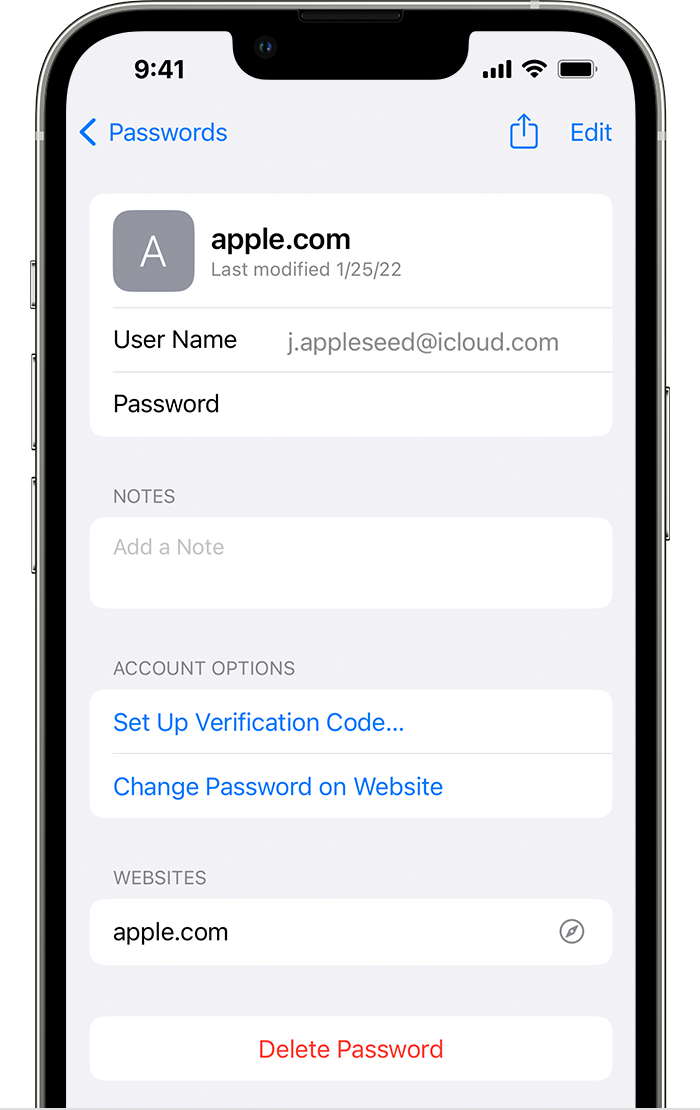
* To delete a saved password or passkey, tap Delete Password or Delete Passkey.
* To update a password or passkey, tap Edit.


Please let us know the outcome after giving the above steps a try.


Thanks for using the Apple Support Communities.


Cheers!

Mar 21, 2023 4:30 PM in response to Missy5937

Missy5937,

Thank you so much for your response. I am afraid, I'm not sure I understand your recommendation. Maybe I need to be more clear. I had deleted the card DAV account that had shown up in the Settings under my ID. I never set one up that I am aware. So every time I made a change/addition to my Contacts, I was asked to provide a cardDAV password. So to correct that, I found a suggestion online that I should delete the card DAV account. I did that but it wiped out all my contacts on the iphone. So I downloaded the file from Google Drive, unfortunately a lot of my recent recent changes to Contacts are not there. I guess my Google drive backup was not working. So, I'd like to recover the Contacts file from the cardDAV account. Is there any way that I can do that?

Thank you for your help.

Mar 24, 2023 7:03 PM in response to Bill_T1

Hi Bill_T1,

Thank you so much for your response and the information that you provided. Unfortunately, it did not work for me. I do have a follow up question. I am not certain I fully understand but you mentioned that if I knew what service was the cardDAV account for, then I could attempt to regain access. I did not create this account so I am not certain, but let us say it was associated with GMail (Google). If that were the case, could I (and how would I) regain access?

Thank you.

This thread has been closed by the system or the community team. You may vote for any posts you find helpful, or search the Community for additional answers.

Deleted all Contacts on IPhone XR when deleted cardDAV account

Welcome to Apple Support Community
A forum where Apple customers help each other with their products. Get started with your Apple Account.
