
Email on my iPhone doesn’t sync with my other Apple devices ? Why?
Email on my iPhone doesn’t sync with my other Apple devices - iPad and Mac. Ideas?
iPhone 13
Email on my iPhone doesn’t sync with my other Apple devices - iPad and Mac. Ideas?
iPhone 13
Hello LindaandLarry,
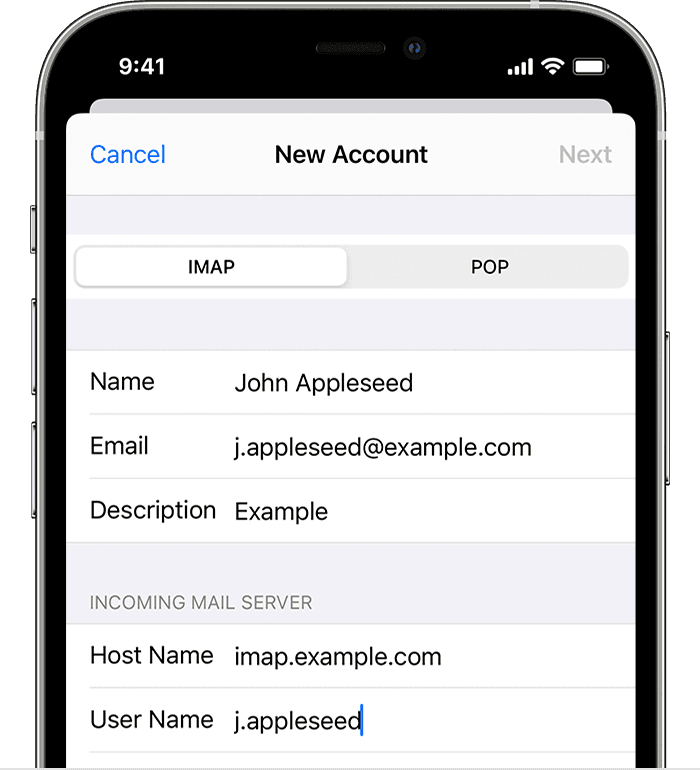
We would like to see how we can help you with your Mail app not syncing as expected between devices. It sounds like they may have been setup as a POP account instead of an IMAP account. Check out this link to confirm they are set up as IMAP accounts to sync across devices: Add an email account to your iPhone, iPad, or iPod touch - Apple Support
"Enter account settings manually
If Mail can't find your email settings, then you need to enter them manually. Tap Next, then follow these steps:
Cheers!
Hello LindaandLarry,
We would like to see how we can help you with your Mail app not syncing as expected between devices. It sounds like they may have been setup as a POP account instead of an IMAP account. Check out this link to confirm they are set up as IMAP accounts to sync across devices: Add an email account to your iPhone, iPad, or iPod touch - Apple Support
"Enter account settings manually
If Mail can't find your email settings, then you need to enter them manually. Tap Next, then follow these steps:
Cheers!
Email on my iPhone doesn’t sync with my other Apple devices ? Why?
