
I don’t have six digit code
About Apple Id
About Apple Id
Hi Brownfish_33,
It sounds like you're referring to a verification code for your Apple ID with two-factor authentication. If this is correct, you can get a code from a trusted device like and iPhone or Mac. The steps below and information found in the article here can help: Get a verification code and sign in with two-factor authentication - Apple Support
"Get a code from Settings on your trusted device
If you can’t receive a verification code on your trusted devices automatically, you can get one from Settings, even if your device is offline.
From your iPhone, iPad, or iPod touch
If your device is online:
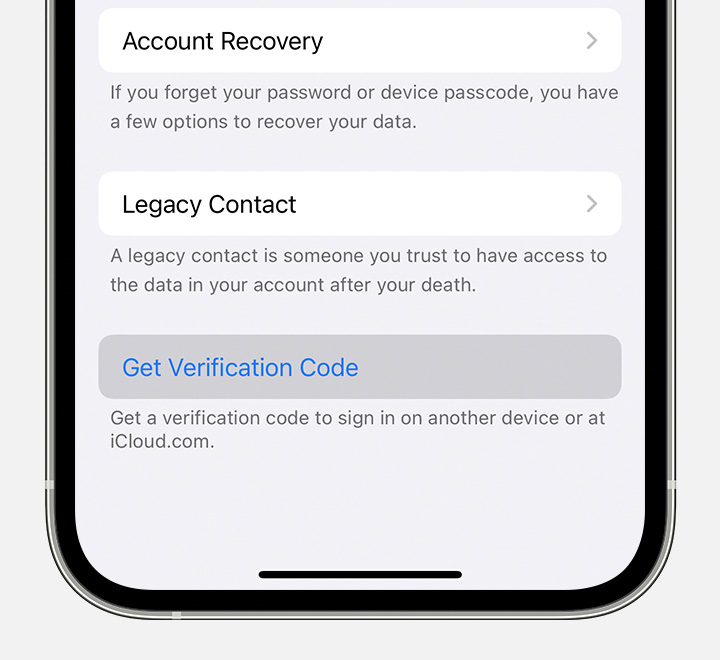
If your device is offline:
If you don't have a trusted device and have exhausted the steps in the article, you may need to start account recovery. View more here: How to use account recovery when you can’t reset your Apple ID password - Apple Support
Cheers.
Hi Brownfish_33,
It sounds like you're referring to a verification code for your Apple ID with two-factor authentication. If this is correct, you can get a code from a trusted device like and iPhone or Mac. The steps below and information found in the article here can help: Get a verification code and sign in with two-factor authentication - Apple Support
"Get a code from Settings on your trusted device
If you can’t receive a verification code on your trusted devices automatically, you can get one from Settings, even if your device is offline.
From your iPhone, iPad, or iPod touch
If your device is online:
If your device is offline:
If you don't have a trusted device and have exhausted the steps in the article, you may need to start account recovery. View more here: How to use account recovery when you can’t reset your Apple ID password - Apple Support
Cheers.
I don’t have six digit code

