changing apple ID on phone from wife's pple ID to my apple ID

when we got my 1st Iphone we set it up with my wife's apple ID and now I have my own apple ID and would like to change it on my phone to my ID but not sure how to do it.


iPhone SE (3rd generation)

Posted on Mar 20, 2023 7:33 AM

Reply
Question marked as Top-ranking reply

Posted on Mar 21, 2023 3:18 PM

Hi rch1973,


Thanks for contacting Apple Support Communities!


We understand that you'd like to sign out of the Apple ID currently signed in on your iPhone and sign in with your own Apple ID.


You can first sign out of your wife's Apple ID on your iPhone if you go to Settings > [Your wife's name] > Sign out. You can also check if her Apple ID is signed in on iMessage and FaceTime if you go to Settings > Messages > Send & Receive > tap the Apple ID at the bottom and choose Sign out. Next, go to Settings > FaceTime > Apple ID > Sign Out.


Once you've signed out of her Apple ID, you can sign in with your own Apple ID as outlined here: Sign in with your Apple ID - Apple Support

"Sign in on your iPhone, iPad, or iPod touch

  1. Open the Settings app.
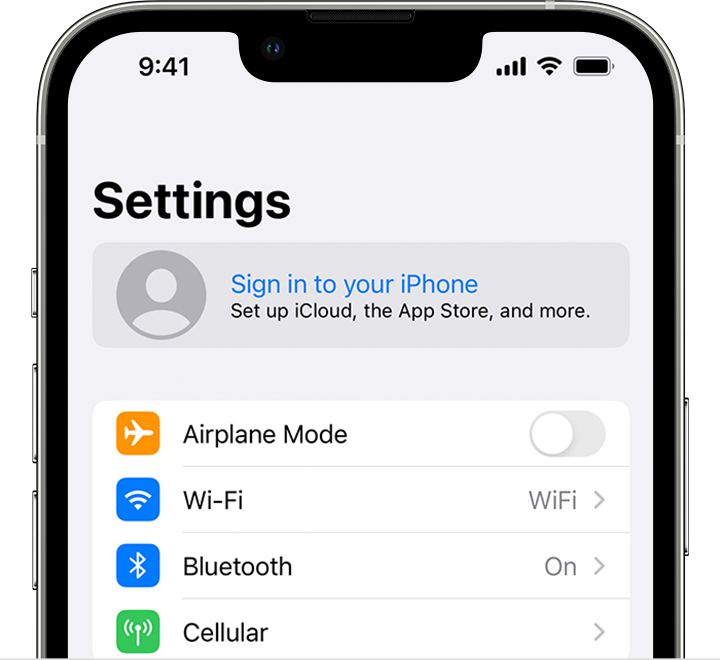
  2. Tap Sign in to your [device].

On iPhone, sign in to your Apple ID in the Settings app


3. Enter your Apple ID and password.

4. If prompted, enter the six-digit verification code sent to your trusted device or phone number and complete sign in.

If you're already signed in to iCloud on the iPhone paired with your Apple Watch, you will automatically be signed in to that Apple ID. Learn more about how to set up and sign in to your Apple Watch


You can also sign in with your Apple ID in Settings > Messages > Send & Receive.


Next, you can sign into FaceTime as well in Settings > FaceTime > Apple ID: Use FaceTime with your iPhone or iPad - Apple Support


If there are purchases associated with your wife's Apple ID that you'd like to use with your Apple ID, you can set up Family Sharing so that you can both access the same purchases: Set up Family Sharing - Apple Support


We hope this helps you.


Take care!


1 reply
Question marked as Top-ranking reply

Mar 21, 2023 3:18 PM in response to rch1973

Hi rch1973,


Thanks for contacting Apple Support Communities!


We understand that you'd like to sign out of the Apple ID currently signed in on your iPhone and sign in with your own Apple ID.


You can first sign out of your wife's Apple ID on your iPhone if you go to Settings > [Your wife's name] > Sign out. You can also check if her Apple ID is signed in on iMessage and FaceTime if you go to Settings > Messages > Send & Receive > tap the Apple ID at the bottom and choose Sign out. Next, go to Settings > FaceTime > Apple ID > Sign Out.


Once you've signed out of her Apple ID, you can sign in with your own Apple ID as outlined here: Sign in with your Apple ID - Apple Support

"Sign in on your iPhone, iPad, or iPod touch

  1. Open the Settings app.
  2. Tap Sign in to your [device].

On iPhone, sign in to your Apple ID in the Settings app


3. Enter your Apple ID and password.

4. If prompted, enter the six-digit verification code sent to your trusted device or phone number and complete sign in.

If you're already signed in to iCloud on the iPhone paired with your Apple Watch, you will automatically be signed in to that Apple ID. Learn more about how to set up and sign in to your Apple Watch


You can also sign in with your Apple ID in Settings > Messages > Send & Receive.


Next, you can sign into FaceTime as well in Settings > FaceTime > Apple ID: Use FaceTime with your iPhone or iPad - Apple Support


If there are purchases associated with your wife's Apple ID that you'd like to use with your Apple ID, you can set up Family Sharing so that you can both access the same purchases: Set up Family Sharing - Apple Support


We hope this helps you.


Take care!


This thread has been closed by the system or the community team. You may vote for any posts you find helpful, or search the Community for additional answers.

changing apple ID on phone from wife's pple ID to my apple ID

Welcome to Apple Support Community
A forum where Apple customers help each other with their products. Get started with your Apple Account.