Hi MissOtt,
Welcome to Apple Support Communities. We understand that you're having an issue with opening photos and links on your iPhone. We'd like to help.
You mentioned that you tried to delete some photo to free up space. Are you receiving any error messages that your storage is full? If you are not sure if your storage may be an issue, this resource will help determine that: How to check the storage on your iPhone and iPad - Apple Support
Use your device to check its storage
1. Go to Settings > General > [Device] Storage. You might see a list of recommendations for optimizing your device's storage, followed by a list of installed apps and the amount of storage each one uses.
2. Tap an app's name for more information about its storage. Cached data and temporary data might not be counted as usage.
In the detailed view you can:
* Offload the app, which frees up storage used by the app, but keeps its documents and data.
* Delete the app, which removes the app and its related data.
* Depending on the app, you might be able to delete some of its documents and data.
If your device is almost full and can't free up space, you might get a Storage Almost Full alert. If you see this alert, check the storage recommendations or offload some less-used content like videos and apps.
Then, check these steps out on how to manage that space you see. While this resource takes about clearing space for an update, the same steps hold true for trying to clear space in general. Feel free to skip step 5.
Manage space on your iPhone, iPad, or iPod touch
To make space on your device, try the recommendations. You can also delete or offload apps and content. You don't need to purchase more iCloud storage. What's the difference between device storage and iCloud storage?
1. Go to Settings > General > [device] Storage.
2. Scroll to the Recommendations section to see tips.
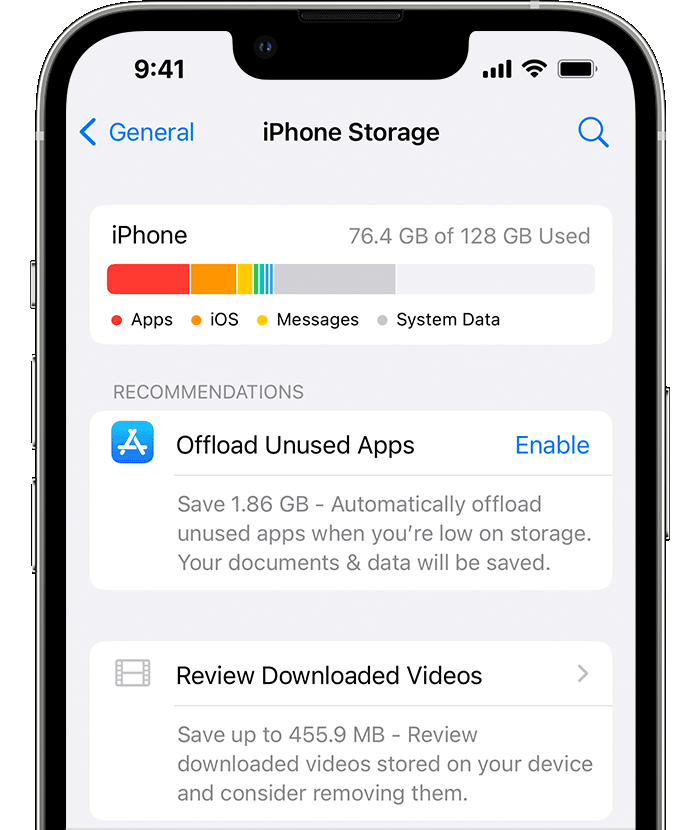
3. If you still need more space after you use the recommendations, you can delete apps and content that you don't need. Scroll to the list of apps, then select any app to see how much space it uses.
4. Tap Delete App. Some apps, such as Music, let you delete parts of their documents and data. You can redownload your purchased apps and content again later.
5. Try to install the update again. Go to Settings > General > Software Update
If you see Other or System Data in the graph that shows your device storage, you don't need to take action to change them. Instead, delete apps and content that you don't need, and use the recommendations.

Hope that helps.
Cheers!


