My apple watch is not showing my wallet passes
I have series 8 watch and its not getting sync with my wallet
Apple Watch Series 8, watchOS 9
I have series 8 watch and its not getting sync with my wallet
Apple Watch Series 8, watchOS 9
Hello komal63,
Thank you for reaching out in Apple Support Communities. You may need to add the payment method or card to your Apple Watch that's synced from the paired iPhone. This may help to update the Wallet app for your Apple Watch. Here are the steps you'll want to follow:
Add a card to Apple Watch with your iPhone
1. Open the Apple Watch app on your iPhone.
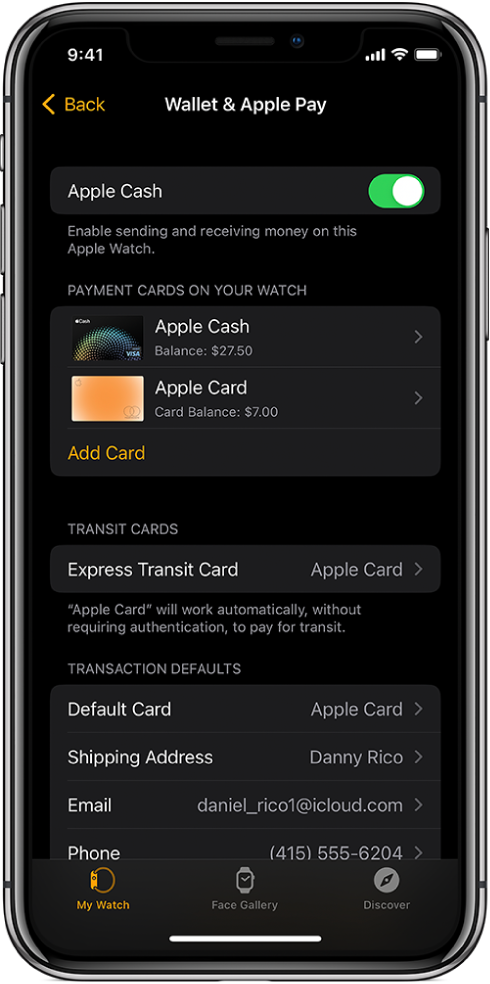
2. Tap My Watch, then tap Wallet & Apple Pay.
3. If you have cards on your other Apple devices, or cards that you recently removed, tap Add next to a card you want to add, then enter the card’s CVV.
4. For any other card, tap Add Card, then follow the onscreen instructions.
Your card issuer may require additional steps to verify your identity.
Following these steps may help and is outlined in this article: https://support.apple.com/guide/watch/set-up-apple-pay-apd285b3ae01/watchos
Kind regards.
Hello komal63,
Thank you for reaching out in Apple Support Communities. You may need to add the payment method or card to your Apple Watch that's synced from the paired iPhone. This may help to update the Wallet app for your Apple Watch. Here are the steps you'll want to follow:
Add a card to Apple Watch with your iPhone
1. Open the Apple Watch app on your iPhone.
2. Tap My Watch, then tap Wallet & Apple Pay.
3. If you have cards on your other Apple devices, or cards that you recently removed, tap Add next to a card you want to add, then enter the card’s CVV.
4. For any other card, tap Add Card, then follow the onscreen instructions.
Your card issuer may require additional steps to verify your identity.
Following these steps may help and is outlined in this article: https://support.apple.com/guide/watch/set-up-apple-pay-apd285b3ae01/watchos
Kind regards.
My apple watch is not showing my wallet passes