Apple Watch wallet trouble
My apple watch suddenly will not complete wallet transactions and refers me to info on my iPhone, which does not display anything relevant. How can this be corrected?
Apple Watch Series 6
My apple watch suddenly will not complete wallet transactions and refers me to info on my iPhone, which does not display anything relevant. How can this be corrected?
Apple Watch Series 6
Hello DavisKiminator,
Let's use the steps below to make sure that your Apple Watch is all up to date:
1. On your iPhone, open the Apple Watch app, then tap the My Watch tab.
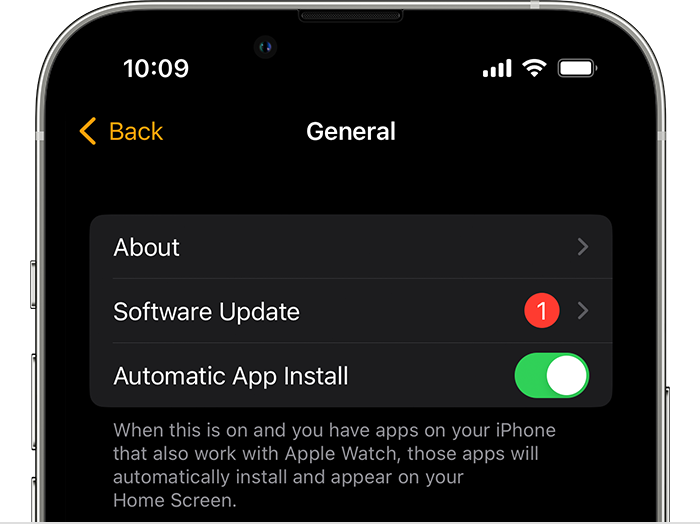
2. Tap General > Software Update.
3. Download the update. If asked for your iPhone passcode or Apple Watch passcode, enter it.
4. Wait for the progress wheel to appear on your Apple Watch. It could take from several minutes to an hour for the update to complete.
Leave your Apple Watch on its charger while the update completes. Don't restart your iPhone or Apple Watch, and don't quit the Apple Watch app. When the update completes, your Apple Watch restarts on its own.
You can also find those steps in this resource: Update your Apple Watch - Apple Support
If your Apple Watch is all up to date, let's restart both your iPhone and Apple Watch:
Restart your iPhone - Apple Support
Restart your Apple Watch - Apple Support
Updating and restarting can sometimes help address odd behaviors.
Should that still persist, what is the exact prompt or message you are receiving on your Apple Watch?
Also, are you still able to complete transactions using your iPhone without any difficulties?
Let us know, and we'll take further steps based on those details.
Hello DavisKiminator,
Let's use the steps below to make sure that your Apple Watch is all up to date:
1. On your iPhone, open the Apple Watch app, then tap the My Watch tab.
2. Tap General > Software Update.
3. Download the update. If asked for your iPhone passcode or Apple Watch passcode, enter it.
4. Wait for the progress wheel to appear on your Apple Watch. It could take from several minutes to an hour for the update to complete.
Leave your Apple Watch on its charger while the update completes. Don't restart your iPhone or Apple Watch, and don't quit the Apple Watch app. When the update completes, your Apple Watch restarts on its own.
You can also find those steps in this resource: Update your Apple Watch - Apple Support
If your Apple Watch is all up to date, let's restart both your iPhone and Apple Watch:
Restart your iPhone - Apple Support
Restart your Apple Watch - Apple Support
Updating and restarting can sometimes help address odd behaviors.
Should that still persist, what is the exact prompt or message you are receiving on your Apple Watch?
Also, are you still able to complete transactions using your iPhone without any difficulties?
Let us know, and we'll take further steps based on those details.
Thanks for the good advice! I restarted the watch, tried checking out at the grocery store and it worked. Cheers.
Apple Watch wallet trouble