
Message Groups
How to switch which contact groups appear at top of app? Is there a limit of six on iPhone ?
How to switch which contact groups appear at top of app? Is there a limit of six on iPhone ?
Hi lbrowna,
You can pin up to nine conversations at the top of the Messages app on an iPhone with iOS 14 or later. "Pin important conversations" in Use Messages on your iPhone or iPad has a great explanation and visual.
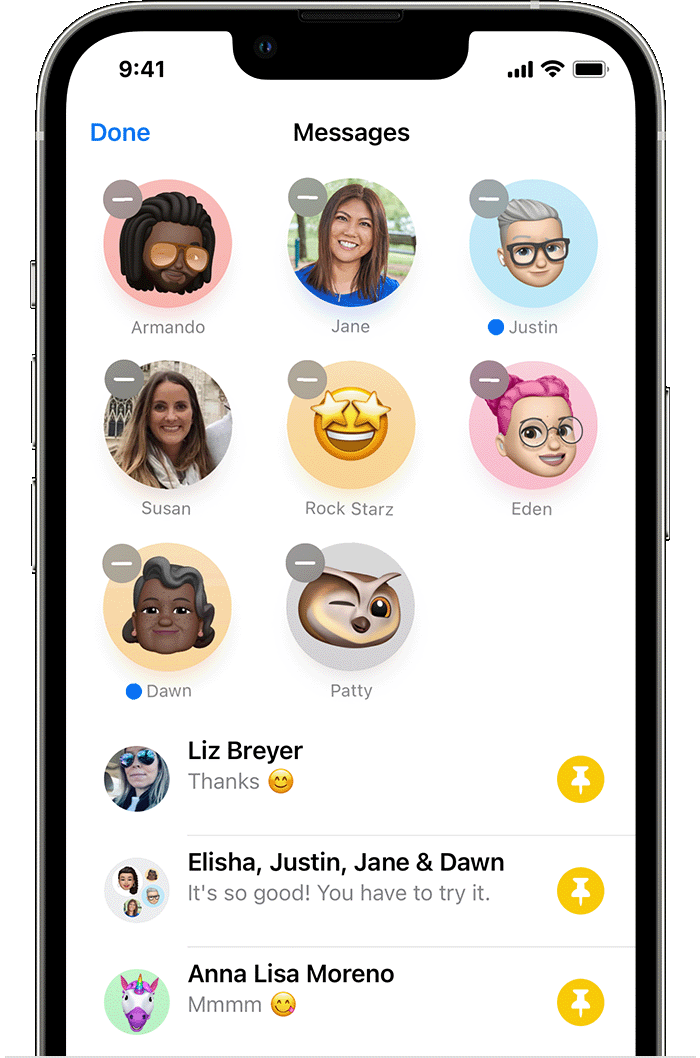
Pin important conversations
1. In Messages, tap Edit or the More button.
2. Tap Edit Pins, then tap the Pin button
.
3. Tap Done.
You can also tap the "-" next to a pin to remove it, or press and hold a conversation to drag it around and reorder the pins. These steps are sure to help you organize your important conversations in Messages!
Warmest Regards.
Hi lbrowna,
You can pin up to nine conversations at the top of the Messages app on an iPhone with iOS 14 or later. "Pin important conversations" in Use Messages on your iPhone or iPad has a great explanation and visual.
Pin important conversations
1. In Messages, tap Edit or the More button
2. Tap Edit Pins
3. Tap Done.
You can also tap the "-" next to a pin to remove it, or press and hold a conversation to drag it around and reorder the pins. These steps are sure to help you organize your important conversations in Messages!
Warmest Regards.
Message Groups

