My ipad wont shut off or move off the opening screen

My ipad won't work. I can't even turn it off because there is a "this accessory may not be support" notice. The iPad will not get off that screen will not let me do anything with it. I've tried cleaning the connectors. Right now I am trying to let it run out of battery power


iPad mini 4, iPadOS 15

Posted on Mar 27, 2023 5:00 AM

Reply
Question marked as Top-ranking reply

Posted on Mar 28, 2023 2:55 PM

Hi MrsPeel47,


Have you tried forcing it to restart? If not, give it a try. On your iPad mini 4, press the volume up button + volume down button + press and hold the top button. You may need to hold the top button for 30 seconds or longer before you see the Apple logo.


Force restart iPad has a great visual to help with the button sequence:

Force restart iPad (models with Face ID or with Touch ID in the top button)
If your iPad doesn’t have the Home button, do the following:

1. Press and quickly release the volume button nearest to the top button.
2. Press and quickly release the volume button farthest from the top button.
3. Press and hold the top button.
4. When the Apple logo appears, release the top button.
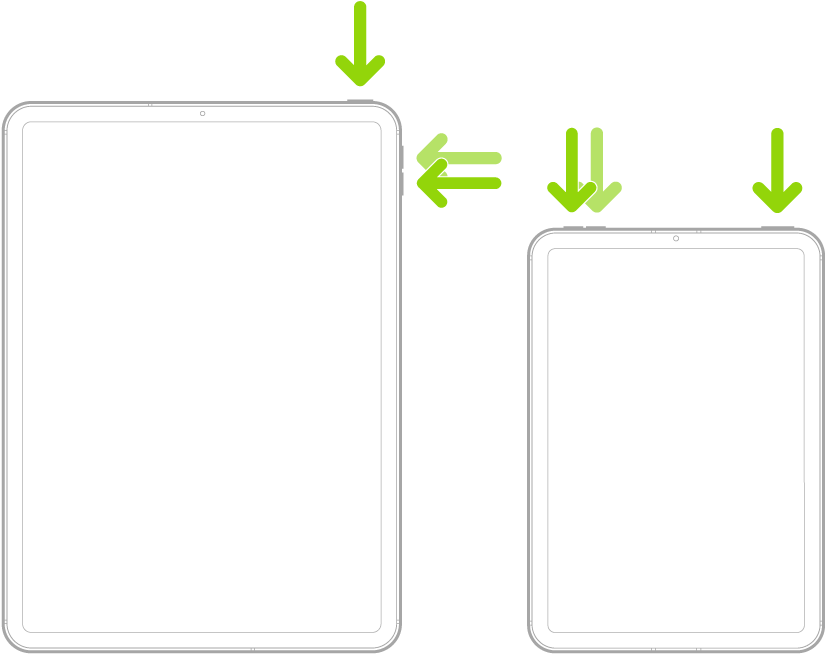
Illustrations of two different iPad models with the screens facing up. The leftmost illustration shows the volume up and volume down buttons on the right side of the device. The top button is shown near the right edge. The rightmost illustration shows the volume up and volume down buttons on the top of the device near the left edge. The top button is shown near the right edge.


Thank you for being part of the Apple Support Communities.


Kindest Regards.


1 reply
Question marked as Top-ranking reply

Mar 28, 2023 2:55 PM in response to MrsPeel47

Hi MrsPeel47,


Have you tried forcing it to restart? If not, give it a try. On your iPad mini 4, press the volume up button + volume down button + press and hold the top button. You may need to hold the top button for 30 seconds or longer before you see the Apple logo.


Force restart iPad has a great visual to help with the button sequence:

Force restart iPad (models with Face ID or with Touch ID in the top button)
If your iPad doesn’t have the Home button, do the following:

1. Press and quickly release the volume button nearest to the top button.
2. Press and quickly release the volume button farthest from the top button.
3. Press and hold the top button.
4. When the Apple logo appears, release the top button.
Illustrations of two different iPad models with the screens facing up. The leftmost illustration shows the volume up and volume down buttons on the right side of the device. The top button is shown near the right edge. The rightmost illustration shows the volume up and volume down buttons on the top of the device near the left edge. The top button is shown near the right edge.


Thank you for being part of the Apple Support Communities.


Kindest Regards.


This thread has been closed by the system or the community team. You may vote for any posts you find helpful, or search the Community for additional answers.

My ipad wont shut off or move off the opening screen

Welcome to Apple Support Community
A forum where Apple customers help each other with their products. Get started with your Apple Account.