messenger kids is making some New Chat Bubble Colors

child received this long message this morning, forwarded from another kids' messenger. Is it a hoax?


Hey There!


I am sorry to interrupt whatever you are doing now but please read below messenger kids is making some New Chat Bubble Colors,


•Rainbow

•Green and Blue Stripes

•Ruby Red

•Carrot Orange

•White with red hearts

•White with pink hearts

•White with blue hearts

•White with green hearts

•Pretty much any colour with any color of hearts!

•Any color of stripes

•Any color of zig zags


But you only get these colors,


If you send this to ten people


The creator of Messenger kids


Jim Balsamic


Is checking to see who will get these awesome new Chat Bubble colours!


But if you break this chain


1. You won’t get these awesome new Chat Bubble colors


2. Your besties won’t think you like them cuz they didn’t get one from you


I just copied and pasted


So send this to ten of your besties!!


Thanks for your time,


It’s so creepy! Forward to 9 people, not me, then turn your Phone off, then turn it back on, and you will have a new wall paper!!

iPhone SE (2nd generation)

Posted on Mar 27, 2023 5:58 AM

Reply
Question marked as Top-ranking reply

Posted on Mar 28, 2023 3:22 PM

Hey RoGard2016,


We understand your child had a message on Messenger that was questionable. We'd be happy to point you in the best direction for support. While this certainly doesn't sound like a message from the developer itself that should be considered legitimate, since this isn't an Apple developed app, you should contact them directly with any of your concerns.


For help with doing so, please review these steps:

Contact the developer of an iOS, iPadOS, or watchOS app
1. Open the App Store on your iPhone or iPad.
2. Search for the app, then tap it. If you can't find it, tap the account button  or your photo at the top of the screen, tap Purchased, tap "Not on this [device]," then tap the app.
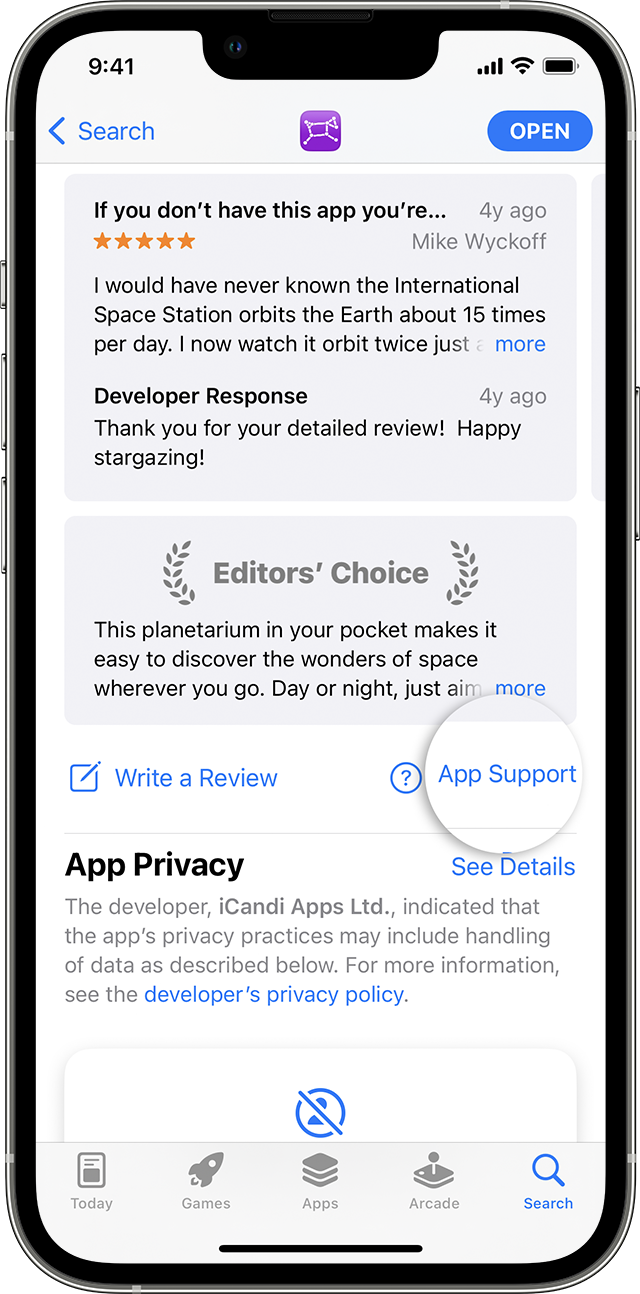
3. The app's product page appears. Scroll to the Ratings & Reviews section, then tap App Support. If you don't see App Support, make sure that you're signed in with the correct Apple ID.
In the App Store on iPhone, you can find the App Support button below the reviews.

This is outlined further here: How to contact an app developer - Apple Support


We hope this helps out.


Take care!


Similar questions

3 replies
Question marked as Top-ranking reply

Mar 28, 2023 3:22 PM in response to RoGard2016

Hey RoGard2016,


We understand your child had a message on Messenger that was questionable. We'd be happy to point you in the best direction for support. While this certainly doesn't sound like a message from the developer itself that should be considered legitimate, since this isn't an Apple developed app, you should contact them directly with any of your concerns.


For help with doing so, please review these steps:

Contact the developer of an iOS, iPadOS, or watchOS app
1. Open the App Store on your iPhone or iPad.
2. Search for the app, then tap it. If you can't find it, tap the account button  or your photo at the top of the screen, tap Purchased, tap "Not on this [device]," then tap the app.
3. The app's product page appears. Scroll to the Ratings & Reviews section, then tap App Support. If you don't see App Support, make sure that you're signed in with the correct Apple ID.
In the App Store on iPhone, you can find the App Support button below the reviews.

This is outlined further here: How to contact an app developer - Apple Support


We hope this helps out.


Take care!


Mar 28, 2023 4:52 PM in response to RoGard2016

Thanks for posting again to the thread RoGard2016,


Since this message is in reference to a third party app, Messenger or Messenger kids, as the previous poster mentioned you'll want to connect to the developer of that app to find out whether the message is legitimate.


They're going to be the most familiar with their promotional messages, and new features coming to apps they create and develop.


If the message is being received in the Apple Messages app, and you've determined it is not a legitimate message after contacting the developer of the app, or if this is an unwanted message, it can be reported as spam or junk.


Report spam or junk messages

When you use iMessage, you can report spam messages to Apple. Depending on your carrier and country or region, you can also report spam you receive with SMS and MMS.

In the list of messages, touch and hold the spam message, then tap Report Junk. Or, if you’ve opened the message, scroll to the bottom of the message, tap Report Junk, then tap Delete and Report Junk.
The sender’s information and the message are sent to Apple, and the message is permanently deleted from your device.

Note: Reporting junk or spam doesn’t prevent the sender from sending messages, but you can block the number to stop receiving them.

If you don’t see the option to report spam or junk messages you receive with SMS or MMS, contact your carrier. See the Apple Support article Wireless carrier support and features for iPhone.

Block, filter, and report messages on iPhone


We hope this helps clarify and provide some additional options for you.


Cheers!


This thread has been closed by the system or the community team. You may vote for any posts you find helpful, or search the Community for additional answers.

messenger kids is making some New Chat Bubble Colors

Welcome to Apple Support Community
A forum where Apple customers help each other with their products. Get started with your Apple Account.