I just bought an iphone 14 pro max. My iphone 11 promax is hung up trying to connect with a laptop at the apple store; frozen, won't do anything. How can I unpair my apple watch from the iphone 11 so that it can pair w/ the iphone 14?

I just bought an iphone 14 pro max. My iphone 11 promax is hung up trying to connect with a laptop at the apple store; frozen, won't do anything. How can I unpair my apple watch from the iphone 11 so that it can pair w/ the iphone 14?

iPhone 14 Pro Max

Posted on Mar 28, 2023 4:32 PM

Reply
Question marked as Top-ranking reply

Posted on Mar 31, 2023 3:32 PM

Thanks for reaching out Marchie2,


It sounds like you need to unpair your Apple Watch, but your iPhone is not currently accessible. We can help.


You can follow these steps to Unpair and erase your Apple Watch:


How to erase your Apple Watch if you don't have your iPhone
1. On your Apple Watch, tap Settings > General > Reset > Erase All Content and Settings. 
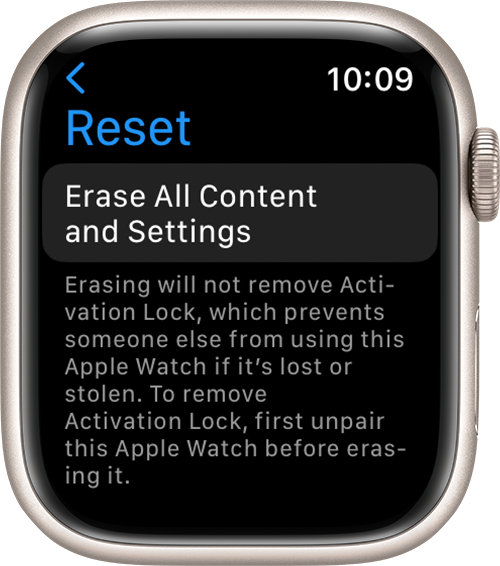
2. Type your password if prompted.
3. For GPS + Cellular models, choose to keep or remove your cellular plan.
* If you want to pair your Apple Watch and iPhone again, keep your plan. 
* If you don't want to pair your Apple Watch and iPhone again, remove your plan. If you aren't going to pair with a different watch or iPhone, you might need to contact your carrier to cancel your cellular subscription. 
4. Tap Erase All to confirm. This resets your Apple Watch to the factory settings.

Now you can set up your Apple Watch again. You'll need the Apple ID and password associated with the watch turn off Activation Lock.


Hope that helps.


Take care.


1 reply
Question marked as Top-ranking reply

Mar 31, 2023 3:32 PM in response to Marchie2

Thanks for reaching out Marchie2,


It sounds like you need to unpair your Apple Watch, but your iPhone is not currently accessible. We can help.


You can follow these steps to Unpair and erase your Apple Watch:


How to erase your Apple Watch if you don't have your iPhone
1. On your Apple Watch, tap Settings > General > Reset > Erase All Content and Settings. 
2. Type your password if prompted.
3. For GPS + Cellular models, choose to keep or remove your cellular plan.
* If you want to pair your Apple Watch and iPhone again, keep your plan. 
* If you don't want to pair your Apple Watch and iPhone again, remove your plan. If you aren't going to pair with a different watch or iPhone, you might need to contact your carrier to cancel your cellular subscription. 
4. Tap Erase All to confirm. This resets your Apple Watch to the factory settings.

Now you can set up your Apple Watch again. You'll need the Apple ID and password associated with the watch turn off Activation Lock.


Hope that helps.


Take care.


This thread has been closed by the system or the community team. You may vote for any posts you find helpful, or search the Community for additional answers.

I just bought an iphone 14 pro max. My iphone 11 promax is hung up trying to connect with a laptop at the apple store; frozen, won't do anything. How can I unpair my apple watch from the iphone 11 so that it can pair w/ the iphone 14?

Welcome to Apple Support Community
A forum where Apple customers help each other with their products. Get started with your Apple Account.