
How can I stop sharing photo's with my child's device?
I have family sharing. How do I stop sharing my photos on my child's device?
iPad, iPadOS 16
I have family sharing. How do I stop sharing my photos on my child's device?
iPad, iPadOS 16
Hi veeteejay,
To clarify, Family Sharing doesn't automatically share personal photos. Have you possibly set up a shared album? Or is the child's device also signed into your same Apple ID? If they are, the best recommendation is for them to have their own Apple ID on their device.
We'd recommend taking a look at this checklist to see if you're inadvertently sharing any of the topics covered:
Of particular note is step 4 concerning photos:
"In the Photos app  , tap Albums, then go to Shared Albums. Select a shared album, and tap People to see the owner of the shared album and whom it’s shared with.
Cheers!
Hi veeteejay,
To clarify, Family Sharing doesn't automatically share personal photos. Have you possibly set up a shared album? Or is the child's device also signed into your same Apple ID? If they are, the best recommendation is for them to have their own Apple ID on their device.
We'd recommend taking a look at this checklist to see if you're inadvertently sharing any of the topics covered:
Of particular note is step 4 concerning photos:
"In the Photos app , tap Albums, then go to Shared Albums. Select a shared album, and tap People to see the owner of the shared album and whom it’s shared with.
Cheers!
Hello veeteejay,
We appreciate that information and all of the troubleshooting you have completed. Is your child’s iPad using your Apple ID? If so, we recommend you create an Apple ID for your child using the steps here: Create an Apple ID for your child - Apple Support
"On your iPhone, iPad, or iPod touch
To verify that you're an adult, you need a credit card. On your iPhone, you can also use a driver's license or state ID added to Wallet where available.
In iOS 16 or iPadOS 16 or later
 .
.Let us know the results.
Take care.
Hi,
I appreciate your help! She has an Apple ID. My photo gallery is on her iPad. That's what I need help with.
Hi, DerekM87,
Thank you very much for your response. Yours is what I've seen during my research. However, it is not a shared album but my photo library. She has her own ID that I created because she is a minor, under the age of 12. My photo library is on her iPad. How do I get my photos off of her iPad?
Hello veeteejay,
When checking your personal device with the steps below are you seeing you're sharing any photo content is set to "Share Automatically"? The steps below found in the article here can help you check: How to use iCloud Shared Photo Library
"Use Shared Library
In Settings on your iPhone or iPad, you can turn on automatic sharing to add photos straight from the camera to your Shared Library. In the Photos app, you can switch views between your Personal Library, the Shared Library, or both at the same time. You can also learn how to find photos shared by other participants, manage sharing suggestions, and more on your iPhone, iPad, or Mac.
Share photos straight from the camera on your iPhone or iPad
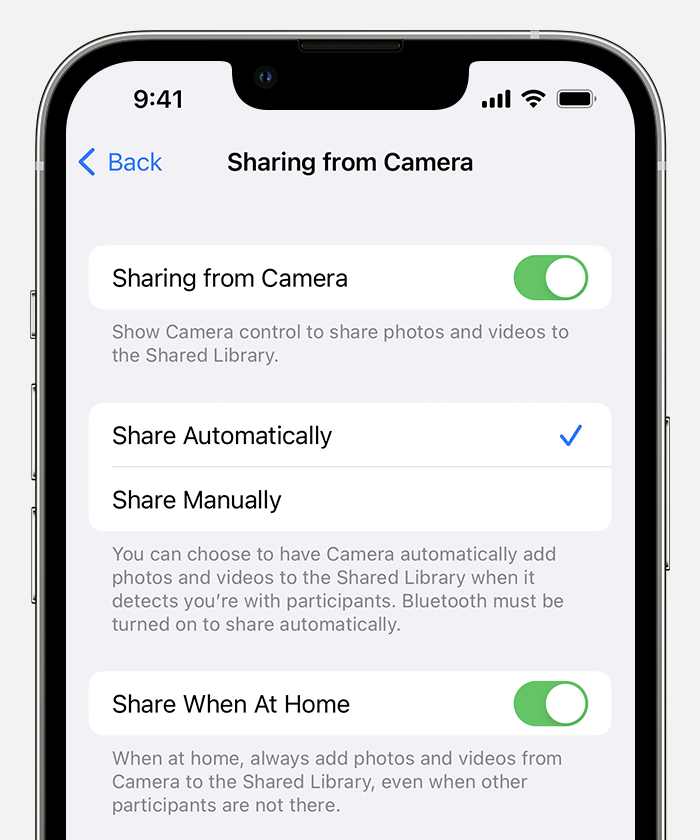
2. In the Camera app, to send photos and videos straight to your Shared Library, make sure that the Shared Library button  is turned on. To send photos and videos to your Personal Library, tap to turn it off."
Additionally, from your daughter's iPad you can check the settings with the help of this article: Leave iCloud Shared Photo Library
You can also make sure your personal Apple ID isn't signed in or linked to her iPad in any way. This article can help you check: Sign in with your Apple ID
If the issue continues, reach out to Apple Support directly to further assist.
Contact - Official Apple Support
Contact Apple for support and service - Apple Support
Cheers!
How can I stop sharing photo's with my child's device?


