
Sound on Builtin speakers
Cannot get the sound on my macbook pro to work. I followed the
instructions, but still no sound on my built in speakers. What do I do
next?
Cannot get the sound on my macbook pro to work. I followed the
instructions, but still no sound on my built in speakers. What do I do
next?
Hey there and welcome to Apple Support Communities NoCallsWH,
We can certainly understand your concern and can help provide some insight.
We recommend checking out these steps for more information on what to do if you have issues with your Mac.
" If you can’t hear sound from your Mac speakers
First, make sure any volume controls in the app you’re using aren’t turned all the way down. Also, try playing a different audio file, CD, or DVD, or try playing the file or disc on another computer or media player to isolate the problem. Then, try the following solutions.
If you’re using your computer’s built-in speakers
 > System Settings, then click Sound
  in the sidebar. (You may need to scroll down.)
 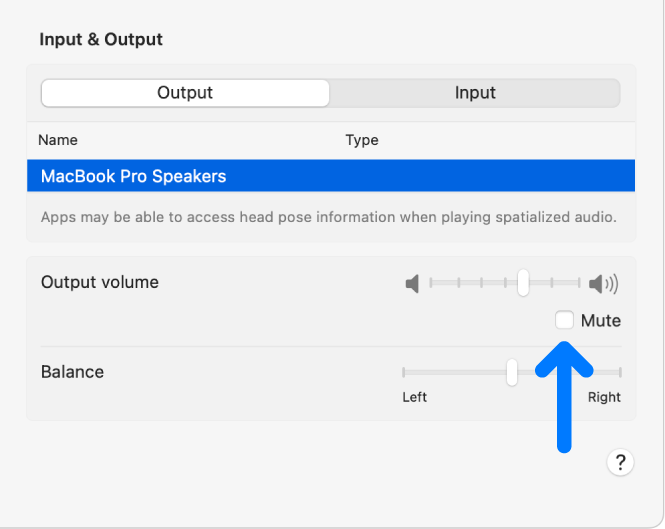 "
"
For additional information, check out this link: If you can’t hear sound from your Mac speakers - Apple Support
These steps will help ensure your device is working with ease and can fix common issues like the ones you’re experiencing.
Kindest regards!
Hey there and welcome to Apple Support Communities NoCallsWH,
We can certainly understand your concern and can help provide some insight.
We recommend checking out these steps for more information on what to do if you have issues with your Mac.
" If you can’t hear sound from your Mac speakers
First, make sure any volume controls in the app you’re using aren’t turned all the way down. Also, try playing a different audio file, CD, or DVD, or try playing the file or disc on another computer or media player to isolate the problem. Then, try the following solutions.
If you’re using your computer’s built-in speakers
> System Settings, then click Sound in the sidebar. (You may need to scroll down.) "
For additional information, check out this link: If you can’t hear sound from your Mac speakers - Apple Support
These steps will help ensure your device is working with ease and can fix common issues like the ones you’re experiencing.
Kindest regards!
Sound on Builtin speakers

