iTunes ringtone not recover on new device
My ringtone I purchased before cannot find on my new devices , how to recover back my ringtone ‘
My ringtone I purchased before cannot find on my new devices , how to recover back my ringtone ‘
Hi kcyeng,
Thanks for using Apple Support Communities. We understand you need to download a previously purchased ringtone, and you can see how to do that here:
1. Go to Settings > Sounds & Haptics.
2. Under Sounds and Haptic Patterns, tap any sound.
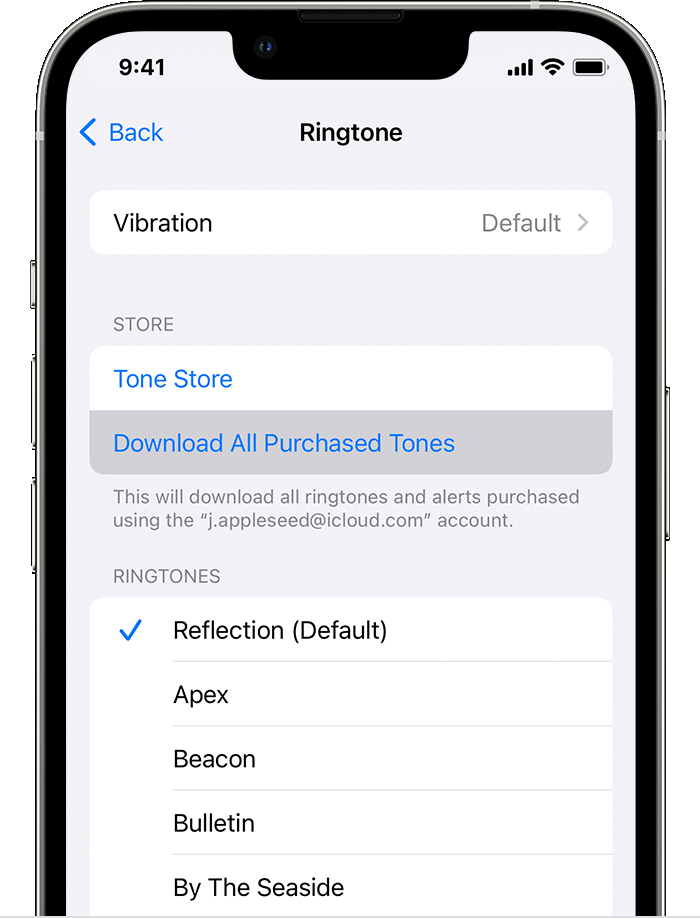
3. Tap Download All Purchased Tones. You might not see this option if you already downloaded all the tones that you purchased or if you haven't purchased any tones.
4.
You might not be able to redownload some previously purchased tones.
See more about those steps here: Use tones and ringtones with your iPhone or iPad - Apple Support
Thank you.
Hi kcyeng,
Thanks for using Apple Support Communities. We understand you need to download a previously purchased ringtone, and you can see how to do that here:
1. Go to Settings > Sounds & Haptics.
2. Under Sounds and Haptic Patterns, tap any sound.
3. Tap Download All Purchased Tones. You might not see this option if you already downloaded all the tones that you purchased or if you haven't purchased any tones.
4.
You might not be able to redownload some previously purchased tones.
See more about those steps here: Use tones and ringtones with your iPhone or iPad - Apple Support
Thank you.
iTunes ringtone not recover on new device