Siri notification in airpods pro 2-gen

situation:

iphone 13 pro max

airpods pro 2-gen

music in airpods.

i get new message in telegram.

siri read this notification.

okay, I understand, continue listening music.

i got 5 new messages from the same contact from telegram.

siri start to read from first message.

okay, never mind.

i got one more message from the same contact.

siri again start reading from beginning …

(no more new messages from that contact)

after few minutes - siri start to reading notifications from the beginning…..

and it’s continuing repeating until I opened telegram chat with unread messages


question:

is it possible to get only one reading from siri and do not repeat all the time unreadings messages?

iPhone 13 Pro Max

Posted on Mar 31, 2023 5:21 AM

Reply

Similar questions

3 replies

Apr 6, 2023 8:05 AM in response to Vpaceote

Hi Vpaceote,


Thanks so much for letting us know more.


Since it seems like the issue is only happening with the Telegram app notifications, adjusting the notification settings for that app may be helpful.


This link outlines options to manage notifications, and will guide you through that process: Use notifications on your iPhone or iPad


Manage notifications

To manage your notifications from the Lock Screen or Notification Center:

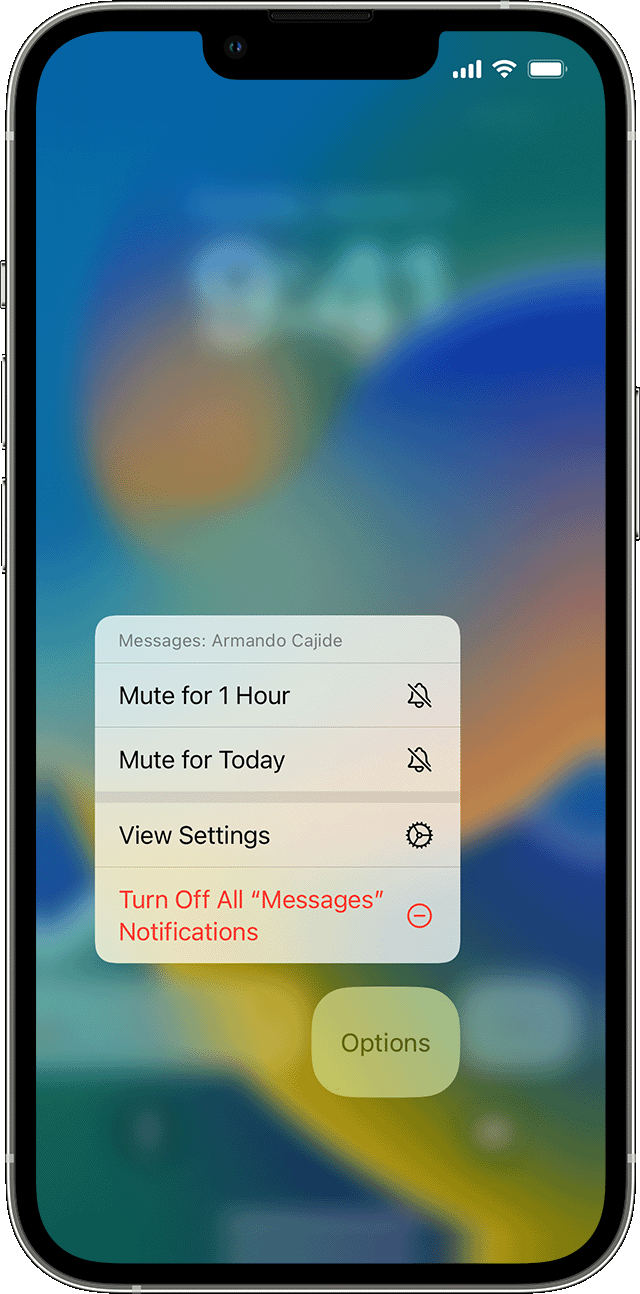
iPhone showing how to manage notifications 

1. Swipe left over an alert or group of alerts.
2. Tap Options, then select from these options: 

* Mute for 1 Hour
* Mute for Today
* View Settings
* Turn Off

You can also tap View Settings to change your alert styles or alert settings for a specific app.


If you need further assistance, with the Telegram app, please contact the app developer for help. This link explains how to contact an app developer: How to contact an app developer


Thanks!

Apr 4, 2023 8:32 AM in response to Vpaceote

Hi Vpaceote,


Thank you for posting to Apple Support Communities.


If you’re experiencing issues with the Telegram app and Siri reading announcements, the steps here can help fix this: If an app on your iPhone or iPad stops responding, closes unexpectedly, or won’t open


If those steps don’t help, try fixing issues with announcing notifications with Siri:


1. Make sure that you're using a compatible device.
2. Make sure that your AirPods or your compatible Beats headphones are paired to your device in Settings > Bluetooth.
3. Go to Settings > Notifications > Announce Notifications and make sure that Announce Notifications is turned on.
4. Make sure that your iPhone or iPad is locked and its screen is dark. Siri doesn't announce messages if you're using your device.


This information is from Announce notifications with Siri on AirPods or Beats.


To help us continue, does this only happen with the Telegram app?


Take care.

This thread has been closed by the system or the community team. You may vote for any posts you find helpful, or search the Community for additional answers.

Siri notification in airpods pro 2-gen

Welcome to Apple Support Community
A forum where Apple customers help each other with their products. Get started with your Apple Account.