adding currency in a column

I have a worksheet of numbers I'd like to sum the whole column on to get a total and I use to be able to do this before the colones symbol was added to them(copy and pasted from my statements).

It just won't add them up anymore. Can someone assist?


MacBook Pro 13″, macOS 11.6

Posted on Apr 3, 2023 10:37 AM

Reply
Question marked as Top-ranking reply

Posted on Apr 3, 2023 9:30 PM

Hi Stephanie,


What is the formula in G130?


Values in column G121 to G123 are centred in the cell.


What happens when you change the alignment to Automatic?


I suspect Numbers is not recognizing the "colones"symbol as a currency symbol, and is treating the column G values as Text, rather than a number representing an amount of currency.


"copy and pasted from my statements" could also be a factor.


All 'text' values have a numeric zero value when picked up by a formula, so the 'sum' in G130 is correct if the values in G121-G123 are all read as text.


Steps to take:

Select column G.

Click the Format brush,

Click Text.

In the alignment bar,

Check the current setting.
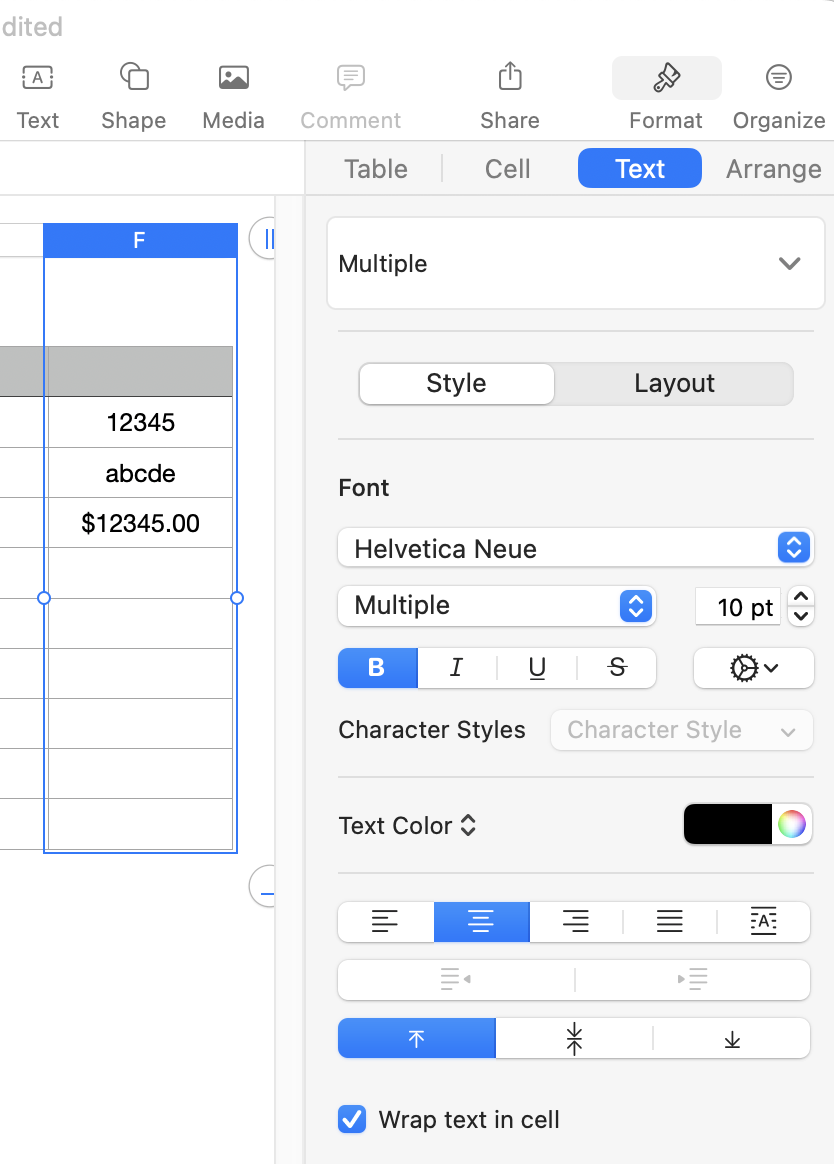
Click on the "A" button (Automatic) and observe the behaviour of the three values.


Data recognized as Numbers, including currency, will align to the right. Text values will align to the left.


Actions:

Change the Data Format in cells that have or will have these numbers to Currency.

If the sums stay at zero, the currency sign is not being recognized, and you'll need to remove it to get a sum.


Whether or not the colones is available in the list of recognized symbols likely depends on the region setting you've chosen. If it is available, you'll find it in a pop up list in the Currency page of the Format Inspector.


Regards,

Barry


4 replies
Question marked as Top-ranking reply

Apr 3, 2023 9:30 PM in response to stephaniecogs

Hi Stephanie,


What is the formula in G130?


Values in column G121 to G123 are centred in the cell.


What happens when you change the alignment to Automatic?


I suspect Numbers is not recognizing the "colones"symbol as a currency symbol, and is treating the column G values as Text, rather than a number representing an amount of currency.


"copy and pasted from my statements" could also be a factor.


All 'text' values have a numeric zero value when picked up by a formula, so the 'sum' in G130 is correct if the values in G121-G123 are all read as text.


Steps to take:

Select column G.

Click the Format brush,

Click Text.

In the alignment bar,

Check the current setting.

Click on the "A" button (Automatic) and observe the behaviour of the three values.


Data recognized as Numbers, including currency, will align to the right. Text values will align to the left.


Actions:

Change the Data Format in cells that have or will have these numbers to Currency.

If the sums stay at zero, the currency sign is not being recognized, and you'll need to remove it to get a sum.


Whether or not the colones is available in the list of recognized symbols likely depends on the region setting you've chosen. If it is available, you'll find it in a pop up list in the Currency page of the Format Inspector.


Regards,

Barry



Apr 4, 2023 8:01 AM in response to stephaniecogs

You may have two problems:


  1. If the symbol was copied and pasted from your statement into Numbers then Numbers thinks it is dealing with Text instead of Number or Currency. So you need to remove the symbol.
  2. You are using . as the thousands separator and , as the decimal separator. But I'm guessing your computer is set to a region that uses , as the thousands separator and . as the decimal separator.


If you correct both of those problems then I'm guessing Numbers will allow you to sum the range.


SG

This thread has been closed by the system or the community team. You may vote for any posts you find helpful, or search the Community for additional answers.

adding currency in a column

Welcome to Apple Support Community
A forum where Apple customers help each other with their products. Get started with your Apple Account.