I have already a purchases ringtone installed. How do I replace it with another? I have an iPhone XS

In Change the wallpaper on your iPhone - Apple Support

it's relatively easy to add new wallpapers for my Lock/Home Screen.

So far so good. However, my chosen wall papers don't last forever,

in fact only a day or two.

Howto secure that my choice will last permanently?

iPhone 14 Pro

Posted on Apr 5, 2023 9:43 AM

Reply
Question marked as Top-ranking reply

Posted on Apr 8, 2023 12:00 PM

Hi hagakyrkogata,


If we understand correctly, you need help changing ringtones and wallpaper on your iPhone XS.


We also see that you have already reviewed:

Use tones and ringtones with your iPhone or iPad - Apple Support

Change the wallpaper on your iPhone - Apple Support


What happen when you attempt to change the ringtone to something different? Let's verify the steps below:


"Change your ringtone

  1. Go to Settings > Sounds & Haptics.
  2. Under Sounds and Haptic Patterns, tap the sound that you want to change.
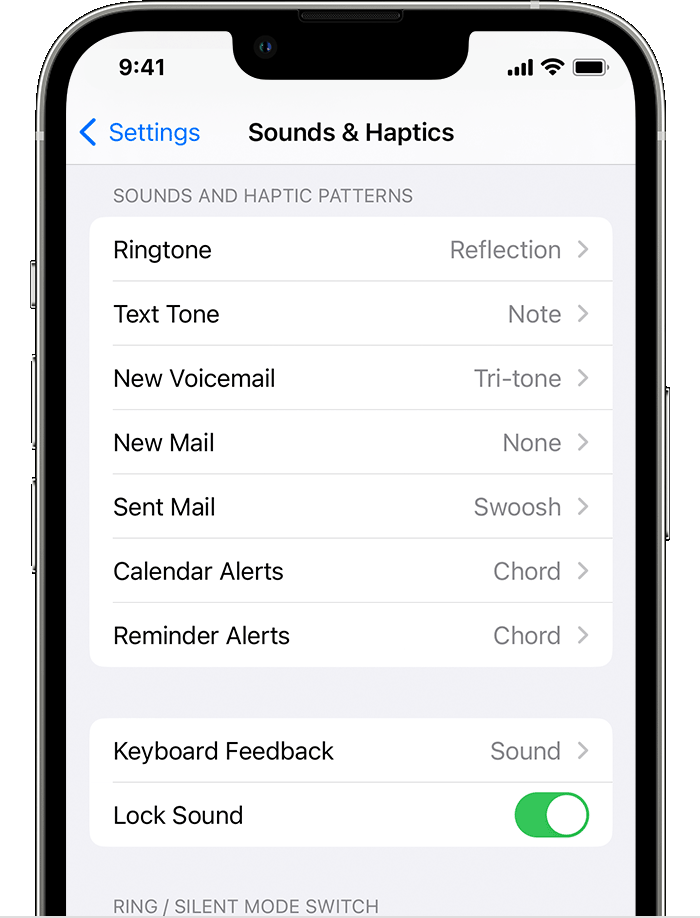
  3. Tap a ringtone or alert tone to hear it and set it as the new sound.

"


Regarding the wallpaper changing, we'd suggest checking to see if the Shuffle feature of Wallpaper settings is selected.


  1. "In the Settings app, tap Wallpaper.
  2. Tap Add New Wallpaper.
  3. Select Photo Shuffle from the top row of options.
  4. On the Photo Shuffle screen, set a frequency (On Tap, On Lock, Hourly, or Daily). Then choose a set of photos that will shuffle as you use your iPhone throughout the day.
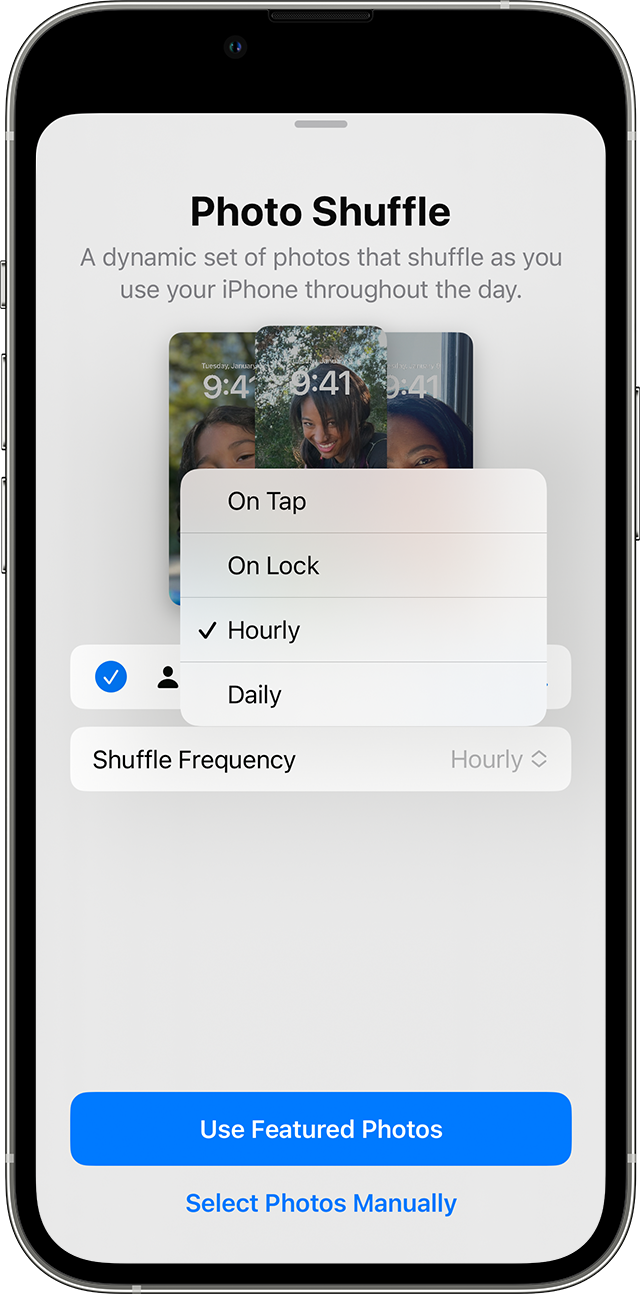
  5. The frequency options for Photo Shuffle when you set up multiple photos to rotate as your Lock Screen on iPhone.

  6. Tap Done.

"

Change the wallpaper on your iPhone - Apple Support


Hope this helps.


Cheers.


2 replies
Question marked as Top-ranking reply

Apr 8, 2023 12:00 PM in response to hagakyrkogata

Hi hagakyrkogata,


If we understand correctly, you need help changing ringtones and wallpaper on your iPhone XS.


We also see that you have already reviewed:

Use tones and ringtones with your iPhone or iPad - Apple Support

Change the wallpaper on your iPhone - Apple Support


What happen when you attempt to change the ringtone to something different? Let's verify the steps below:


"Change your ringtone

  1. Go to Settings > Sounds & Haptics.
  2. Under Sounds and Haptic Patterns, tap the sound that you want to change.

  3. Tap a ringtone or alert tone to hear it and set it as the new sound.

"


Regarding the wallpaper changing, we'd suggest checking to see if the Shuffle feature of Wallpaper settings is selected.


  1. "In the Settings app, tap Wallpaper.
  2. Tap Add New Wallpaper.
  3. Select Photo Shuffle from the top row of options.
  4. On the Photo Shuffle screen, set a frequency (On Tap, On Lock, Hourly, or Daily). Then choose a set of photos that will shuffle as you use your iPhone throughout the day.
  5. The frequency options for Photo Shuffle when you set up multiple photos to rotate as your Lock Screen on iPhone.

  6. Tap Done.

"

Change the wallpaper on your iPhone - Apple Support


Hope this helps.


Cheers.


This thread has been closed by the system or the community team. You may vote for any posts you find helpful, or search the Community for additional answers.

I have already a purchases ringtone installed. How do I replace it with another? I have an iPhone XS

Welcome to Apple Support Community
A forum where Apple customers help each other with their products. Get started with your Apple Account.