How to manage Spotify queue on iPod

When I tried looking up an answer to this all I found were people wanting to disable it. Sometimes I’ll be listening to a playlist and want to listen to a song not on it then return to said playlist, most of the time it asks me if I want to keep or clear the queue. Now sometimes I do want to clear it so I wouldn’t want to disable this notification. But most of the time I want to keep it. But it doesn’t always ask. When it doesn’t it will clear everything. So then I have to restart the whole playlist which means I’ll have to skip many songs since I already listened to them. What’s the deal?


ios 15.7.2


[Re-Titled by Moderator]

iPod

Posted on Apr 5, 2023 10:19 PM

Reply
15 replies

Nov 12, 2023 2:48 AM in response to RjbT3

Ok. I think I’ve found the solution myself. But it’s more of a workaround than a solution. The only way I have found to clear the play queue is to search/find a single song and play it. This clears the play queue. It is no good trying to play a song that sits within an Album or playlist because this simply adds every subsequent song to the play queue, obliterating what was already there. This is infuriating.


To preserve the play queue you simply have to use “play next” or “play last”. If you want to insert more than one song to “play next” in order (as in to play after the song you just set to “play next”), you can’t. You have to find a song that is not part of an Album/Playlist and play it first.


OR…


Select any song to “play last” and/or scroll to the end of the play queue and play the last song. This also, de facto clears the queue.


In summary, you can’t insert a bunch of songs, one by one, into the play queue. You have to select “play last” scroll all the way to it, select play and then resume adding songs to “play last” (or “play next”) to the cleared queue.


Cumbersome, infuriating and most un-Apple like, but there it is.


Apr 16, 2023 9:24 AM in response to Glamzar

Hello Glamzar,


We noticed that you've tried to restart your iPhone, have you made sure that it's up to date? If not, updating your device may resolve the issue, we recommend following the steps here: Update iOS on iPhone - Apple Support


These steps may help:

Update iPhone automatically
If you didn’t turn on automatic updates when you first set up your iPhone, do the following:
1. Go to Settings  > General > Software Update > Automatic Updates.
2. Turn on Download iOS Updates and Install iOS Updates.
When an update is available, iPhone downloads and installs the update overnight while charging and connected to Wi-Fi. You’re notified before an update is installed.


Thanks.

Aug 26, 2023 9:14 PM in response to Glamzar

Same happened to me. Everyone wants to disable it. I guess people prefer to listen like one song randomly and hated the prompt

message but it was very important to me as I like to organize my queue and use the play next and play last a lot and re arrange the songs. It was a great future that caters to my listening habits, instead of Spotify that is mostly singles/song or playlist oriented from

my experience. I like albums or playlists on the go (a feature all the way back to the click wheel iPod). I understand people wanting to disable it but now it’s gone altogether and it’s very frustrating. Now it doesn’t even appear randomly. Its seems is completely gone as a feature. It’s very frustrating.

Apr 8, 2023 4:40 PM in response to Glamzar

Hello Glamzar,


This page can help with detailing how to see and change what plays next: Add music to your queue to play next on your iPhone, iPad, iPod touch, or Android device - Apple Support


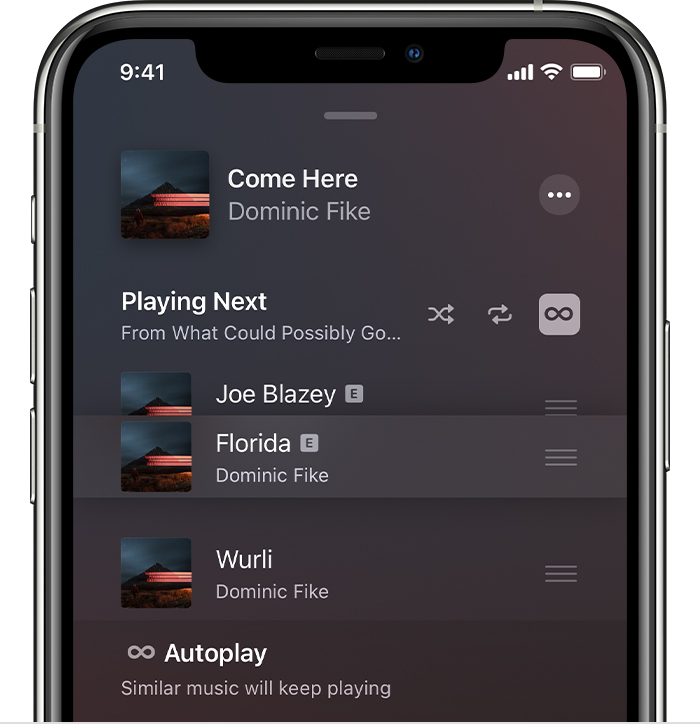
See and change what plays next
1. Tap the song that's playing at the bottom of your screen.
2. In the lower-right corner of your screen, tap Playing Next the Playing Next icon.
3. From here, you can see and edit your Playing Next and Autoplay queues.
* Reorder music: Drag the three lines the Reorder icon next to a song up or down.
* Remove a song: Swipe left over a song, then tap Remove.
iPhone showing music that's being rearranged on the Playing Next screen

If you play music that's not in your queue, you'll see an option to clear your music queue. If you choose Clear, then the music in your queue is replaced with the music you've selected to play.

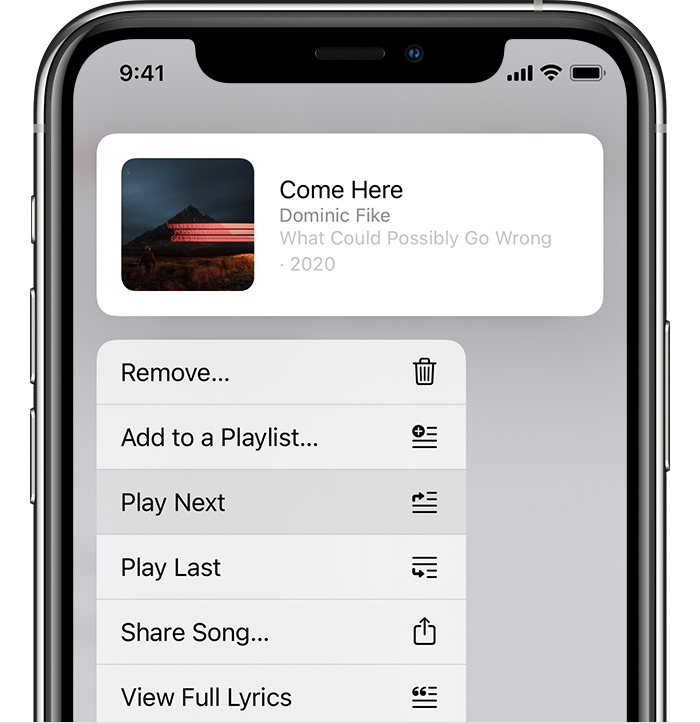
Choose what you want to play next
1. Open the Apple Music app and play music.
2. Find a song, album, or playlist that you want to play next.
3. When you find something, touch and hold it, then choose when you want it to play:
* To play your selection right after the song that’s playing, tap Play Next the Play Next icon.
* To move your selection to the bottom of your music queue, tap Play Last the Play Last icon.
iPhone showing a song selected to play next


Cheers.


Sep 1, 2023 5:58 PM in response to Glamzar

Spend 15-20 minutes digging through my music, just to tap the wrong song once and trash the entire playlist with no prompt or recovery. I don't know why they chose to delete an intuitive function like "hey, do you want erase 20 minutes of sifting through lists, or did you tap the wrong song because this is a flat screened iphone". For some reason people choosing to turn a function 'off' means the function should be just be removed.

Changing things for the sake of changing things, that function's been there for half a decade and had an off button, and an online directory that told us where that button was. But 4 months later and here we are, still making 1500 playlists for any kind of mood I might be in because some people don't care if their time is wasted because they were wasting their time anyways. Apple needed "something" to update, besides security, I guess they met their quota but the Design Team needed padding.

Sep 23, 2023 10:16 AM in response to Cdcoletrain

This is really infuriating and it’s not on all Apple Music ! I need a solution it’s just pointless adding to the queue when with one moments slip and it’s all gone. The fact I can’t turn a setting on or off is just ridiculous you pay for the phone not for apple to change the functionality for no reason ! Has anyone actually had a solution to this ? Keep or lose up next should be fully the user’s choice not just lose a whole playlist this is a touch screen phone it’s easily done !!

Sep 23, 2023 10:21 AM in response to ace1018

This means you are updating to the latest update of settings which doesn’t include the promt so that’s leading people to definitively lose it. Apple should specify the updated changes fully and allow people to decide if they want to lose a setting they may use regularly in order to enjoy the expensive Apple Music app. If it wasn’t included in my contract I’d have cancelled Apple Music.

Nov 26, 2023 4:13 PM in response to Glamzar

This is still driving me crazy. I use the play next, play last and organize my queue a lot. Like a playlist on the go (like original iPods had pressing the button aaaall the way back). And now just by pressing by mistake a song I lose all my queue? It’s crazy. drives me nuts.


But I just find people complaining about the pop up and this is the only post I found about someone wanting to keep it. It’s a perfectly logical pop-up or at least give me the option to disable it or not. I guess apple listened to the majority who just listens to random tracks or singles and took it out.


Dec 19, 2023 12:02 AM in response to Glamzar

I feel like I found my people. I’ve been so upset for months bout this change. But just a few minutes ago, I just got really ****** off. Like I’ve been queuing up songs as I’m journaling, then I click something by mistake and it just cleared everything that I’ve been working on. Like I don’t want to have to make a playlist, I now like to be intentional with my playlists. I wish they would bring the feature back and/or just give us an option to turn it on or off.

This thread has been closed by the system or the community team. You may vote for any posts you find helpful, or search the Community for additional answers.

How to manage Spotify queue on iPod

Welcome to Apple Support Community
A forum where Apple customers help each other with their products. Get started with your Apple Account.