Unassociated number with phone

I live in Germany and went back to the states to deal with something. While there, I used my American SIM card but removed it since returning. I am now getting an error message that my number is registered to my apple id but not associated withthe phone and will lose the ability to Facetime and imessage with this number. Ive tried turning off imessage, FaceTime, restarting my phone, and turning them off but it didn't work.


I did do an update last week to iOS 16.4 and that's when it started


Does anyone have a remedy to this problem?

iPhone 12 Pro, iOS 16

Posted on Apr 6, 2023 10:26 AM

Reply
Question marked as Top-ranking reply

Posted on Apr 9, 2023 5:41 PM

Hi Awwhitman1,


Thank you for using the Apple Support Communities! For this issue, you'll want to follow the steps below that can help:


Add or remove your phone number in Messages or FaceTime


If you can't see or select your number in Messages or FaceTime
1. Make sure that you're using the latest software for your Mac or iOS device
2. Make sure that you correctly followed the iPhone steps to set up your phone number. You should be using the same Apple ID on all of your devices.
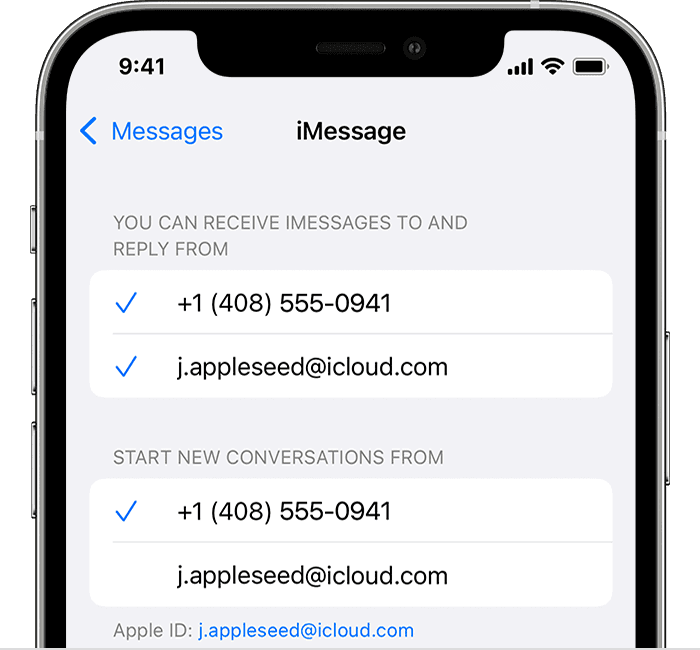
3. In the “You can be reached” section of Messages and FaceTime settings, make sure that there are checkmarks beside your phone number and Apple ID:
4. iPhone showing how to choose where you can be reached
If your phone number is unchecked and you can't select it, or you have some other issue, follow these steps:
1. On your Mac:
* In Messages, choose Messages > Settings, then click iMessage. Click Sign Out.
* In FaceTime, choose FaceTime > Settings, then click General. Click Sign Out.
4. On your iPhone, iPad, and iPod touch:
* Go to Settings > Messages > Send & Receive. Tap your Apple ID, then tap Sign Out.
* Go to Settings > FaceTime. Tap your Apple ID, then tap Sign Out.
7. On your iPhone:
* Go back to Settings > Messages and make sure that iMessage is turned on.
* Tap Send & Receive, then choose “Use your Apple ID for iMessage” and sign in with your Apple ID.
10. Using the same Apple ID, sign back in to Messages and FaceTime on your other devices. 
If you still need help, change your Apple ID password and repeat the setup steps. If that doesn't work, contact Apple Support.


Hope this helps!

Have a great day.


1 reply
Question marked as Top-ranking reply

Apr 9, 2023 5:41 PM in response to Awwhitman1

Hi Awwhitman1,


Thank you for using the Apple Support Communities! For this issue, you'll want to follow the steps below that can help:


Add or remove your phone number in Messages or FaceTime


If you can't see or select your number in Messages or FaceTime
1. Make sure that you're using the latest software for your Mac or iOS device
2. Make sure that you correctly followed the iPhone steps to set up your phone number. You should be using the same Apple ID on all of your devices.
3. In the “You can be reached” section of Messages and FaceTime settings, make sure that there are checkmarks beside your phone number and Apple ID:
4. iPhone showing how to choose where you can be reached
If your phone number is unchecked and you can't select it, or you have some other issue, follow these steps:
1. On your Mac:
* In Messages, choose Messages > Settings, then click iMessage. Click Sign Out.
* In FaceTime, choose FaceTime > Settings, then click General. Click Sign Out.
4. On your iPhone, iPad, and iPod touch:
* Go to Settings > Messages > Send & Receive. Tap your Apple ID, then tap Sign Out.
* Go to Settings > FaceTime. Tap your Apple ID, then tap Sign Out.
7. On your iPhone:
* Go back to Settings > Messages and make sure that iMessage is turned on.
* Tap Send & Receive, then choose “Use your Apple ID for iMessage” and sign in with your Apple ID.
10. Using the same Apple ID, sign back in to Messages and FaceTime on your other devices. 
If you still need help, change your Apple ID password and repeat the setup steps. If that doesn't work, contact Apple Support.


Hope this helps!

Have a great day.


This thread has been closed by the system or the community team. You may vote for any posts you find helpful, or search the Community for additional answers.

Unassociated number with phone

Welcome to Apple Support Community
A forum where Apple customers help each other with their products. Get started with your Apple Account.