Numbers summing across sheets

I have a budget of income and expenses with a different sheet for each month. There is also a sheet for the cumulative values. The sheets are identical. As I add a month I have to add those values to the cumulative values, manually. The formulae are going to get cumbersome by year's end. Is there a way to forsee the future sheets by using a predictable naming of the sheets, so that no change is needed to to the cumulative formulae as a new month is added. Would applescript be of use?


Posted on Apr 7, 2023 11:18 AM

Reply
Question marked as Top-ranking reply

Posted on Apr 7, 2023 9:10 PM

There is no single-cell formula to sum values across sheets. I am not sure what your specific situation is so I'll give two different, but similar, examples. The first is kind of a general method. The second I think is more what you are looking for.


The first method gathers data from different sheets into one table. With it gathered into one table you can more easily use it in other formulas.
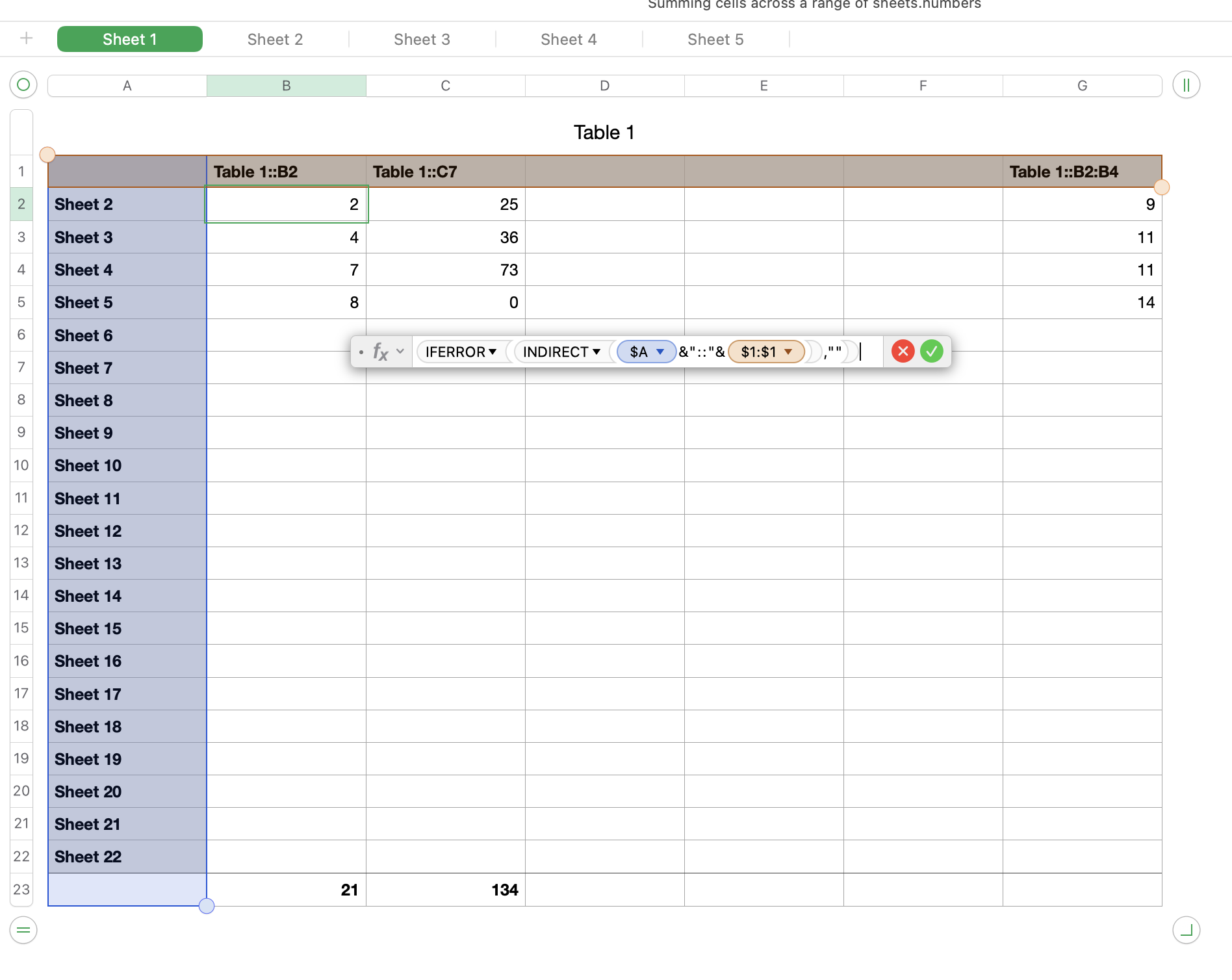


Column A is a list of sheet names. If you have a naming convention, you can pre-fill the names of sheets that do not yet exist. I only have 5 sheets total but column A goes to Sheet 22. As you add the new sheets to your document, they will get included in the table.


Row 1 gives the table name and cell address. This example allows you to pull data from more than one table on each sheet, though I only have one table on each sheet at this time. If you only have one table, you can incorporate the table name into the formula and then you'll only have to put the cell address in row 1.


The last row is a header row where I sum each column. You could use other functions, this was just an example.


Formula in cell B2 =IFERROR(INDIRECT($A2&"::"&B$1),"")

fill to the rest of the cells, other than the footer row.


Note that empty cells will come across as 0's. If that is a problem, the formula can be modified.


----


The second method is more tailored to your request, as I understand it:
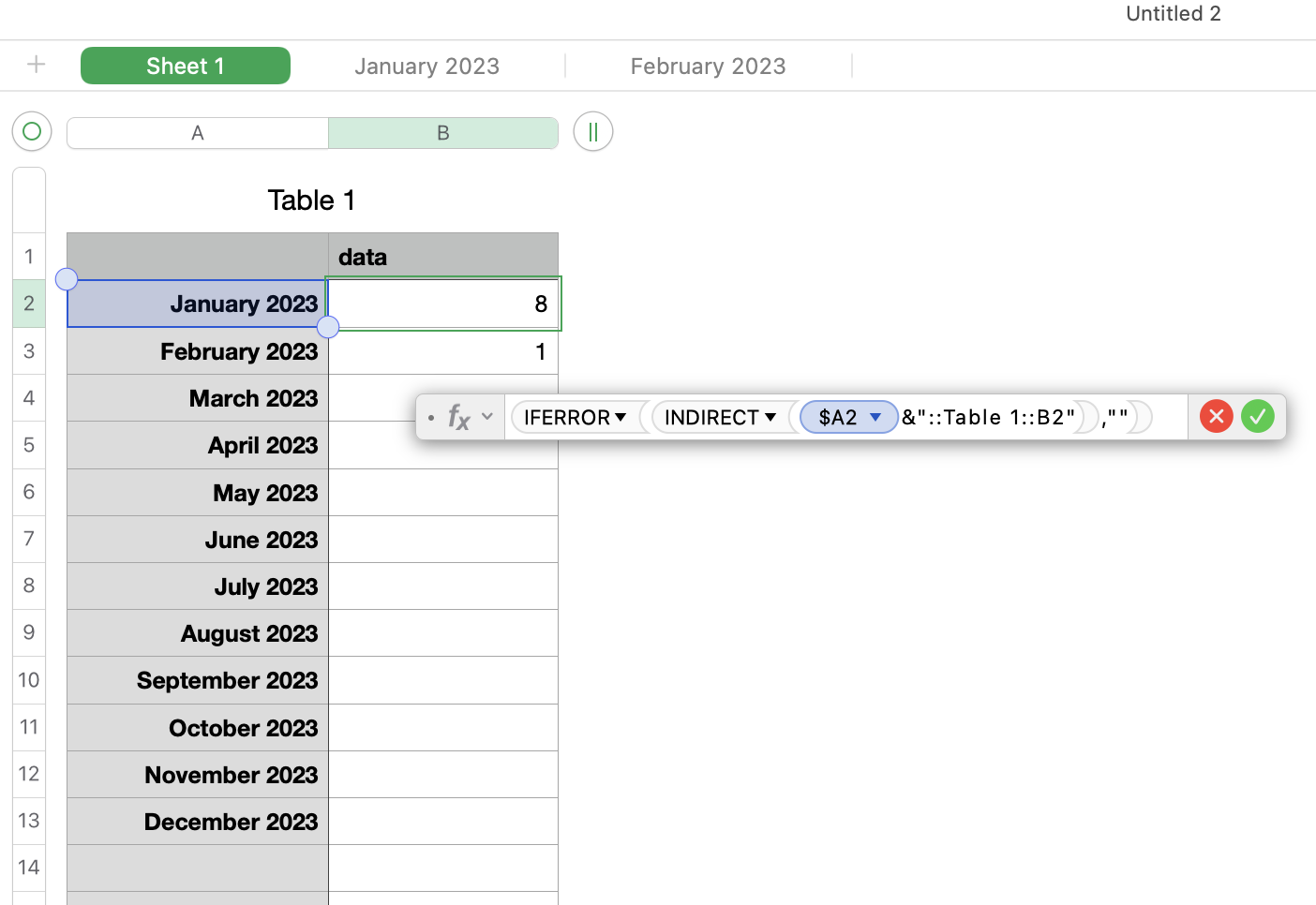


Column A is a list of months, which will be the same as the table names. You don't need to include the year (unless your sheet names have it like mine do). It would be best if this column was formatted as text.


B2 = IFERROR(INDIRECT($A2&"::Table 1::B2"),"")

fill down

(Table 1 is the table that is on the monthly sheets. If your table is named something different, use your table name instead)


5 replies
Question marked as Top-ranking reply

Apr 7, 2023 9:10 PM in response to PercyLaurie

There is no single-cell formula to sum values across sheets. I am not sure what your specific situation is so I'll give two different, but similar, examples. The first is kind of a general method. The second I think is more what you are looking for.


The first method gathers data from different sheets into one table. With it gathered into one table you can more easily use it in other formulas.


Column A is a list of sheet names. If you have a naming convention, you can pre-fill the names of sheets that do not yet exist. I only have 5 sheets total but column A goes to Sheet 22. As you add the new sheets to your document, they will get included in the table.


Row 1 gives the table name and cell address. This example allows you to pull data from more than one table on each sheet, though I only have one table on each sheet at this time. If you only have one table, you can incorporate the table name into the formula and then you'll only have to put the cell address in row 1.


The last row is a header row where I sum each column. You could use other functions, this was just an example.


Formula in cell B2 =IFERROR(INDIRECT($A2&"::"&B$1),"")

fill to the rest of the cells, other than the footer row.


Note that empty cells will come across as 0's. If that is a problem, the formula can be modified.


----


The second method is more tailored to your request, as I understand it:


Column A is a list of months, which will be the same as the table names. You don't need to include the year (unless your sheet names have it like mine do). It would be best if this column was formatted as text.


B2 = IFERROR(INDIRECT($A2&"::Table 1::B2"),"")

fill down

(Table 1 is the table that is on the monthly sheets. If your table is named something different, use your table name instead)

Apr 20, 2023 6:51 AM in response to PercyLaurie

Same principal. Keep like data together rather than scattering it across different tables. Use filters, categories, Pivot Tables as well as SUMIFS and other functions to extract summaries. You will find that a LOT easier than trying to consolidate data you have scattered in different places.


BTW, Pop-Up Menu is not needed for that general approach. It's just a handy feature to simplify some data entry.


SG

Apr 18, 2023 11:02 PM in response to Badunit

Thank you for your suggestions Badunit. There are a number of new ideas which I will look into. In the meantime I will adopt the expedient of splitting the year into two spreadsheets, January to June and July to December. I will copy the cumulative sheet data from January to June across to the first sheet of July to December. A bonus of this approach is the reduction of a cumbersome 25 sheets in one spreadsheet to 13 in the first half year and 14 in the second half year. (Bring on Hide/Unhide!)

Apr 20, 2023 1:16 AM in response to SGIII

Thank you SGIII for your suggestion. At this stage of the year I think I'll stick with my current approach and split it into half years. If I duplicate the first half-year, rename the tabs, clear the data but leave the formulae and do a little tinkering I think it's a goer. I had not used categories-using pop-up-menus- but may investigate that for next year. My situation is a little more complicated than the one you proposed. It is not actually a budget per se but a record of income and expenditure. It is for 2 people. Income comes from a variety of sources at different times. Expenditure is recorded for the individual and for a "common" account with a balancing out of "common" expenditure maintained.

This thread has been closed by the system or the community team. You may vote for any posts you find helpful, or search the Community for additional answers.

Numbers summing across sheets

Welcome to Apple Support Community
A forum where Apple customers help each other with their products. Get started with your Apple Account.