Hi Ymichael26,
Take a moment to restart your Mac from the Apple menu > Restart. After doing so, does the issue persist? If it does, try the steps below to reset the system management controller on your Mac.
"Laptop computer with the T2 chip
Before resetting the SMC, follow these steps:
- Shut down your Mac, if possible.
- Press and hold the power button for 10 seconds, then release the button.
- Every Mac has a power button. On laptop computers that have Touch ID, press and hold Touch ID.
- Wait a few seconds, then press the power button to turn on your Mac.
If the issue persists, reset the SMC:
- Shut down your Mac.
- On your built-in keyboard, press and hold all of the following keys. Your Mac might turn on.
- Control
 on the left side of your keyboard
 - Option (Alt)
 on the left side of your keyboard
 - Shift
 on the right side of your keyboard
- Keep holding all three keys for 7 seconds, then press and hold the power button as well. If your Mac is on, it will turn off as you hold the keys.
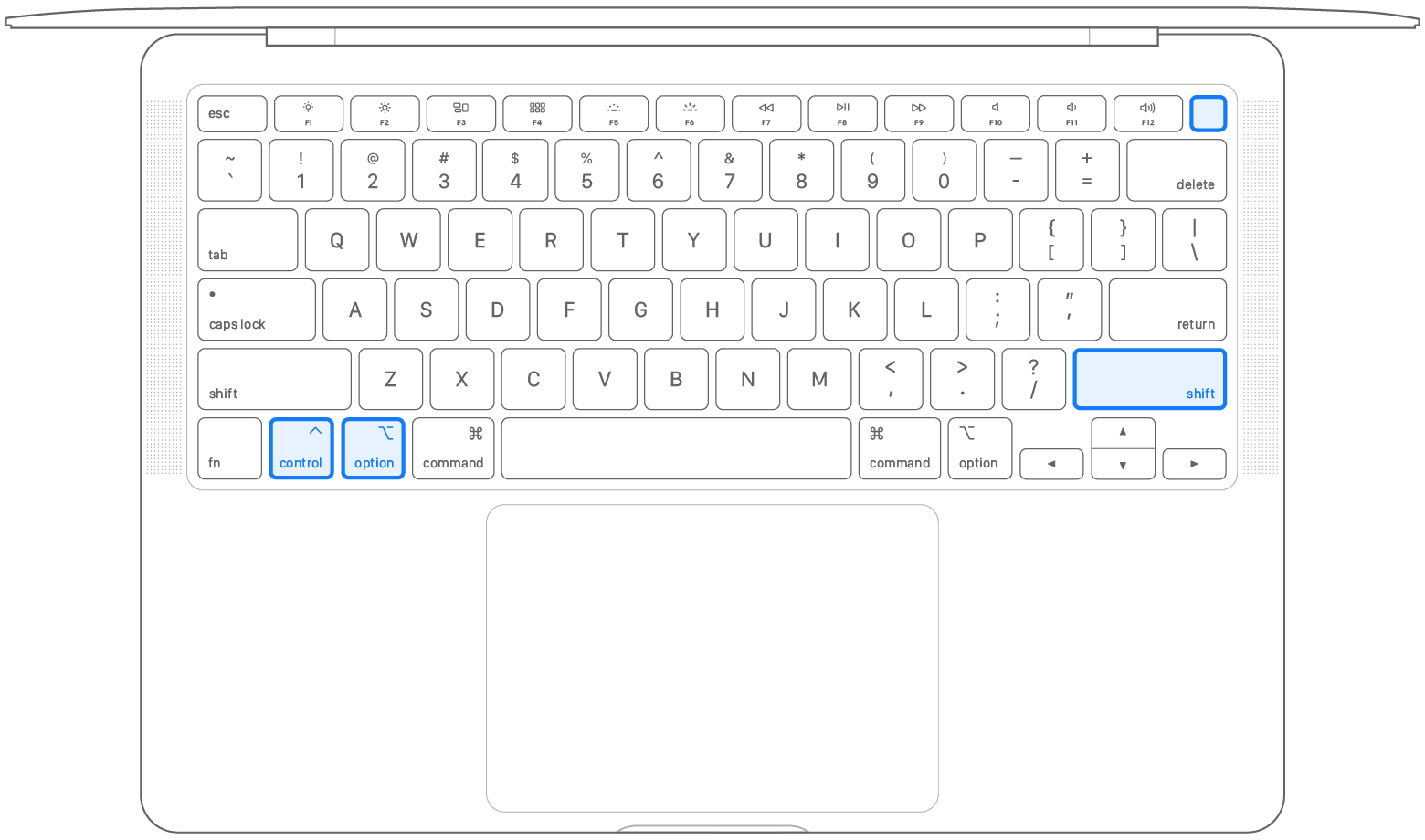
- Keep holding all four keys for another 7 seconds, then release them.
- Wait a few seconds, then press the power button to turn on your Mac.
If you need help, contact Apple Support. "
If the scrubbing feature still doesn't work properly, we'd advise contacting Apple Support for additional assistance.
Cheers!


