
restore items from time machine backup

hi, I have the last software-ventura on my mac and I am trying to restore some photos from my time machine backup. the explanation what is it the article: Restore items backed up with Time Machine on Mac

is apsolutely on the level that I cannot understand. can someone please explain this more specificly? thank you


On your Mac, open a window for the item you want to restore.

For example, to recover a file you accidentally deleted from your Documents folder, open the Documents folder.

If you’re missing an item from the desktop, you don’t need to open a window.

Use Launchpad to view and open apps on Mac and open Time Machine (in the Other folder). A message may appear while your Mac connects to the backup disk.

Use the arrows and timeline to browse the local snapshots and backups.
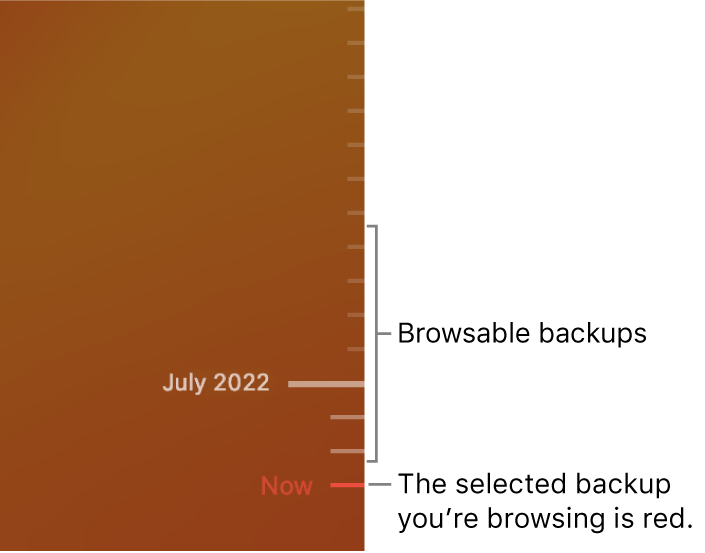
If you see a pulsing light to semi-dark grey tick mark, it represents a backup that’s still loading or validating on the backup disk.

Select one or more items you want to restore (these can include folders or your entire disk), then click Restore.

Restored items return to their original location. For example, if an item was in the Documents folder, it’s returned to the Documents folder.


MacBook Air 13″, macOS 13.3

Posted on Apr 8, 2023 9:40 AM

Reply
Question marked as Top-ranking reply

Posted on Apr 10, 2023 2:08 PM

Hello zElenac,


Thanks for choosing the Apple Support Communities. We'd be happy to help explain how to restore items from a Time Machine backup. Try following this list of steps, they may help resolve the issue and help you restore the photos you were looking for.


  1. Click on Time Machine in your top menu bar
  2. Click "Browse Time Machine Backups
  3. This will open a timeline, on the right you can scroll to the date in which you know the photo existed on your Mac. Click on that date.
  4. Time Machine will then scroll to that date and give you a Finder window with all of the files from that date. This includes all of your folders and the folder you had the photo or photos stored.
  5. Locate the item you want to restore, click on it, and below you will see "Restore". Click on restore and it will be restored to your current date and time in the folder it was originally in.


More info on restoring items from Time Machine can be found here: Restore items backed up with Time Machine on Mac - Apple Support


We hope this helps.


Cheers!


Similar questions

1 reply
Question marked as Top-ranking reply

Apr 10, 2023 2:08 PM in response to zElenac

Hello zElenac,


Thanks for choosing the Apple Support Communities. We'd be happy to help explain how to restore items from a Time Machine backup. Try following this list of steps, they may help resolve the issue and help you restore the photos you were looking for.


  1. Click on Time Machine in your top menu bar
  2. Click "Browse Time Machine Backups
  3. This will open a timeline, on the right you can scroll to the date in which you know the photo existed on your Mac. Click on that date.
  4. Time Machine will then scroll to that date and give you a Finder window with all of the files from that date. This includes all of your folders and the folder you had the photo or photos stored.
  5. Locate the item you want to restore, click on it, and below you will see "Restore". Click on restore and it will be restored to your current date and time in the folder it was originally in.


More info on restoring items from Time Machine can be found here: Restore items backed up with Time Machine on Mac - Apple Support


We hope this helps.


Cheers!


This thread has been closed by the system or the community team. You may vote for any posts you find helpful, or search the Community for additional answers.

restore items from time machine backup

Welcome to Apple Support Community
A forum where Apple customers help each other with their products. Get started with your Apple Account.