Lost Photos on Icloud Sync

Last year I uploaded and deleted many pictures from my phone to my laptop. I later synced iCloud and now I went to look for the photos that I removed from my phone and they are gone. Is there anything I can do to get them back!?!


Posted on Apr 12, 2023 1:11 PM

Reply
Question marked as Top-ranking reply

Posted on Apr 14, 2023 2:09 PM

Hi lstopak,


If you're using iCloud Photos on your devices, this may be expected behavior. iCloud Photos syncs your photos across all of your devices, so deleting them from one device deletes them from all, very similar to email.


That said, if you've accidentally deleted some photos you didn't mean to, it is possible they may still be in the Recently Deleted folder:


"Check your Recently Deleted album

If you accidentally deleted your photo or video, it goes to the Recently Deleted album. Go to Photos > Albums, and tap Recently Deleted in the Utilities section.


On your iPhone or iPad

  1. In iOS 16, iPadOS 16.1, or later, use Face ID or Touch ID to unlock your Recently Deleted album.
  2. Tap a photo or video, then tap Recover. To recover multiple photos, tap Select, select your photos or videos, then tap Recover.
  3. Confirm that you want to recover the photos or videos.
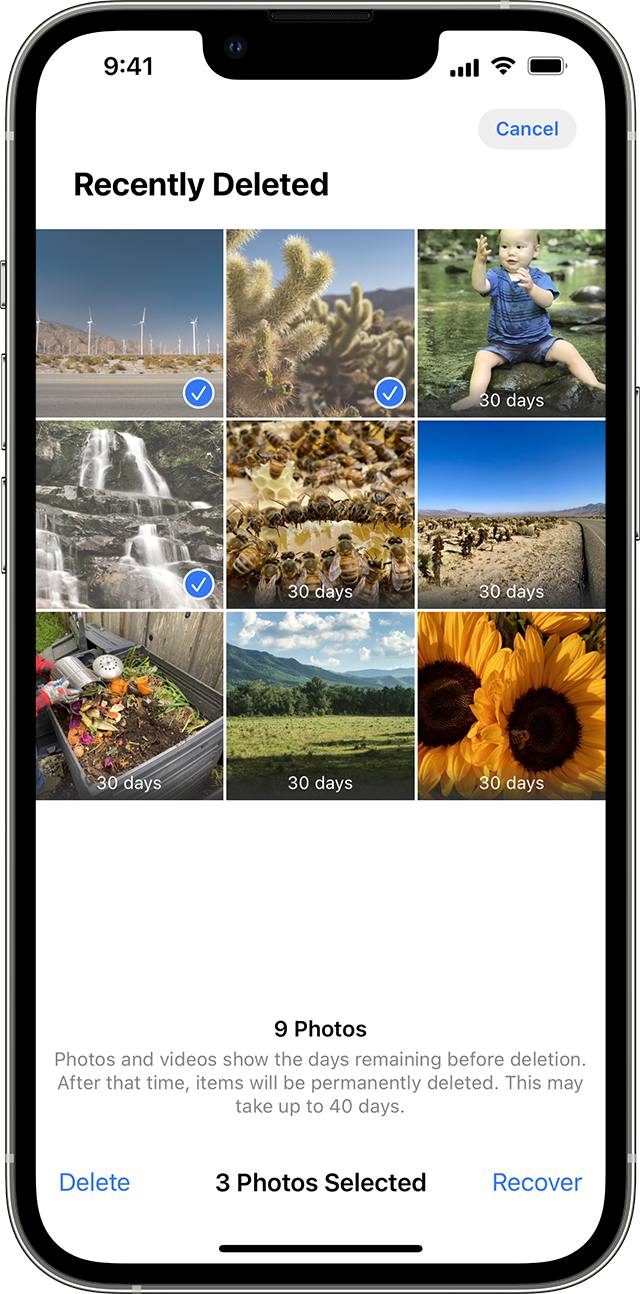
The Recently Deleted album in Photos on iPhone 

On your Mac

  1. In macOS Ventura or later, use Touch ID or your login password to unlock your Recently Deleted album.
  2. Click the photo or video.
  3. Click Recover.

Anything in your Recently Deleted album stays there for 30 days. After 30 days, it's permanently deleted and you can't get it back."


If they are not there, contact Apple Support directly for assistance. In some limited cases they may be able to recover deleted photos from iCloud.


Take care.


1 reply
Question marked as Top-ranking reply

Apr 14, 2023 2:09 PM in response to lstopak

Hi lstopak,


If you're using iCloud Photos on your devices, this may be expected behavior. iCloud Photos syncs your photos across all of your devices, so deleting them from one device deletes them from all, very similar to email.


That said, if you've accidentally deleted some photos you didn't mean to, it is possible they may still be in the Recently Deleted folder:


"Check your Recently Deleted album

If you accidentally deleted your photo or video, it goes to the Recently Deleted album. Go to Photos > Albums, and tap Recently Deleted in the Utilities section.


On your iPhone or iPad

  1. In iOS 16, iPadOS 16.1, or later, use Face ID or Touch ID to unlock your Recently Deleted album.
  2. Tap a photo or video, then tap Recover. To recover multiple photos, tap Select, select your photos or videos, then tap Recover.
  3. Confirm that you want to recover the photos or videos.

The Recently Deleted album in Photos on iPhone 

On your Mac

  1. In macOS Ventura or later, use Touch ID or your login password to unlock your Recently Deleted album.
  2. Click the photo or video.
  3. Click Recover.

Anything in your Recently Deleted album stays there for 30 days. After 30 days, it's permanently deleted and you can't get it back."


If they are not there, contact Apple Support directly for assistance. In some limited cases they may be able to recover deleted photos from iCloud.


Take care.


This thread has been closed by the system or the community team. You may vote for any posts you find helpful, or search the Community for additional answers.

Lost Photos on Icloud Sync

Welcome to Apple Support Community
A forum where Apple customers help each other with their products. Get started with your Apple Account.