No text sound after software update

Since the latest software update, i am not getting sound notification on my texts or fb messenger when my phone is locked. I don’t have my phone on silent or DND, all my settings are on and set with tones (not default etc). I have restarted my phone. I don’t have a smartwatch. I don’t want a banner preview of text showing when phone is on lock, i simply want the text tone back working when my phone is locked. Every time there is a software update there seems to be an issue with something. Very frustrating. Thank you

iPhone 11, iOS 16

Posted on Apr 13, 2023 4:00 PM

Reply
Question marked as Top-ranking reply

Posted on Apr 14, 2023 1:51 AM

Have you enabled Scheduled Summary?


Settings > Notifications > [Select the App that you are having trouble receiving immediate notifications]


See the pic below for a few examples. Please select immediate delivery.
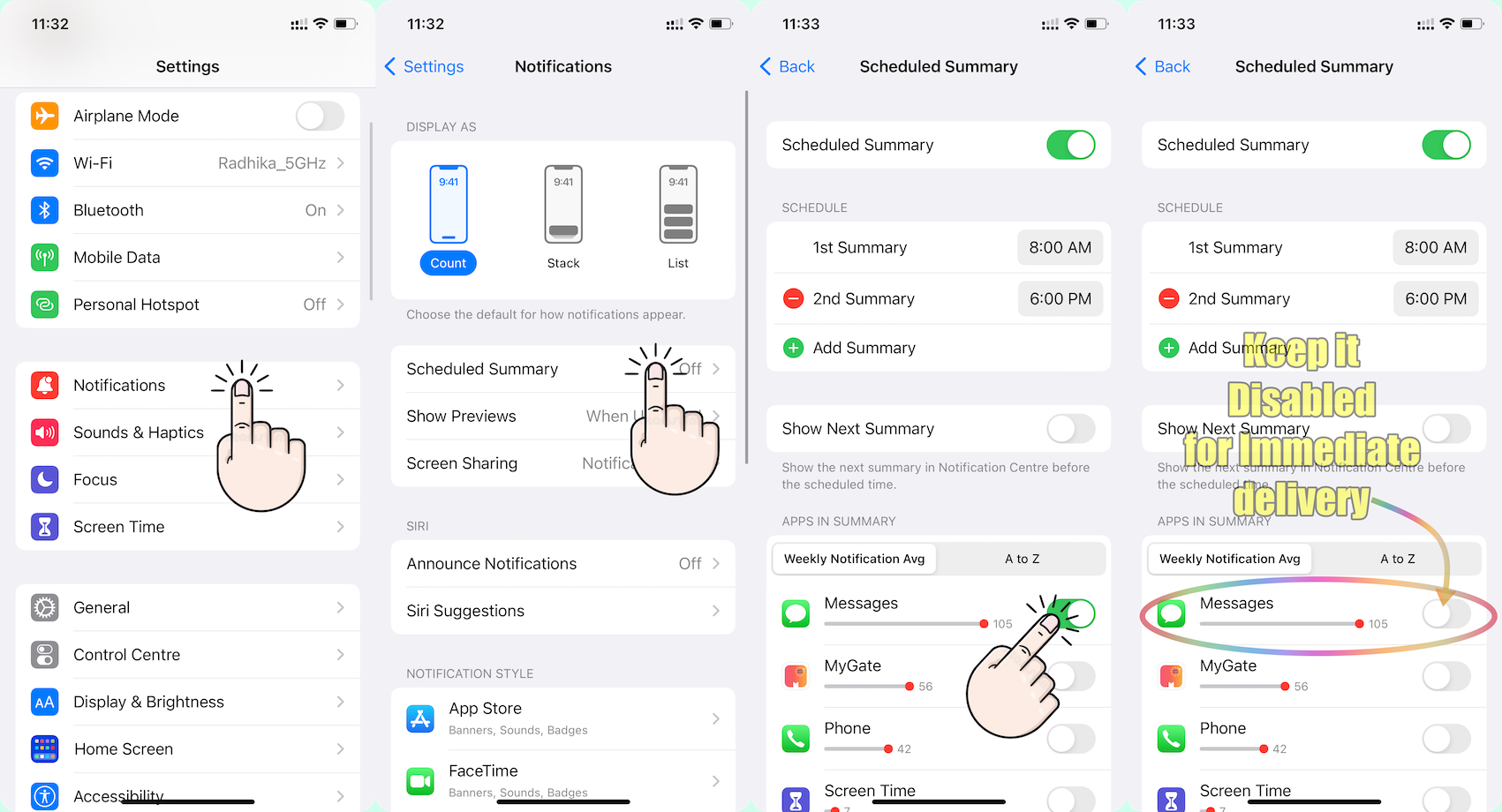


Go to Settings and tap Notifications. Select an app under Notification Style. Under Alerts, choose the alert style that you want. If you turn on Allow Notifications, choose when you want the notifications delivered — immediately or in the scheduled notification summary.


Use notifications on your iPhone, iPad, and iPod touch


Change notification settings on iPhone

  1. Go to Settings > Notifications.
  2. To schedule a notifications summary, tap Scheduled Summary, then turn on Scheduled Summary. ... 
  3. To choose when you want most notification previews to appear, tap Show Previews, select an option—Always, When Unlocked, or Never—then tap.

More items...


Change notification settings on iPhone - Apple Support (IN)


You can allow access to Notification Center on the Lock Screen. Go to Settings > Face ID & Passcode (on an iPhone with Face ID) or Touch ID & Passcode (on other iPhone models). Enter your passcode. Scroll down and turn on Notification Center (below Allow Access When Locked).


View and respond to notifications on iPhone - Apple Support (IN)


1 reply
Question marked as Top-ranking reply

Apr 14, 2023 1:51 AM in response to Kourtneylees

Have you enabled Scheduled Summary?


Settings > Notifications > [Select the App that you are having trouble receiving immediate notifications]


See the pic below for a few examples. Please select immediate delivery.



Go to Settings and tap Notifications. Select an app under Notification Style. Under Alerts, choose the alert style that you want. If you turn on Allow Notifications, choose when you want the notifications delivered — immediately or in the scheduled notification summary.


Use notifications on your iPhone, iPad, and iPod touch


Change notification settings on iPhone

  1. Go to Settings > Notifications.
  2. To schedule a notifications summary, tap Scheduled Summary, then turn on Scheduled Summary. ... 
  3. To choose when you want most notification previews to appear, tap Show Previews, select an option—Always, When Unlocked, or Never—then tap.

More items...


Change notification settings on iPhone - Apple Support (IN)


You can allow access to Notification Center on the Lock Screen. Go to Settings > Face ID & Passcode (on an iPhone with Face ID) or Touch ID & Passcode (on other iPhone models). Enter your passcode. Scroll down and turn on Notification Center (below Allow Access When Locked).


View and respond to notifications on iPhone - Apple Support (IN)


This thread has been closed by the system or the community team. You may vote for any posts you find helpful, or search the Community for additional answers.

No text sound after software update

Welcome to Apple Support Community
A forum where Apple customers help each other with their products. Get started with your Apple Account.
