Hey korinthias,
We'd recommend reviewing this article as it provides steps to help resolve HomePod issues: If HomePod or HomePod mini isn't responding - Apple Support
"Check your Wi-Fi connection
HomePod and HomePod mini automatically connect to the same Wi-Fi network as your iPhone or iPad. To check your Wi-Fi signal strength:
- Open the Home app on your iPhone, iPad, or Mac.
- Tap or click HomePod.
- Scroll down, or tap or click the Settings icon
 and scroll down to Wi-Fi Network. The Wi-Fi signal strength indicator
  appears next to your network name.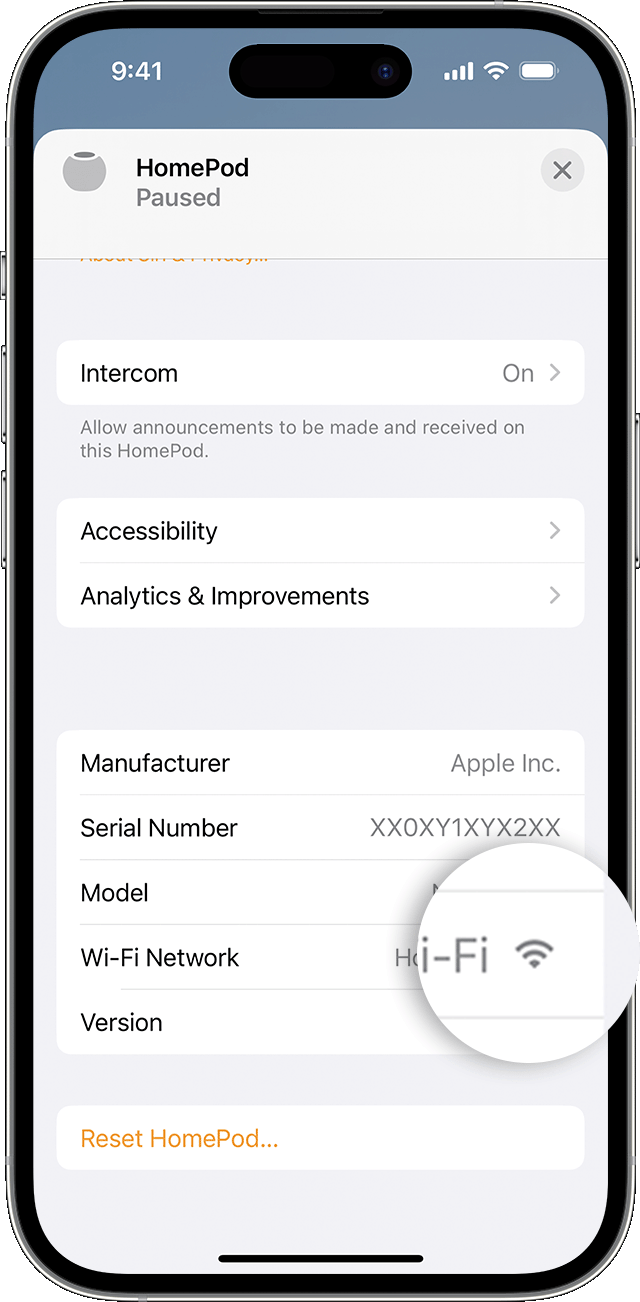
If the signal strength indicator shows two bars or fewer  , your Wi-Fi signal strength is weak. Try moving your HomePod speaker closer to your router and remove potential sources of wireless interference.
If the signal strength indicator shows an exclamation point  , learn what to do.
Learn what to do if Siri on your HomePod says it can't connect to the internet

HomePod and HomePod mini support captive portal Wi-Fi networks that require additional sign-in steps, for example, those provided by hotels or dorms. Use your iPhone or iPad to connect to the network, then follow the onscreen instructions for setup.
The Wi-Fi signal strength indicator isn't supported on HomePod speakers connected to networks that block peer-to-peer traffic, like some captive networks.

Restart HomePod or HomePod mini
- Open the Home app on your iPhone, iPad, or Mac that's signed in with the Apple ID that you used to set up HomePod.
- Tap or click HomePod.
- Scroll down, or tap or click the Settings icon and scroll down.
- If you have two HomePod speakers set up as a stereo pair, select Restart HomePod. If your HomePod speaker is not set up as a stereo pair, select Reset HomePod, then select Restart HomePod.
If you don't see an option to restart your HomePod, unplug it from power, then plug it back in and try again.
If HomePod still doesn't respond, reset it.
If HomePod or HomePod mini still isn't responding
If you still have issues using HomePod, contact Apple Support."
Thanks!


