
airpod charging
why is my left airpod not charging?
why is my left airpod not charging?
Hello mcotera,
Thanks for choosing the Apple Support Communities. If your left or right AirPod is not charging or working, we suggest following these steps to resolve the issue.
If your left or right AirPod isn't working - Apple Support
If issues persist, try resetting your AirPods then test again. Here is how: How to reset your AirPods and AirPods Pro - Apple Support
"You might need to reset your AirPods if they won't charge, or to fix a different issue.
 next to your AirPods, tap Forget This Device, then tap again to confirm.
5. Put your AirPods in their charging case, and keep the lid open.
6. Press and hold the setup button on the back of the case for about 15 seconds, until the status light on the front of the case flashes amber, then white.*
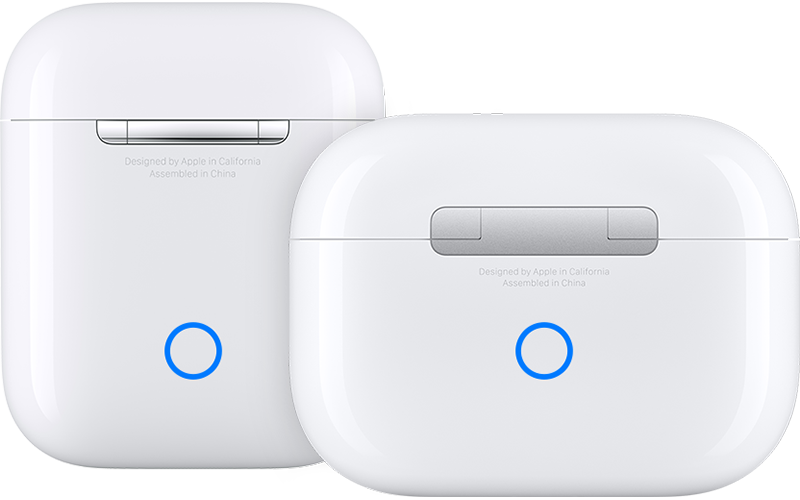
7. Reconnect your AirPods: With your AirPods in their charging case and the lid open, place your AirPods close to your iPhone or iPad. Follow the steps on your device's screen.
AirPods can be associated with one Apple ID. If you want to use AirPods (3rd generation) or AirPods Pro (1st or 2nd generation) that someone else has used, they first need to remove the AirPods from their Apple ID."
We hope this helps.
Cheers!
Hello mcotera,
Thanks for choosing the Apple Support Communities. If your left or right AirPod is not charging or working, we suggest following these steps to resolve the issue.
If your left or right AirPod isn't working - Apple Support
If issues persist, try resetting your AirPods then test again. Here is how: How to reset your AirPods and AirPods Pro - Apple Support
"You might need to reset your AirPods if they won't charge, or to fix a different issue.
next to your AirPods, tap Forget This Device, then tap again to confirm.5. Put your AirPods in their charging case, and keep the lid open.
6. Press and hold the setup button on the back of the case for about 15 seconds, until the status light on the front of the case flashes amber, then white.*
7. Reconnect your AirPods: With your AirPods in their charging case and the lid open, place your AirPods close to your iPhone or iPad. Follow the steps on your device's screen.
AirPods can be associated with one Apple ID. If you want to use AirPods (3rd generation) or AirPods Pro (1st or 2nd generation) that someone else has used, they first need to remove the AirPods from their Apple ID."
We hope this helps.
Cheers!
airpod charging

