one beats studio Bud earbud not playing?
one beats studio Bud earbud not playing? how to fix this?
one beats studio Bud earbud not playing? how to fix this?
Greetings Boxstersgirl,
It sounds like one of your Beats Studio Buds is not working. We know how important having a working pair of earbuds is for you, and we will help get you to the right place to find a resolution. Have you tried to reset your buds? This simple step can resolve issues like this.
Reset your Beats Studio Buds
If you have sound, Bluetooth, or charging issues with your earphones, you might want to reset them.
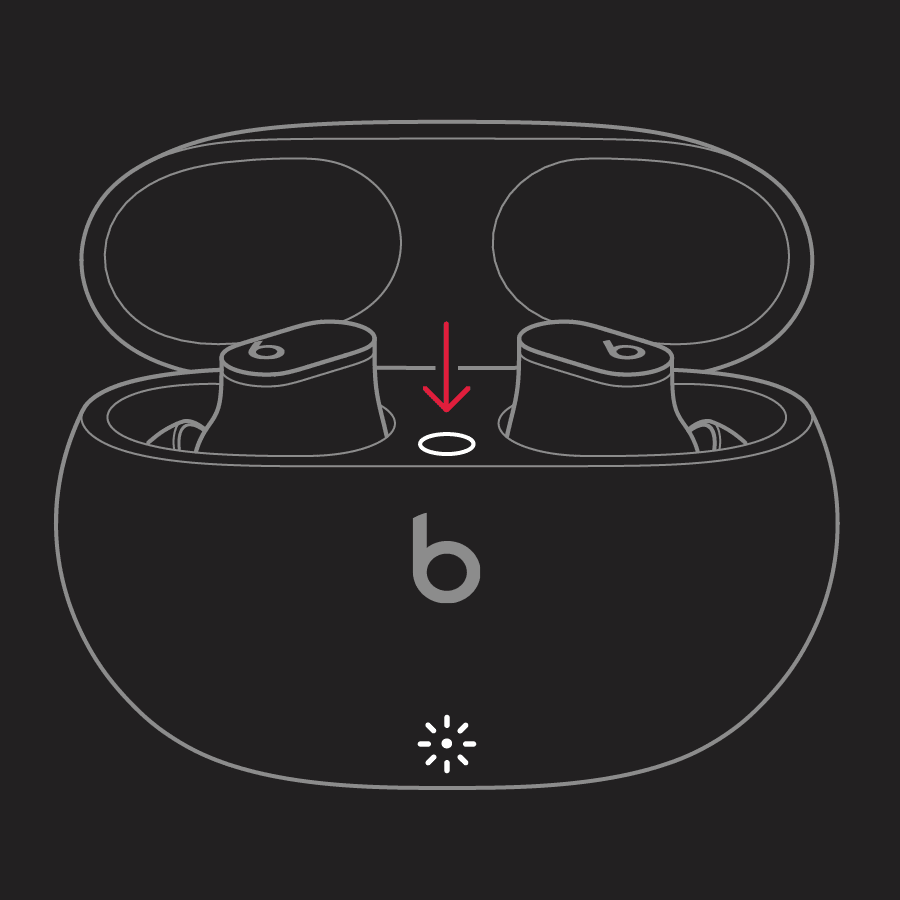
1. Place both earbuds in the charging case. Leave the case open.
2. Press and hold the system button on the case for 15 seconds or until the LED indicator light flashes red and white.
3. Release the system button.
The LED indicator light will continue to flash white, which means that you can pair your Beats Studio Buds with your iPhone, Mac, Android device, or other device again.
This info is located in this support article:
• Reset your Beats Studio Buds - Apple Support
If you still need help, then please check out this support article too:
• If you can't connect to your wireless Beats product - Apple Support
Cheers!
Greetings Boxstersgirl,
It sounds like one of your Beats Studio Buds is not working. We know how important having a working pair of earbuds is for you, and we will help get you to the right place to find a resolution. Have you tried to reset your buds? This simple step can resolve issues like this.
Reset your Beats Studio Buds
If you have sound, Bluetooth, or charging issues with your earphones, you might want to reset them.
1. Place both earbuds in the charging case. Leave the case open.
2. Press and hold the system button on the case for 15 seconds or until the LED indicator light flashes red and white.
3. Release the system button.
The LED indicator light will continue to flash white, which means that you can pair your Beats Studio Buds with your iPhone, Mac, Android device, or other device again.
This info is located in this support article:
• Reset your Beats Studio Buds - Apple Support
If you still need help, then please check out this support article too:
• If you can't connect to your wireless Beats product - Apple Support
Cheers!
one beats studio Bud earbud not playing?