Photos Library

Hi, I'm using Photos for quite a long time and I transfered the i-photos library to photos library few years ago.

I'm using an external hard disk and yesterday I tried to make it as system's library and since then (almost 24 hours) it's trying to open the file...

Is there a way to open the library again?

I have a M1 MacBook Air 16 GB with macOS Ventura 13.2.1

Thank you in advance


MacBook Air 13″, macOS 10.15

Posted on Apr 18, 2023 1:22 AM

Reply
Question marked as Top-ranking reply

Posted on Apr 18, 2023 2:32 AM

Have you checked, if your external volume is suitable for a Photos Library? YOur external drive should be prepared as described here:

Move your Photos library to save space on your Mac - Apple Support


Most important:

  • The file system format needs to be MacOS Extended (Journaled) or APFS (for an SSD drive) - "formatted for Mac" does not suffice for libraries, only for single files.
  • The external volume must not have been used for Time Machine backups or have any third-prty backup software installed
  • The drive needs to have a wired connection and not been accessed over the local network. Don't even think about putting the library on a NAS.
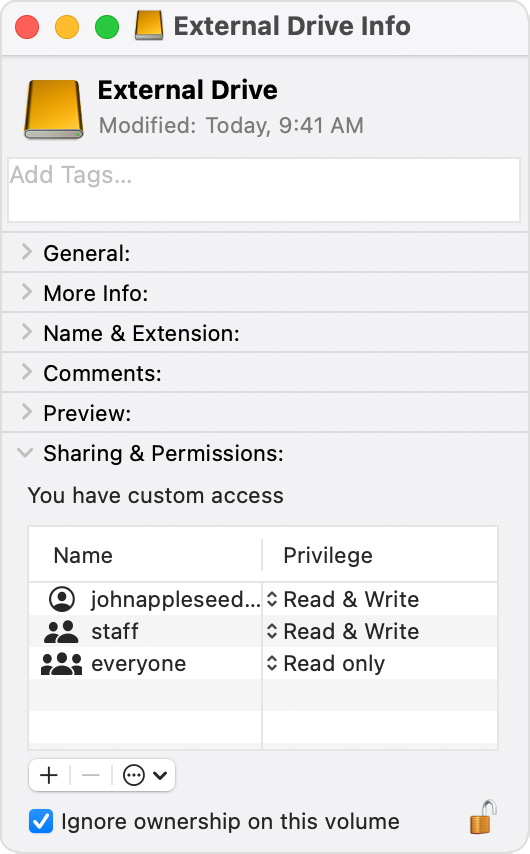
  • If you cannot enable the "Ignore ownership on this volume", your external drive is not compatible.


6 replies
Question marked as Top-ranking reply

Apr 18, 2023 2:32 AM in response to Jojje-GR

Have you checked, if your external volume is suitable for a Photos Library? YOur external drive should be prepared as described here:

Move your Photos library to save space on your Mac - Apple Support


Most important:

  • The file system format needs to be MacOS Extended (Journaled) or APFS (for an SSD drive) - "formatted for Mac" does not suffice for libraries, only for single files.
  • The external volume must not have been used for Time Machine backups or have any third-prty backup software installed
  • The drive needs to have a wired connection and not been accessed over the local network. Don't even think about putting the library on a NAS.
  • If you cannot enable the "Ignore ownership on this volume", your external drive is not compatible.


Apr 18, 2023 3:14 AM in response to Jojje-GR

Have you checked it? Previous system versions may not have been giving an error message, if the file system format has not been supported. macOS Ventura is more critical will no longer open a library on a volume, where the library could get damaged.

Is the file system format of the volume APFS, not case-sensitive?

Can you set the "Ignore ownership on this volume"flag in the Info for the volume?


This thread has been closed by the system or the community team. You may vote for any posts you find helpful, or search the Community for additional answers.

Photos Library

Welcome to Apple Support Community
A forum where Apple customers help each other with their products. Get started with your Apple Account.