
How can I exit the Migration Assist? I didn't click continue.
I wanted to see what Migration assist was. I had no intention of using it. I only have the continue button. The back button is light grey and won't work.
MacBook Air 13″, macOS 12.6
I wanted to see what Migration assist was. I had no intention of using it. I only have the continue button. The back button is light grey and won't work.
MacBook Air 13″, macOS 12.6
Hi Harlow1972,
For help with canceling Migration Assistant test force quitting the app using the steps below found in the article here: How to force an app to quit on your Mac - Apple Support
"Force an app to quit
Press these three keys together: Option (or Alt), Command, Esc (Escape).1 Or choose Force Quit from the Apple menu in the corner of your screen.

A Force Quit window opens. Select the app that you want to quit, then click Force Quit:
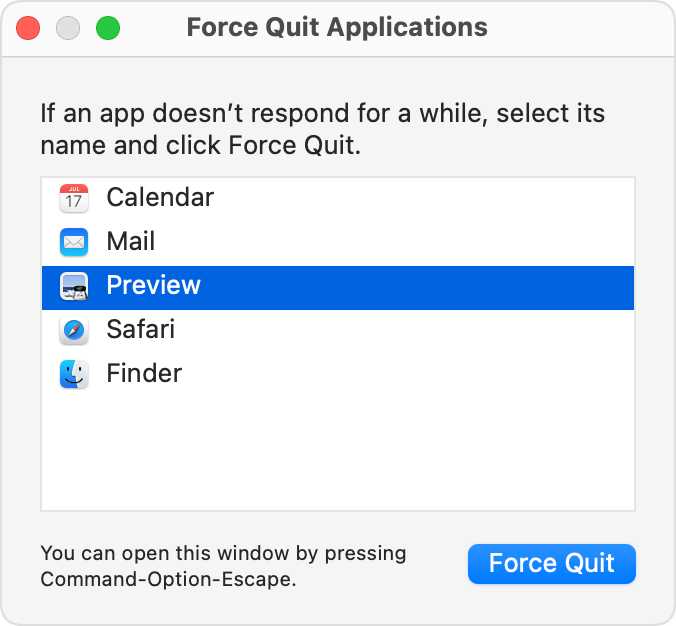
The Finder is always open, but if it stops responding, you can force it to quit and then open again: Select Finder in the Force Quit window, then click Relaunch. "
If you need more information about what Migration Assistant is an when you should use it, the article here can assist: Transfer to a new Mac with Migration Assistant - Apple Support
If you're unable to force quit or have any issues, reach out to Apple Support directly to further assist.
Contact - Official Apple Support
Contact Apple for support and service - Apple Support
Best.
Hi Harlow1972,
For help with canceling Migration Assistant test force quitting the app using the steps below found in the article here: How to force an app to quit on your Mac - Apple Support
"Force an app to quit
Press these three keys together: Option (or Alt), Command, Esc (Escape).1 Or choose Force Quit from the Apple menu in the corner of your screen.
A Force Quit window opens. Select the app that you want to quit, then click Force Quit:
The Finder is always open, but if it stops responding, you can force it to quit and then open again: Select Finder in the Force Quit window, then click Relaunch. "
If you need more information about what Migration Assistant is an when you should use it, the article here can assist: Transfer to a new Mac with Migration Assistant - Apple Support
If you're unable to force quit or have any issues, reach out to Apple Support directly to further assist.
Contact - Official Apple Support
Contact Apple for support and service - Apple Support
Best.
How can I exit the Migration Assist? I didn't click continue.

