Hi JAG68,
Thank you for posting to Apple Support Communities.
If you’re experiencing issues with apps on your iPhone, this may be resolved by updating the software. Here's how to complete this:
- "Back up your device using iCloud or your computer.
- Plug your device into power and connect to the internet with Wi-Fi.
- Go to Settings > General, then tap Software Update.
- If you see more than one software update option available, choose the one that you want to install.
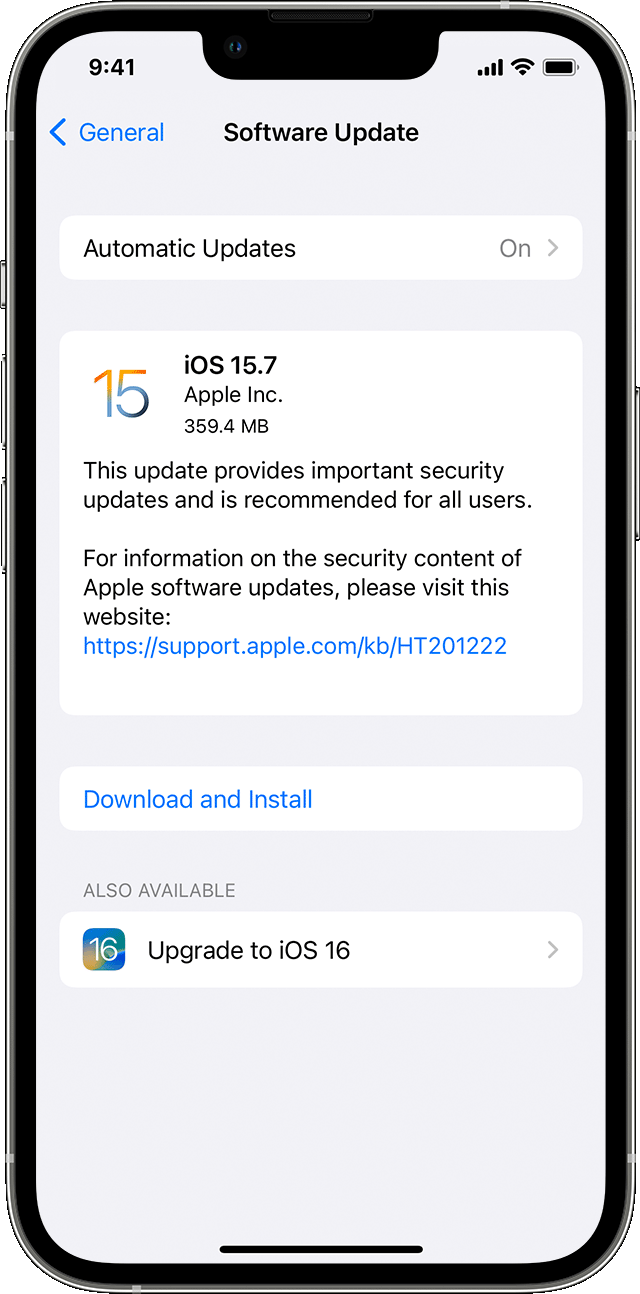
5. Tap Install Now. If you see Download and Install instead, tap it to download the update, enter your passcode, then tap Install Now. If you don't know your passcode, learn what to do."
This information is provided in Update your iPhone or iPad - Apple Support.
If those steps don’t help, we’ll need some additional information to provide more specific support.
How much storage is available on your iPhone? To find out go to Settings > General > iPhone Storage. Slow performance may be caused by storage on your iPhone
If you connect to a different Wi-Fi network does the same thing happen?
Take care.


