
Do not disturb/Focus
Why is scrolling across home screens prevented while Do not disturb/Focus is on?
iPhone 12 Pro
Why is scrolling across home screens prevented while Do not disturb/Focus is on?
iPhone 12 Pro
Hey Laboy1978,
We'd recommend reviewing this article as it provides steps for setting Home Screen Pages for use during Focus. It sounds like you have that option set up to allow only one Home Screen:Use Focus on your iPhone or iPad - Apple Support
"Connect Home Screen pages to Focus
After you set up Focus, you can silence notifications or allow only notifications from the people and apps that match your Focus. You can also customize a Home Screen page that has only apps related to your Focus and make that page the only one accessible during the time you have the Focus enabled.
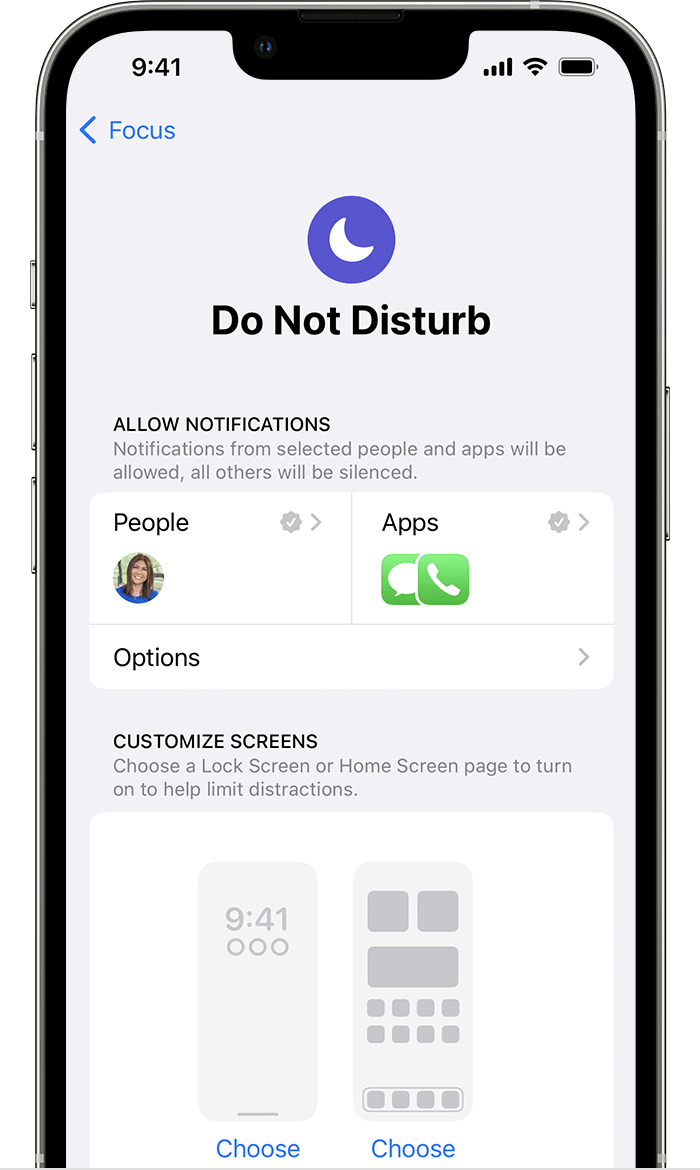
From here, you can also tap Options and turn on Hide Notification Badges, which hides notifications on your Home Screen apps."
Thanks!
Hey Laboy1978,
We'd recommend reviewing this article as it provides steps for setting Home Screen Pages for use during Focus. It sounds like you have that option set up to allow only one Home Screen:Use Focus on your iPhone or iPad - Apple Support
"Connect Home Screen pages to Focus
After you set up Focus, you can silence notifications or allow only notifications from the people and apps that match your Focus. You can also customize a Home Screen page that has only apps related to your Focus and make that page the only one accessible during the time you have the Focus enabled.
From here, you can also tap Options and turn on Hide Notification Badges, which hides notifications on your Home Screen apps."
Thanks!
Do not disturb/Focus

