iCloud storage-iPhone storage

I have 2TB iCloud storage yet my phone says I am out of storage and cca. 27 GB of photos are stored on my phone (and cca. 500 GB of photos stored in iCloud). I understand that iPhone storage is different from iCloud storage. However, recently my phone started to say that I have no storage on my phone and I don't understand two things: first: why is that my phone does not sync photos to iCloud recently (if I open photos in iCloud preferences it says it is not synced even though I followed the steps how to make it active again: like restart my phone etc..) and second: how can I upload the 27 GB of photos to my iCloud or free up space in my phone to iCloud when I have 2TB iCloud storage.

iPhone XS, iOS 16

Posted on Apr 27, 2023 6:12 AM

Reply
Question marked as Top-ranking reply

Posted on Apr 27, 2023 6:14 AM

If you have upgraded iCloud storage and are seeing a message on your device that storage is full then it is possible you are not making the best use of iCloud storage and need to use optimization features. If you do have optimization activated then it is possible you are exceeding your device's needs in terms of on-device storage and you need to buy a device with more storage.


Click on the link to learn how to optimize the storage on a device --> "How to check the storage on your iPhone, iPad, and iPod touch" - How to check the storage on your iPhone and iPad - Apple Support

- "If your device is low on storage, it automatically frees up space while installing an app, updating iOS or iPadOS, downloading music, recording videos, and more.


To make more storage available, your device can remove some of your items, like streamed music and videos, files in iCloud Drive, and parts of apps that aren't needed. It also removes temporary files and clears the cache on your device. But your device only removes items that can be downloaded again or that aren't needed anymore."


Here's the same information as a video: "How to free up space on your iPhone, iPad, or iPod" - https://youtu.be/bnhuHSv_WrI


If you have optimizing activated but it is not syncing Here's a list of standard things to try when a feature is not working:


Make sure the software is up to date on all devices involved.

Update macOS on Mac - Apple Support

Update your iPhone or iPad - Apple Support


Sometimes it helps to have the devices involved take a fresh look at settings:

● If this is a service, try disabling it and turning it back on.

● Try signing out of accounts and back in again.

Sign out of iCloud on your iPhone, iPad, iPod touch, Apple TV, or Mac - Apple Support

Sign in with your Apple ID - Apple Support

If you have more than one Apple ID, don't forget you may be signed into other accounts too for special services such as iMessage and Media & Purchases.

● Restarting is a simple step that can resolve many unexpected behaviors.

iPhone: Restart your iPhone - Apple Support then choose your model.

iPad: Restart your iPad - Apple Support

Mac: Ways to start up your Mac - Apple Support


Try using other equipment if possible. I have seen several cases where somebody tried to do something on one item of equipment and failed, but then tried on a different item of equipment and succeeded.


Sometimes it can take some time for changes to propagate through the system and waiting may help ( e.g., Family Sharing of Apple News+ - Apple Community ). If a problem persists, particularly over several days, try contacting Apple for assistance:


Click here --> Choose your country or region - Official Apple Support Select your country, then a product. If you don't see one that handles your issue then keep experimenting with selections until you reach one that gets you a chat session or a telephone call and get the representative to redirect you.


or:


"See a list of Apple phone numbers around the world."

Click here --> Contact Apple for support and service - Apple Support


Similar questions

3 replies
Question marked as Top-ranking reply

Apr 27, 2023 6:14 AM in response to keczelidora

If you have upgraded iCloud storage and are seeing a message on your device that storage is full then it is possible you are not making the best use of iCloud storage and need to use optimization features. If you do have optimization activated then it is possible you are exceeding your device's needs in terms of on-device storage and you need to buy a device with more storage.


Click on the link to learn how to optimize the storage on a device --> "How to check the storage on your iPhone, iPad, and iPod touch" - How to check the storage on your iPhone and iPad - Apple Support

- "If your device is low on storage, it automatically frees up space while installing an app, updating iOS or iPadOS, downloading music, recording videos, and more.


To make more storage available, your device can remove some of your items, like streamed music and videos, files in iCloud Drive, and parts of apps that aren't needed. It also removes temporary files and clears the cache on your device. But your device only removes items that can be downloaded again or that aren't needed anymore."


Here's the same information as a video: "How to free up space on your iPhone, iPad, or iPod" - https://youtu.be/bnhuHSv_WrI


If you have optimizing activated but it is not syncing Here's a list of standard things to try when a feature is not working:


Make sure the software is up to date on all devices involved.

Update macOS on Mac - Apple Support

Update your iPhone or iPad - Apple Support


Sometimes it helps to have the devices involved take a fresh look at settings:

● If this is a service, try disabling it and turning it back on.

● Try signing out of accounts and back in again.

Sign out of iCloud on your iPhone, iPad, iPod touch, Apple TV, or Mac - Apple Support

Sign in with your Apple ID - Apple Support

If you have more than one Apple ID, don't forget you may be signed into other accounts too for special services such as iMessage and Media & Purchases.

● Restarting is a simple step that can resolve many unexpected behaviors.

iPhone: Restart your iPhone - Apple Support then choose your model.

iPad: Restart your iPad - Apple Support

Mac: Ways to start up your Mac - Apple Support


Try using other equipment if possible. I have seen several cases where somebody tried to do something on one item of equipment and failed, but then tried on a different item of equipment and succeeded.


Sometimes it can take some time for changes to propagate through the system and waiting may help ( e.g., Family Sharing of Apple News+ - Apple Community ). If a problem persists, particularly over several days, try contacting Apple for assistance:


Click here --> Choose your country or region - Official Apple Support Select your country, then a product. If you don't see one that handles your issue then keep experimenting with selections until you reach one that gets you a chat session or a telephone call and get the representative to redirect you.


or:


"See a list of Apple phone numbers around the world."

Click here --> Contact Apple for support and service - Apple Support


Apr 27, 2023 8:29 AM in response to keczelidora

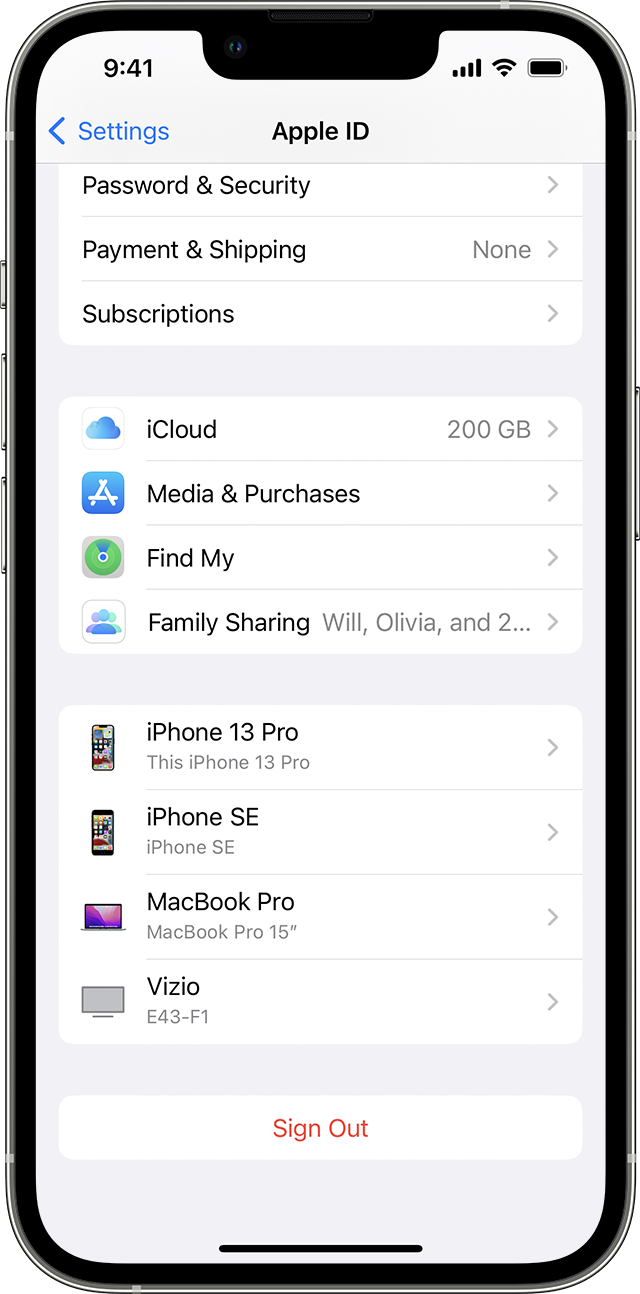
Read this document to learn how to sign out of iCloud on your iPhone, iPad, iPod touch, Apple TV, or Mac --> Sign out of iCloud on your iPhone, iPad, iPod touch, Apple TV, or Mac - Apple Support


  1. Go to Settings, then tap your name. 
  2. Scroll down to the bottom.

  3. Tap Sign Out.

  4. Enter your Apple ID password and tap Turn Off. Forgot your Apple ID password
  5. Turn on the data that you want to keep a copy of on your device.
  6. Tap Sign Out.
  7. Tap Sign Out again to confirm that you want to sign out of iCloud.


This thread has been closed by the system or the community team. You may vote for any posts you find helpful, or search the Community for additional answers.

iCloud storage-iPhone storage

Welcome to Apple Support Community
A forum where Apple customers help each other with their products. Get started with your Apple Account.