How to connect WiFi if I can’t connect and pair watch and phone
How can I connect the Wi-Fi to my Apple Watch if I can’t pair my phone and watch together
How can I connect the Wi-Fi to my Apple Watch if I can’t pair my phone and watch together
Hello Marisa0307,
If you want to connect your Apple Watch to Wi-Fi, please check out the information in this link, which will guide you through that process: Connect your Apple Watch to Wi-Fi
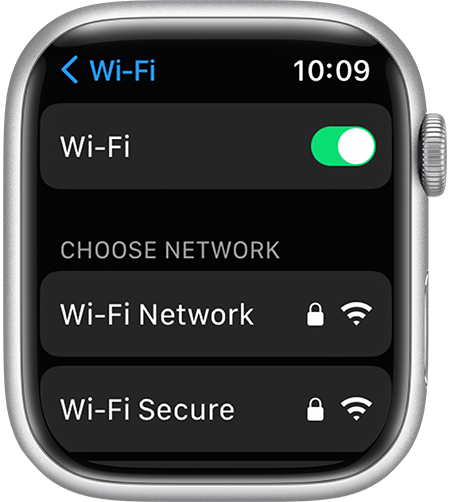
Choose a Wi-Fi network
1. Open the Settings app on your Apple Watch.
2. Tap Wi-Fi. Your device automatically searches for networks.
3. Tap the name of the network that you want to join. If you have Apple Watch Series 6 or later, you can connect to 2.4GHz or 5GHz Wi-Fi networks. Apple Watch Series 5 and earlier, and Apple Watch SE, can connect only to 2.4GHz Wi-Fi networks.
4. If asked, enter the password using Scribble or the Apple Watch keyboard.
5. Tap Join.
If you're unable to pair your Apple Watch and iPhone, please check out this link, which outlines what to do: If you can't pair an Apple Watch with your iPhone
Make sure that Apple Watch isn’t already paired
When you set up Apple Watch, your iPhone asks you to hold the watch up to your iPhone camera. If your iPhone says that it's unable to connect to Apple Watch — or if the watch shows a clock face — Apple Watch might already be paired.
Thanks!
Hello Marisa0307,
If you want to connect your Apple Watch to Wi-Fi, please check out the information in this link, which will guide you through that process: Connect your Apple Watch to Wi-Fi
Choose a Wi-Fi network
1. Open the Settings app on your Apple Watch.
2. Tap Wi-Fi. Your device automatically searches for networks.
3. Tap the name of the network that you want to join. If you have Apple Watch Series 6 or later, you can connect to 2.4GHz or 5GHz Wi-Fi networks. Apple Watch Series 5 and earlier, and Apple Watch SE, can connect only to 2.4GHz Wi-Fi networks.
4. If asked, enter the password using Scribble or the Apple Watch keyboard.
5. Tap Join.
If you're unable to pair your Apple Watch and iPhone, please check out this link, which outlines what to do: If you can't pair an Apple Watch with your iPhone
Make sure that Apple Watch isn’t already paired
When you set up Apple Watch, your iPhone asks you to hold the watch up to your iPhone camera. If your iPhone says that it's unable to connect to Apple Watch — or if the watch shows a clock face — Apple Watch might already be paired.
Thanks!
How to connect WiFi if I can’t connect and pair watch and phone