How can see my Gallery photos
How can see my Gallery photos
How can see my Gallery photos
Hi sahin148,
Thanks for using the Apple Support Communities.
We need help understanding the type of support that you're seeking.
When you have a free moment, please provide us with more information regarding the exact issue you're experiencing and what you'd like to accomplish, and we'll do our best to help you find a solution.
In the meantime, it seems that you might have a question about how to browse your photos in Photos on Mac. Is that correct? If so, check out the link below.
Browse your photos in Photos on Mac - Apple Support
How photos and videos are organized in Photos
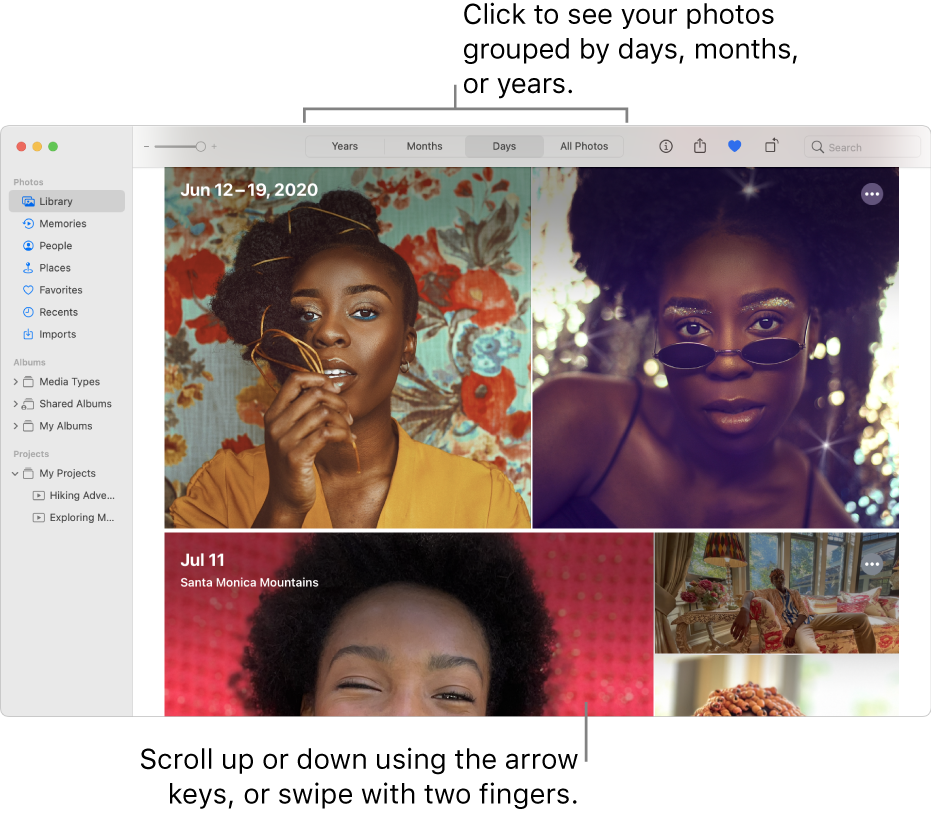
In the Photos appon your Mac, you can easily browse your photos using the sidebar on the left side of the Photos window. Click an item in the sidebar to see photos organized in different ways.
* Library: Browse your photos and videos by when they were taken. See Browse your photos by days, months, or years.
* Memories: View collections of photos and videos automatically edited for you and set to music. See View Memories.
* People: Browse your photos by the people Photos identifies in them. See Find and identify photos of people.
* Places: Browse by the locations where the photos were taken. See Find photos by location.
* Albums: View albums you created or shared. Some albums are automatically created to organize your photos by categories—for example, Media Types. See What are albums in Photos? and Create a Smart Album.
Browse your photos by days, months, or years
1. In the Photos app
2. In the toolbar, click one of the following:
* Years: Quickly go to a specific year in your photo library.
* Months: View photos grouped by month, and organized by the days or the location they were taken.
* Days: View photos taken on the same day.
* All Photos: View all of your photos and videos at the same size, in chronological order.
3. Double-click a day, month, or year to see the photos in it.
On a trackpad, you can pinch open or closed on the day, month, or year to change views.
If the resource above has nothing to do with the type of support you're seeking, provide us specifics on what you are seeing and experiencing on your end for more help, and we'll continue from there.
Cheers!
Hi sahin148,
Thanks for using the Apple Support Communities.
We need help understanding the type of support that you're seeking.
When you have a free moment, please provide us with more information regarding the exact issue you're experiencing and what you'd like to accomplish, and we'll do our best to help you find a solution.
In the meantime, it seems that you might have a question about how to browse your photos in Photos on Mac. Is that correct? If so, check out the link below.
Browse your photos in Photos on Mac - Apple Support
How photos and videos are organized in Photos
In the Photos app
* Library: Browse your photos and videos by when they were taken. See Browse your photos by days, months, or years.
* Memories: View collections of photos and videos automatically edited for you and set to music. See View Memories.
* People: Browse your photos by the people Photos identifies in them. See Find and identify photos of people.
* Places: Browse by the locations where the photos were taken. See Find photos by location.
* Albums: View albums you created or shared. Some albums are automatically created to organize your photos by categories—for example, Media Types. See What are albums in Photos? and Create a Smart Album.
Browse your photos by days, months, or years
1. In the Photos app
2. In the toolbar, click one of the following:
* Years: Quickly go to a specific year in your photo library.
* Months: View photos grouped by month, and organized by the days or the location they were taken.
* Days: View photos taken on the same day.
* All Photos: View all of your photos and videos at the same size, in chronological order.
3. Double-click a day, month, or year to see the photos in it.
On a trackpad, you can pinch open or closed on the day, month, or year to change views.
If the resource above has nothing to do with the type of support you're seeking, provide us specifics on what you are seeing and experiencing on your end for more help, and we'll continue from there.
Cheers!
How can see my Gallery photos