
I made family subscription in Apple Music and my wife can’t use it, it asks her for payment.
I made family subscription in Apple Music and my wife can’t use it, it asks her for payment anyway.
iPhone SE, iOS 16
I made family subscription in Apple Music and my wife can’t use it, it asks her for payment anyway.
iPhone SE, iOS 16
Hi mikhael64,
For help with not seeing content when using Family Sharing, on both devices test the steps below found in the article here: If you can't find your family's shared content
"Check your Family Sharing settings
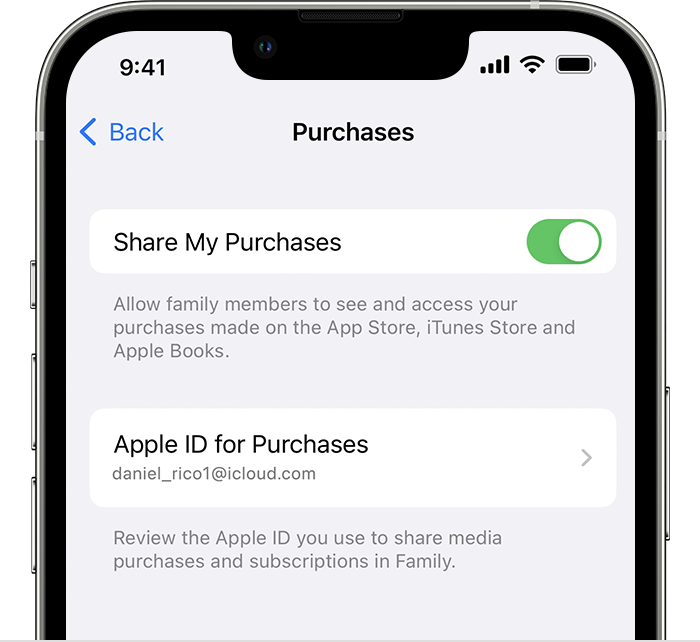
Make sure that you're using the same Apple ID for Family Sharing and Media & Purchases. And make sure that purchase sharing is turned on. Then ask your family members to check their settings too.
On your iPhone or iPad with iOS 16 or later
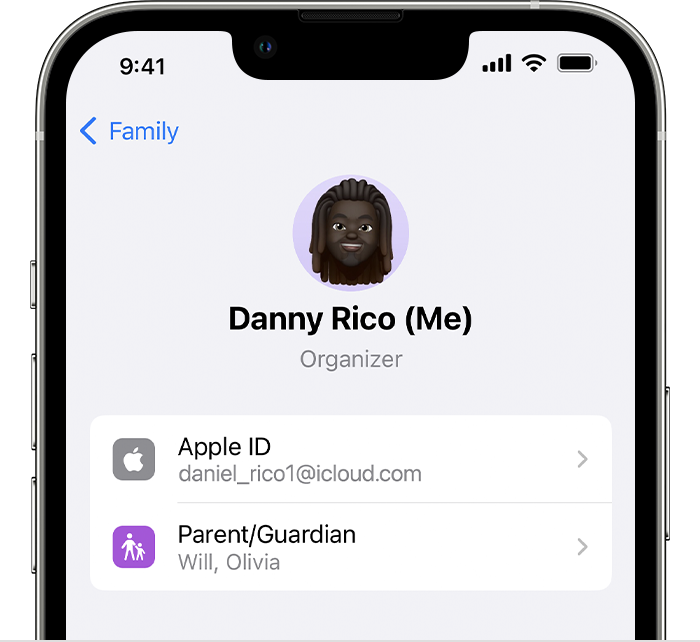 4. Tap Purchases.
5. Tap Apple ID for Purchases and make sure that you're signed in with with the same Apple ID that you use for Family Sharing. If not, tap Share using secondary Apple ID and enter the Apple ID and password for that Apple ID.
 "
"
You'll also want to ensure your active subscription is the Family Sharing plan. Get an Apple Music family subscription
You can also check she was added correctly with the steps here: Set up Family Sharing - Apple Support
If the issue remains, reach out to Apple directly to further assist.
Cheers.
Hi mikhael64,
For help with not seeing content when using Family Sharing, on both devices test the steps below found in the article here: If you can't find your family's shared content
"Check your Family Sharing settings
Make sure that you're using the same Apple ID for Family Sharing and Media & Purchases. And make sure that purchase sharing is turned on. Then ask your family members to check their settings too.
On your iPhone or iPad with iOS 16 or later
4. Tap Purchases.
5. Tap Apple ID for Purchases and make sure that you're signed in with with the same Apple ID that you use for Family Sharing. If not, tap Share using secondary Apple ID and enter the Apple ID and password for that Apple ID.
"
You'll also want to ensure your active subscription is the Family Sharing plan. Get an Apple Music family subscription
You can also check she was added correctly with the steps here: Set up Family Sharing - Apple Support
If the issue remains, reach out to Apple directly to further assist.
Cheers.
I made family subscription in Apple Music and my wife can’t use it, it asks her for payment.

