Clock

I have been using the Alarm/clock for years. Suddenly there is a notice saying “set in Health app”. I do Not want to have that as it records kinds of intimate information. I have never seen any warning of this coming, pretty uncool, that. How do I get a free replacement?

iPhone XR, iOS 16

Posted on Apr 30, 2023 6:15 AM

Reply
Question marked as Top-ranking reply

Posted on May 2, 2023 8:49 AM

Hey Unitram7,


Thanks for posting in Apple Support Communities.


We want to see if we can help with using the Alarm. It shouldn't be asking you to go to the Health app just to set your alarm. That may happen if you are trying to set up or edit a sleep schedule. See Turn off alarms and delete sleep schedules in Health on iPhone - Apple Support for details on this feature to make sure it hasn't accidentally been enabled.


Make sure your iPhone has the current iOS 16.4.1 version installed by going to Settings > General > About. If not, you will want to update to the latest version since updates contain both security updates as well as fixes that can address this situation.


If your iPhone is already updated, then try restarting it. We know this sounds simple, but restarting the iPhone following the steps below a lot of times fixes unusual behavior that pops up. Restart your iPhone

How to restart your iPhone X, 11, 12, 13, or later
1. Press and hold either volume button and the side button until the power-off slider appears.
2. Drag the slider, then wait 30 seconds for your device to turn off. If your device is frozen or unresponsive, force restart your device.
3. To turn your device back on, press and hold the side button (on the right side of your iPhone) until you see the Apple logo.
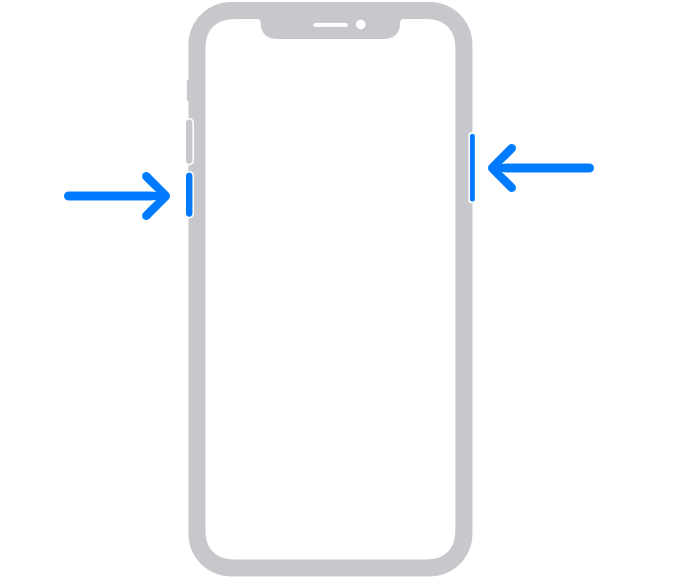
The volume button is located on the left side of the device, and the side button is located on the right


After restarting if you still are prompted to go to the Health app, reach out to Apple Support so they can look into this with you further.


Take care!

Similar questions

1 reply
Question marked as Top-ranking reply

May 2, 2023 8:49 AM in response to Unitram7

Hey Unitram7,


Thanks for posting in Apple Support Communities.


We want to see if we can help with using the Alarm. It shouldn't be asking you to go to the Health app just to set your alarm. That may happen if you are trying to set up or edit a sleep schedule. See Turn off alarms and delete sleep schedules in Health on iPhone - Apple Support for details on this feature to make sure it hasn't accidentally been enabled.


Make sure your iPhone has the current iOS 16.4.1 version installed by going to Settings > General > About. If not, you will want to update to the latest version since updates contain both security updates as well as fixes that can address this situation.


If your iPhone is already updated, then try restarting it. We know this sounds simple, but restarting the iPhone following the steps below a lot of times fixes unusual behavior that pops up. Restart your iPhone

How to restart your iPhone X, 11, 12, 13, or later
1. Press and hold either volume button and the side button until the power-off slider appears.
2. Drag the slider, then wait 30 seconds for your device to turn off. If your device is frozen or unresponsive, force restart your device.
3. To turn your device back on, press and hold the side button (on the right side of your iPhone) until you see the Apple logo.
The volume button is located on the left side of the device, and the side button is located on the right


After restarting if you still are prompted to go to the Health app, reach out to Apple Support so they can look into this with you further.


Take care!

This thread has been closed by the system or the community team. You may vote for any posts you find helpful, or search the Community for additional answers.

Clock

Welcome to Apple Support Community
A forum where Apple customers help each other with their products. Get started with your Apple Account.