Child’s Account no longer downloads Apps

Hi,


I have followed a previous post the same as this that dried up in January 2023.


I have my son setup under my family account and restrictions all set up for my approval and all device upto date with latest software.


I was able to download apps on an old iPad and thought I’d be clever updating to latest iOS. Now when I try to download on his iPad a spinner just spins in the “get buttons” position after entering his password twice.


I get no approval request like I used to and the App Store stays like this until it resets back to the “get” button after a long period of time.


Please help 🙏🏽

Posted on Apr 30, 2023 10:19 AM

Reply
Question marked as Top-ranking reply

Posted on May 2, 2023 12:30 PM

Hey Durtmcgurt,


It sounds like you’re having an issue with getting Ask to Buy notifications in order to complete the download of an app on your son’s iPad.


If so, we’ve got some great steps specifically for Ask to Buy issues which may help out:

Things to try first 
1. Make sure that both you and your child have updated to the latest iOS or iPadOS on your iPhone or iPad, and the latest macOS on your Mac.
2. If you turned on Focus on your device, either turn it off so that you can receive notifications, or check your Focus settings to make sure that you can receive Time Sensitive notifications like Ask to Buy requests. 
3. Try changing the name of your device, and check that you and your child's devices have different names. To see and change the name of a device, go to Settings > General > About > Name. 

If your Ask to Buy requests are missing
If you miss an Ask to Buy notification, you can find the request in Notification Center on your iPhone, iPad, iPod touch, or Mac. If you still don't see your Ask to Buy requests, check your Family Sharing settings, check which Apple ID you're signed in with, and make sure that you're on a supported device.

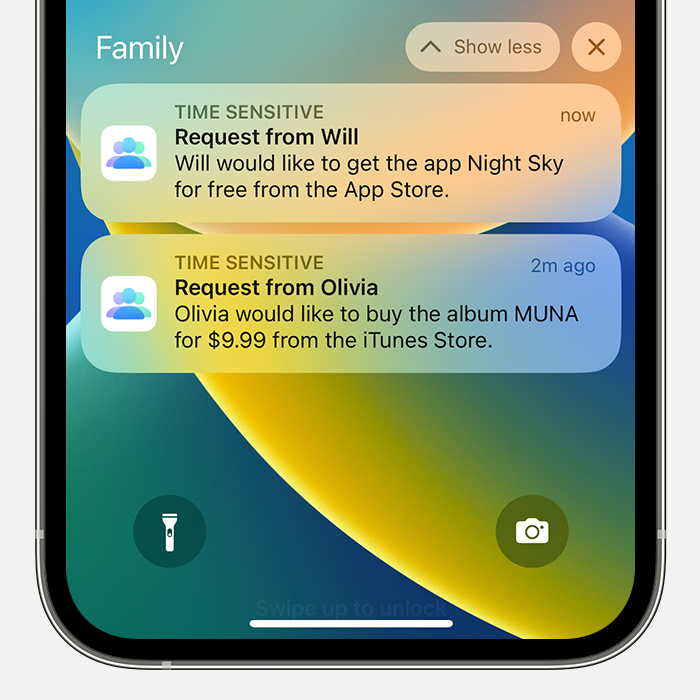
Open Notification Center on your iPhone, iPad, or iPod touch
Look for Ask to Buy requests in the Family section of Notification Center. 
* From the Lock Screen, swipe up from the middle of the screen.
* From any other screen, swipe down from the center of the top of your screen.

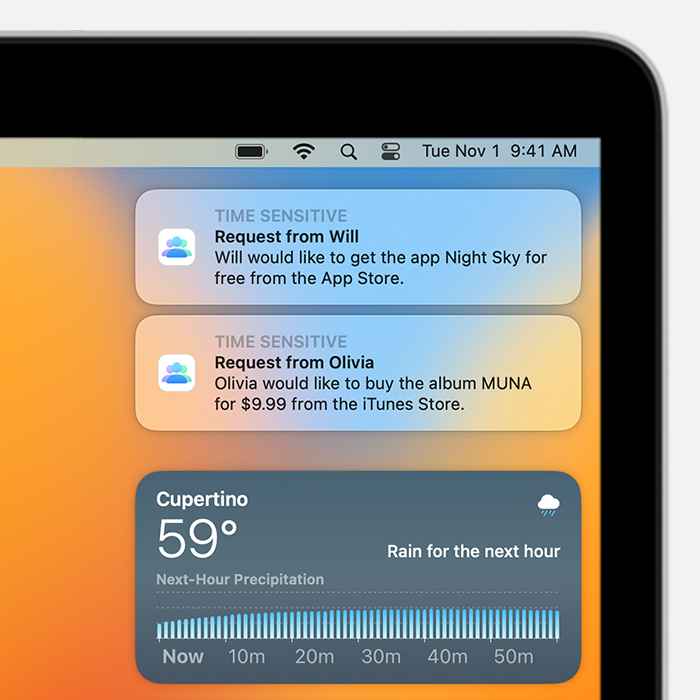
Open Notification Center on your Mac
Ask to Buy requests show up at the top of Notification Center on your Mac. 
Click the date in the upper right corner of your screen or swipe left with two fingers from the right edge of your trackpad. Notifications show up at the top of Notification Center.


For more info, check out: If Ask to Buy isn't working - Apple Support


We hope this helps out, but if not, you can reach Apple Support here: Get Support


Take care!

3 replies
Question marked as Top-ranking reply

May 2, 2023 12:30 PM in response to Durtmcgurt

Hey Durtmcgurt,


It sounds like you’re having an issue with getting Ask to Buy notifications in order to complete the download of an app on your son’s iPad.


If so, we’ve got some great steps specifically for Ask to Buy issues which may help out:

Things to try first 
1. Make sure that both you and your child have updated to the latest iOS or iPadOS on your iPhone or iPad, and the latest macOS on your Mac.
2. If you turned on Focus on your device, either turn it off so that you can receive notifications, or check your Focus settings to make sure that you can receive Time Sensitive notifications like Ask to Buy requests. 
3. Try changing the name of your device, and check that you and your child's devices have different names. To see and change the name of a device, go to Settings > General > About > Name. 

If your Ask to Buy requests are missing
If you miss an Ask to Buy notification, you can find the request in Notification Center on your iPhone, iPad, iPod touch, or Mac. If you still don't see your Ask to Buy requests, check your Family Sharing settings, check which Apple ID you're signed in with, and make sure that you're on a supported device.

Open Notification Center on your iPhone, iPad, or iPod touch
Look for Ask to Buy requests in the Family section of Notification Center. 
* From the Lock Screen, swipe up from the middle of the screen.
* From any other screen, swipe down from the center of the top of your screen.

Open Notification Center on your Mac
Ask to Buy requests show up at the top of Notification Center on your Mac. 
Click the date in the upper right corner of your screen or swipe left with two fingers from the right edge of your trackpad. Notifications show up at the top of Notification Center.


For more info, check out: If Ask to Buy isn't working - Apple Support


We hope this helps out, but if not, you can reach Apple Support here: Get Support


Take care!

This thread has been closed by the system or the community team. You may vote for any posts you find helpful, or search the Community for additional answers.

Child’s Account no longer downloads Apps

Welcome to Apple Support Community
A forum where Apple customers help each other with their products. Get started with your Apple Account.