i lost my mobile , what is the way to get photos saved in mobile

i lost my mobile , what is the way to get photos saved in mobile


Posted on May 1, 2023 11:30 PM

Reply
Question marked as Top-ranking reply

Posted on Nov 26, 2023 10:52 PM

If you have not taken measures to regularly back up your photos to a cloud service or another device, recovering them can be challenging. However, here are some general steps you can take:

  1. Use Cloud Backup:
    • If you had cloud backup services enabled on your mobile device (such as Google Photos for Android or iCloud for iPhone), you may be able to access your photos by logging into your account on another device.
  1. Check for Automatic Backups:
    • Some mobile devices are set to automatically back up photos and other data. Check if your device had this feature enabled, and if so, you might be able to retrieve your photos from the backup.
  1. Check SD Card or Internal Storage:
    • If your photos were saved on an SD card or the internal storage of the lost mobile device, you might be able to retrieve them by inserting the SD card into another device or using data recovery software.
  1. Contact Mobile Service Provider:
    • Report the loss of your mobile phone to your mobile service provider. Some providers have services that can help you locate or remotely wipe your device. However, keep in mind that these services may not recover your photos.
  1. Use Find My Device (Android) or Find My iPhone (iOS):
    • If you had enabled location tracking services on your mobile device, you may be able to locate it using services like Find My Device for Android or Find My iPhone for iOS. These services also offer options to remotely lock or erase your device, but this may not recover your photos.
  1. File a Police Report:
    • If your phone was stolen, filing a police report may be necessary. Provide them with as much information as possible, including any details about your phone and the circumstances of the loss.
  1. Check with Data Recovery Services:
    • There are professional data recovery services that specialize in retrieving data from mobile devices. However, these services can be expensive, and success is not guaranteed.

Remember that the effectiveness of these steps depends on the specific circumstances and the measures you had in place before losing your mobile phone. It's always a good practice to regularly back up important data to prevent significant losses in case of theft, loss, or device failure.

5 replies
Question marked as Top-ranking reply

Nov 26, 2023 10:52 PM in response to cheleverimahesh

If you have not taken measures to regularly back up your photos to a cloud service or another device, recovering them can be challenging. However, here are some general steps you can take:

  1. Use Cloud Backup:
    • If you had cloud backup services enabled on your mobile device (such as Google Photos for Android or iCloud for iPhone), you may be able to access your photos by logging into your account on another device.
  1. Check for Automatic Backups:
    • Some mobile devices are set to automatically back up photos and other data. Check if your device had this feature enabled, and if so, you might be able to retrieve your photos from the backup.
  1. Check SD Card or Internal Storage:
    • If your photos were saved on an SD card or the internal storage of the lost mobile device, you might be able to retrieve them by inserting the SD card into another device or using data recovery software.
  1. Contact Mobile Service Provider:
    • Report the loss of your mobile phone to your mobile service provider. Some providers have services that can help you locate or remotely wipe your device. However, keep in mind that these services may not recover your photos.
  1. Use Find My Device (Android) or Find My iPhone (iOS):
    • If you had enabled location tracking services on your mobile device, you may be able to locate it using services like Find My Device for Android or Find My iPhone for iOS. These services also offer options to remotely lock or erase your device, but this may not recover your photos.
  1. File a Police Report:
    • If your phone was stolen, filing a police report may be necessary. Provide them with as much information as possible, including any details about your phone and the circumstances of the loss.
  1. Check with Data Recovery Services:
    • There are professional data recovery services that specialize in retrieving data from mobile devices. However, these services can be expensive, and success is not guaranteed.

Remember that the effectiveness of these steps depends on the specific circumstances and the measures you had in place before losing your mobile phone. It's always a good practice to regularly back up important data to prevent significant losses in case of theft, loss, or device failure.

May 1, 2023 11:33 PM in response to cheleverimahesh

Was Find My enabled?


Open the Find My app. Choose the Devices tab or the Items tab. Select your missing device or item, then choose Play Sound. If your device is offline, it won't play a sound until it connects to a network.

Use the Find My app to locate a missing device or item


If Find My [device] was not turned ON before your device was lost or stolen, it can't be used to locate a device nor one can use the IMEI number for tracking a device. The best action would be to Change the Apple ID password and change the passwords for other internet accounts that were used on the device. This can include email accounts, Facebook, Twitter, etc...



Don'ts

If the device is removed from an account after it is erased, Activation Lock will be turned off. This allows another person to turn on and use the device.


An example of my iPhone 5 is given in the GIF below. There is no "Undo" after you remove it from your account.


Find IMEI & Serial No. of the Lost Device


  1. If an iPhone, iPad, or iPod touch is lost or stolen - Apple ...
  2. Find the serial number or IMEI on an iPhone, iPad, or iPod ...

You may use a web browser to get the Serial Number and the IMEI Number. You cannot track using the IMEI number. but you may need it so keep it handy

Log in to https://appleid.apple.com with your Apple ID credentials. All your devices will be listed there. Click on any to get the details.


Do's, If you had enabled "Find My" before it was lost


Beware of Phishing!


Be careful and be smart to --> Recognize and avoid phishing messages, phoney support calls ...

Note: Apple will never send you any info on Lost/Found iPhones. It (Phishing) may appear as the image given below.


Switched Off? Still traceable


Even if the iPhone is switched off it is findable, see the pic below.


Device Offline?


I see my device in Find My, but it's offline
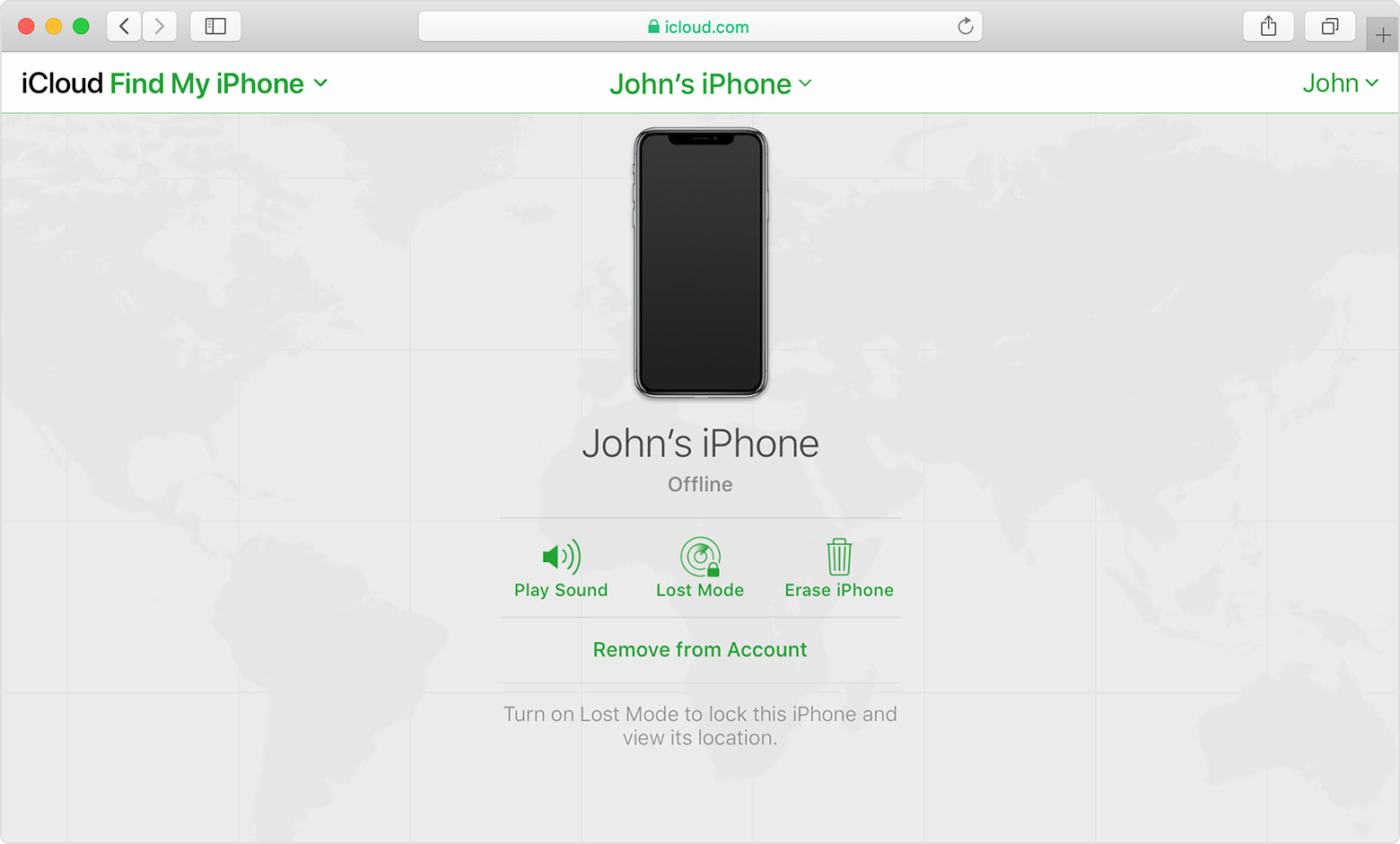

If you see "Offline," "No location available," or "Location Services Off," your device might be offline for one of these reasons:


Don't see your device?

  • You might not have Find My turned on.
  • If you're using the Find My app, you can't see your device's location if more than 7 days have passed since its last location was sent to Apple.
  • If you're using iCloud.com/find, you can't see your device's location if it's powered off, the battery has run out, or more than 24 hours has passed since its last location was sent to Apple.
  • Learn how you can still protect your information.


This thread has been closed by the system or the community team. You may vote for any posts you find helpful, or search the Community for additional answers.

i lost my mobile , what is the way to get photos saved in mobile

Welcome to Apple Support Community
A forum where Apple customers help each other with their products. Get started with your Apple Account.