How can I remove Search Alpha from Safari?

For 2 weeks now, search alpha has started to appear every time I open safari. I have tried to follow in the steps of some websites with the intention of solving this and nothing changes.

I hope someone can help me with this and maybe give me some advice so that it doesn't happen to me anymore.


[Re-Titled by Moderator]

MacBook Air (M2, 2022)

Posted on May 3, 2023 4:09 PM

Reply
Question marked as Top-ranking reply

Posted on Jun 4, 2023 6:07 PM

Toni_125, please follow the instructions below.



First, ensure you have a reliable backup of your Mac, in case something should go wrong with continued troubleshooting. To learn how to do that, please read Back up your Mac with Time Machine.


  • A backup is a fundamental prerequisite regardless of whatever method you may choose uninstall adware, and would apply even if your Mac were running perfectly well. Do not overlook this fundamental requirement. It's important.


Next: This step will prevent the scam products from loading so that they can be removed while they are inactive. Restart in "Safe Mode", and log in: How to use safe mode on your Mac - Apple Support. Starting in Safe Mode takes longer than usual so let it finish. The rogue processes affecting that Mac are inoperative in "Safe Mode".


The following files and / or folders need to be deleted while using your Mac in "Safe Mode":


First screenshot:
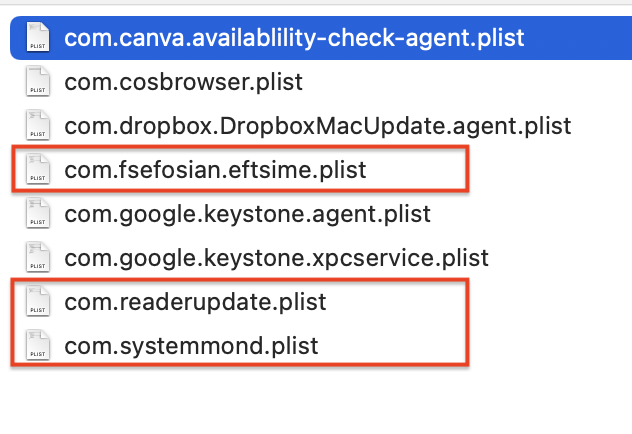


Nothing needs to be deleted from the folders in your other two screenshots, but please read my comments regarding "Malwarebytes" later.


Drag those selections of files to the Trash. You may be asked to authenticate. Confirm they are no longer present in that folder. Leave all the others alone for now.


Next: open Safari and select the Safari menu > Preferences (or Settings) > Extensions. If you see any Safari Extensions that you do not recognize or understand, simply click the Uninstall button and they will be gone. No Safari Extensions are required for normal operation. Then, select the General pane and review your Homepage selection. Then, select the Search pane and confirm your desired Search Engine. Repeat those equivalent actions for any other browser you may use (Brave, Firefox, or Opera for example).


There may also be adware-associated app icons in your Mac's Applications folder. Open it and examine its contents. Any unwanted or mysterious app icons should be obvious to you, but again please don't remove anything if you are uncertain—ask first. Identify any suspicious apps by name, or post another screenshot.


Next: In an abundance of caution, examine System Preferences (or Settings) > Extensions. Determine if there are any System Extensions that may have been installed without your knowledge. Ask if you're uncertain.


Remaining in System Preferences, check for the presence of any Profiles. Profiles are installed by organizations with a need to manage Macs deployed in institutional corporate or educational environments (for example), but have also been exploited by adware creators and similar malcontents. If any Profiles are installed on your Mac an icon like this will appear in System Preferences:



If you see that icon in System Preferences, select it. To remove a Profile, select it, then click the [—] (minus) button and authenticate.


Remaining in System Preferences, open Users & Groups. Select your User Account's Login Items. You may or may not find those Applications in its list. If you do, select them then click the [—] (minus) button to remove them from Login Items.


You can then restart your Mac and log in as usual. Evaluate its operation and ensure everything is working as you expect it should.


Next: You can see for yourself that "Malwarebytes" did nothing to prevent you from installing the "Search Alpha" adware, nor did it appear to help in removing it. It's up to you to determine whether you want to keep it around or not, but if something isn't doing your Mac any good I recommend uninstalling it. Follow its uninstallation instructions.


Next: if you want to eradicate all remaining adware remnants post a screenshot of the following folder, in the same manner as you did earlier:


~/Library/Application Support


It is normal for that folder to contain many items, but anything associated with the above adware may contain identical names. If you find a folder or folders bearing those names, drag those folders to the Trash. Without the files you already removed or the reintroduction of similar malware, they can do nothing but occupy space. These can be removed if you wish, but again don't remove anything if you are uncertain.


Finally: If any of the above actions result in abnormal operation or if something else stops working, the easiest way to recover would be to restore the Time Machine backup you created as a prerequisite, so the importance of that fundamental step cannot be overemphasized.


102 replies

May 3, 2023 5:35 PM in response to Maekilob

As for advice on it not happening again, assuming you have cleared it using the previous article:

  • Don't allow Notifications
  • Don't allow Popups
  • Don't use Antivirus
  • Don't use Cleaner apps or ones that claim to increase your speed
  • Don't use Extensions.


You can check for Notifications at Safari > Settings > Websites > Notifications.

You can check for PopUps at Safari > Settings > Websites > Popup Windows.

You can check for Extensions at Safari > Settings > Extensions.


Sep 6, 2023 1:09 PM in response to HW114

HW114, if you have Safari configured to reopen all windows from last session, the previously opened web page(s) will reappear. The solution is to simply close the web page in the usual manner.


If you are still encountering trouble I ask that you please start a brand new Discussion, for at least the following two reasons:


  • This one has become hopelessly clogged with many different replies from many different people to many different people, and
  • For some reason (perhaps a forum bug) I am no longer receiving email updates from this Discussion despite "following" it, which means I am running across it simply by happenstance.


Please post a brand new Discussion. To do that click the Ask the Community link above.


In the meantime try deleting the "ea.origin.WebHelper.plist" file in your screenshot, in addition to the two you deleted already.

May 3, 2023 6:16 PM in response to Maekilob

Post those three screenshots from the User Tip in Mac Jim ID's reply and I (or anyone willing to help) will help you get rid of it, if you need help.


Preventing it from happening again is even easier. Effective defenses against malware and other threats - Apple Community describes the fundamental principles. That longwinded document can be summarized in the few words think before you click.

Jun 28, 2023 8:26 PM in response to hre3625

First make sure you have a backup, then startup in Safe Mode.

How to use safe mode on your Mac - Apple Support


In your LaunchAgents folder delete:

  • com.fsefosian.eftsime.plist
  • com.readerupdate.plist
  • com.systemmond.plist


I don't see anything that needs deleting in the LaunchDaemons folder, but I defer to John Galt, he is the master of installed Malware in the system files. The files I listed are known Malware that should be deleted.


Also refer to John's article that you replied to and follow his excellent advice.


Jun 30, 2023 10:29 AM in response to danqing145

Mac Jim ID wrote:

Hard to tell with the abbreviated file names in your screen shots.


👍


I recently amended the instructions to make that requirement more clear.


Specifically,


  • Make sure all that folder's file names are readable by selecting View > as List or other selection that shows that folder's complete contents, including complete file names.


and


  • Once again ensure all its files and their names are readable and capture a screenshot.


and


  • When posting your message, please review and confirm the screenshots you post reveal complete, readable file names. If they do not, then please review the above instructions.


For an example of screenshots showing complete, readable file names click this post. That link will take you directly to it.

Jul 26, 2023 1:11 PM in response to PXP_Mac

As Mac Jim ID wrote there are quite a few files that need to be deleted but there may be additional ones contributing to the Safari redirect problem.


You ought to start from the beginning and post all three screenshots of the affected folders. Be sure to capture their complete contents.


And yes any and all "anti-virus" and "cleaning" scams need to go. Rule 1 of Macs is don't install junk.

Nov 16, 2023 7:15 PM in response to jklee1132

Reply Part 2 of 2


At your convenience you can drag the following folders from Application Support to the Trash. There is no need to boot "Safe Mode" to do that. Without the Launch Agents and / or Launch Daemons to invoke their contents they are inert and just occupying space.


Finally: If any of the above actions result in abnormal operation or if something else stops working, the easiest way to recover would be to restore the Time Machine backup you created as a prerequisite, so the importance of that fundamental step cannot be overemphasized.



Jun 29, 2023 6:20 AM in response to hre3625

hre3625, follow Mac Jim ID's instructions, and if you should encounter problems please write back.


I will add the following comment regarding the "anti-virus" product installed on that Mac: You can see for yourself "TotalAV" did nothing to prevent you from installing the "Search Alpha" / "Search Marquis" adware, nor did it appear to help in eradicating it. That same comment would apply to every other similarly categorized product. They are all worthless. Some are malicious. None are beneficial.


I recommend that you uninstall "TotalAV" according to its uninstallation instructions, if you can find them, and assuming they actually work. Rule 1 of Macs is don't install junk.

Jul 2, 2023 8:11 AM in response to John Galt

Thanks for this! I followed the steps and safari seems to be working perfectly now. However, Brave browser and google chrome are still using microsoft bing as their search engine. I’ve checked browser settings and have even tried resetting their respective settings but the problem still persists.

Please advice.


Really appreciate your time and efforts. Thanks again!

This thread has been closed by the system or the community team. You may vote for any posts you find helpful, or search the Community for additional answers.

How can I remove Search Alpha from Safari?

Welcome to Apple Support Community
A forum where Apple customers help each other with their products. Get started with your Apple Account.