Low quality photos gone after adding more storage

Hi apple community,


I recently upgraded to an additional 50gb of iCloud storage per month. Before I did this, I had a bunch of photos that were saved as low quality copies, assumedly because of low storage. Said photos showed an exclamation mark, and tapping on it would return a dialogue box that reads something along the lines of “a high quality version of this photo could not be found” or something like that.


I was hoping that adding extra storage would free up space to restore the high quality images, but upon checking, it seems all of those photos are gone. Is there any way to restore them? Or perhaps are they hiding somewhere? I tried accessing photos on iCloud on my PC but it seems they were gone from there too.


any ideas? Cheers fam 🙏🏼😁

iPhone 11 Pro Max, iOS 16

Posted on May 8, 2023 2:02 AM

Reply
1 reply

May 10, 2023 5:57 PM in response to zayde99

Hey zayde99,


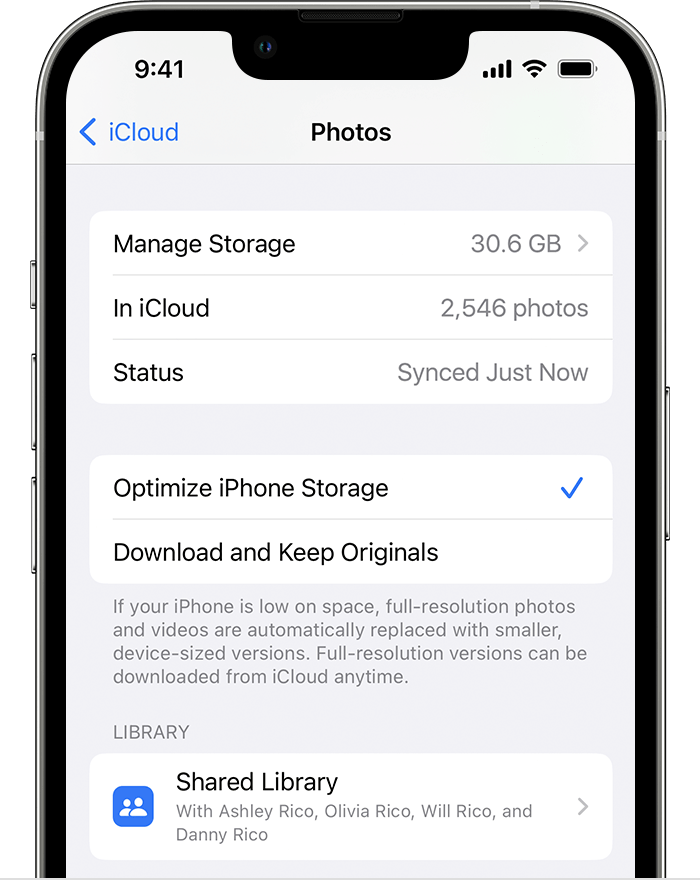
When using optimize storage on your iPhone, high resolution photos are stored in iCloud. If those photos were removed from iCloud, they would not longer be accessible.


You can learn more about that here: Manage your photo and video storage - Apple Support


"Store your photos and videos in iCloud

By default, your photos and videos are stored on your device in their original, high-resolution version. This means that they use a lot of space on your iPhone, iPad, and iPod touch. With iCloud Photos, you can make more space available on your device and still have access to your entire full-resolution collection wherever you go.

Get started with iCloud Photos:

  1. Tap Settings > [your name] > iCloud > Photos.
  2. Tap Sync this iPhone. In iOS 15 or earlier, tap to turn on iCloud Photos.
  3. Select Optimize iPhone Storage to save space on your device.

When Optimize Storage is turned on, full-resolution photos and videos are stored in iCloud, and, when needed, space-saving copies are stored on your device. And as long as you have enough space in iCloud, you can store as many photos and videos as you want."


Thanks!

This thread has been closed by the system or the community team. You may vote for any posts you find helpful, or search the Community for additional answers.

Low quality photos gone after adding more storage

Welcome to Apple Support Community
A forum where Apple customers help each other with their products. Get started with your Apple Account.